Quantum algorithms – a first example

We have now seen how quantum gates implement unitary transformations on qubits. Intuitively, we should, as in the classical case, now be able to combine these quantum gates into quantum algorithms that perform more complex sequences of manipulations of a quantum state. In this post, we will look at a first example to get an idea how this works. The material in this section is well covered by standard textbooks, like [1] section 3.8 or [2], chapter 6 and chapter 7. In addition, the fundamental structure of quantum algorithm is discussed in the classical papers [3] and [4].

In general, a quantum algorithm can be broken down into several phases. First, we need to initialize the system in a known initial state. Then, we apply a series of transformations, which, as we know, can be described in terms of quantum gates. Finally, we perform a measurement to derive a result.

To illustrate this, let us assume that we are given a more or less arbitrary classical problem that we want to solve using a quantum computer. Formally, this could be a function

f \colon {\{0,1\}}^n \rightarrow {\{0,1\}}^m

mapping binary numbers of length n to binary numbers of length m. We might have an algorithm to calculate this function on a classical computer and are looking for a quantum version of this algorithm.

The first problem we need to solve is that, as we know, quantum algorithms are given by unitary transformations, in particular they are reversible. In the most general setting however, a function f like the one above is not reversible – even if n is equal to m, there is no guarantee that the function is invertible. Fortunately, that can easily be fixed. If we let l = m + n and consider the function

\{0,1\}^l \rightarrow \{0,1\}^l

that maps a pair (x,y) with x \in \{0,1\}^n and y \in \{0,1\}^m to (x, y \oplus f(x)) , where \oplus is the bitwise exlusive or, we obtain an invertible function (as y = (y \oplus f(x)) \oplus f(x)) ), and we can recover our old function f if we let y = 0 .

Now let us consider a quantum computer that has l qubits, so that its states are given by elements of a Hilbert space of dimension 2l. We can then identify the bit strings of length l, i.e. the elements of \{0,1\}^l, with the natural numbers between 0 and 2l-1 and these numbers in turn with elements of the standard basis – the bit string 0 \dots 11 for instance would correspond to the element of the standard basis that we denote by |3\rangle. Thus, the function described above defines a permutation of the elements of the standard basis. Consequently, by the rules of linear algebra, there is exactly one unitary transformation Uf with the property that (with that identification)

U_f(|x, y\rangle) = |x, y \oplus f(x)\rangle

The transformation Uf is a unitary transformation and, as any unitary transformation, can therefore be decomposed into a sequence of elementary quantum gates. Let us now see how these quantum gates yield an algorithm to calculate f.

Preparing the initial state

First, we need to place our quantum system in some well defined state. For our example, we will use the so-called Hadamard-Walsh transformation to do this. This transformation is defined as the n-fold tensor product of the Hadamard operator H with itself and often denoted by W. Let us see how this operator acts on the state |00 \dots 0 \rangle. First, we can write this as

W |00 \dots 0 \rangle = (H \otimes \dots \otimes H) (|0\rangle \otimes \dots \otimes |0 \rangle)

Applying the Hadamard operator to each of the n factors individually, we see that this is

W |00 \dots 0 \rangle = \frac{1}{\sqrt{2^n}} (|0\rangle + |1\rangle) \otimes \dots \otimes (|0 \rangle + |1\rangle)

Multiplying out this expression, we see that each possible combination of ones and zeros appears exactly once within the sum. In other words, each of the states |x\rangle appears exactly once, where x ranges from 0 to 2n-1. Consequently, we see that

W |00 \dots 0 \rangle = \frac{1}{\sqrt{2^n}} \sum_0^{2^{n-1}} |x\rangle

In our case, the state space is a product of n qubits represented by the variable x and m qubits represented by the variable y. As initial state for our quantum algorithm, we will now choose the state that is obtained by applying the Hadamard-Walsh operator W to the first n qubits of the state |0,0\rangle and the identity to the remaining m qubits. Thus, our initial state will be

(W \otimes I) (|0, 0\rangle) = \frac{1}{\sqrt{2^n}} \sum_0^{2^{n-1}} |x, 0\rangle

Transformation and measurement

Having defined the initial state, let us now apply the transformation Uf. Using the fact that this transformation is of course linear and the formula for U_f|x,y\rangle obtained above, we easily see that applying this transformation to our initial state yields the state

U_f (W \otimes I) (|0, 0\rangle) = \frac{1}{\sqrt{2^n}} \sum_0^{2^{n-1}} |x, f(x)\rangle

It is worth pausing for a moment to take a closer look at this expression. The right hand side of this expression is a superposition of states that encodes the value of f(x) for all possible values of x. Thus, if we can find a way to physically implement quantum devices that are able to

  • Initialize an n+m qubit quantum system in a well-known state like |0,0\rangle
  • realize the transformations W \otimes I and U_f by a set of quantum gates

we are able to create a state that somehow computes all values f(x) in only one pass of the quantum algorithm.

At the first glance, this sounds like magic. Regardless how big n is, we would be able to calculate all values of f(x) in only one pass of our quantum algorithm! In other words, we would calculate all values of f(x) fully in parallel. This (apparent) feature of quantum computers is often referred to be the term quantum parallelism.

However, there is a twist. Even if we are able to apply a quantum algorithm in order to put our system in a state as above encoding all values of f(x), we still need to be able to extract the actual values of f(x) from that state. Thus, we need to perform a measurement.

If, for instance, we are using a measurement device that corresponds to a projection onto the individual states |x,y\rangle , i.e. to the basis of our Hilbert space, then applying that measurement would yield a state

|x, f(x)\rangle

for some value of x. Unfortunately, we cannot tell upfront to which of these vectors we would project. In fact, all these vectors appear with equal amplitude and the probability to obtain each of these vectors is \frac{1}{2^n}. Thus to retrieve the value of f(x) for a given value of x, we would have a rather small probability to be successful with only one pass of the algorithm.

But the situation is even worse – once we have executed our measurement, the superposition created by our algorithm is destroyed and the system has collapsed to one of the eigenstates. Thus, if we wanted to perform a large number of measurements in order to obtain f(x) for a given value of x with high probability, we would have to execute our algorithm again for each of the measurements, resulting in a large number of passes. It appears that the advantage of quantum parallelism is lost again….

Fortunately, the situation is not as hopeless as one might think. In many cases, we are not actually interested in all values of f(x). Rather, we are interested in some property of the function f, maybe even in a property that has a simple yes-no answer and can therefore be represented by a single bit. If we find a way to adapt our measuring process by projecting to a different basis or by transforming our state further before measuring, we might be able to get our answer with one measurement only. In the next section, we will look at an algorithm which is in a certain sense the blueprint and inspiration of many other quantum algorithms exploiting this approach.

The Deutsch-Jozsa algorithm

The Deutsch-Jozsa algorithm is a quantum algorithm that tackles the following problem. Suppose we are given a function

f \colon \{0,1\}^n \rightarrow \{0,1\}

We call such a function balanced if the number of times this function takes the value 0 is equal to the number of times this function takes the value 1 (which is obviously only possible if n is even which we will assume).

Now assume that we already know that either f is balanced or f is constant. We want to determine which of these two properties holds. With a classical algorithm, we would have to call f at most n/2 + 1 times, but might as well need this number of invocations for some functions f. In [4], Deutsch and Jozsa presented a quantum algorithm to solve this problem which requires only two applications of the unitary transformation Uf which is the equivalent of applying f in the quantum world, which is generally considered to be the first quantum algorithm that demonstrates a true advantage compared to a classical computation.

To describe the algorithm, we follow the general approach outlined above. We consider a quantum system with n+1 qubits and again denote a basis of the corresponding Hilbert space by |x, y \rangle where x is a n-bit number and y is 0 or 1. We again obtain an initial state

|\Phi_0 \rangle = (H \otimes \dots H \otimes I) |0,0 \rangle = \frac{1}{\sqrt{2^n}} \sum_x |x,0 \rangle

by applying the Hadamard-Walsh transformation to the state |0,0 \rangle . The algorithm then proceeds by applying Uf resulting in the state

U_f |\Phi_0 \rangle =  \frac{1}{\sqrt{2^n}} \sum_x |x, f(x) \rangle

Now an additional “smart” operation comes into play. First, we use an operator which is denoted by S in [4] and is defined by

S|x,y\rangle = (-1)^y |x,y \rangle

(this is a bit in conflict with our previous notation where we have used the symbol S for the phase shift operator, but let us again this for now to stay aligned with the notation in [4]). When we apply the operator S to our state, we obtain

S U_f |\Phi_0 \rangle =  \frac{1}{\sqrt{2^n}} \sum_x (-1)^{f(x)} |x, f(x) \rangle

Finally, we apply the inverse of Uf, which is actually Uf itself, as a straightforward calculation on basis vectors using the definition of Uf shows. Thus we end up with the state

|\psi \rangle = U_f S U_f |\Phi_0 \rangle =  \frac{1}{\sqrt{2^n}} \sum_x (-1)^{f(x)} |x, 0 \rangle

Let us now compute the overlap, i.e. scalar product, of this state with the state |\Phi_0 \rangle . As clearly

\langle \Phi_0 | x,0 \rangle  = \frac{1}{\sqrt{2^n}}

we obtain

\langle \Phi_0 | U_f S U_f |\Phi_0 \rangle =  \frac{1}{2^n} \sum_x (-1)^{f(x)}

Now suppose that we perform a measurement corresponding to the projection onto the subspace spanned by |\Phi_0 \rangle and let us try to understand the possible outcomes of the measurement. If the function f is constant, then the above sum is simply \pm 1 , depending on the sign of f. Thus our measurement will give us one with certainty, as our state is simply a scalar multiple of |\Phi_0 \rangle . If, however, f is not constant but balanced, the sum is zero. Thus we will obtain the value zero with probability one. Thus we can decide whether f is balanced or constant with only one measurement!

How would we actually perform such a measurement, assuming that we can measure the individual qubits of our quantum computer? To perform a measurement corresponding to the projection onto |\Phi_0 \rangle , a natural approach is to apply a transformation which takes |\Phi_0 \rangle to one of the basis vectors |x, y \rangle, say to |0,0 \rangle . But this is exactly the Hadamard-Walsh transformation. As this transformation is unitary and hermitian, we have

\langle \Phi_0 | U_f S U_f |\Phi_0 \rangle  =  \langle 0,0  | (W \otimes I) U_f S U_f |\Phi_0 \rangle

and we see that

\langle 0,0  | (W \otimes I) U_f S U_f |\Phi_0 \rangle = \frac{1}{2^n} \sum_x (-1)^{f(x)}

We can now repeat our previous argument to link the structure of f to the outcome of a measurement. In fact, if f is constant, the scalar product is one and our final state will be a multiple of |0,0 \rangle , if f is balanced, the scalar product will be zero and our state has no overlap with |0, 0 \rangle.

Now measurement in the standard basis corresponds to successive measurement of all individual qubits. Thus in the first case, all bits will be measured as zero with certainty, and in the second case, at least one bit will be measures as one with certainty. Hence we arrive at the following form of the algorithm.

  • Prepare the quantum system in the initial state |0, 0 \rangle
  • Apply the Hadamard-Walsh transformation to the first n qubits
  • Apply Uf, then apply the phase shift operator f and then apply Uf once more
  • Finally apply the Hadamard-Walsh transformation once more to the first n qubits and measure all qubits
  • If the measurement yields zero for all qubits, the function f is constant, otherwise the function f is balanced

This version of the algorithm, which is essentially the version presented in the original paper [4], uses two invocations of Uf. Later, a slighly more efficient version of the algorithm was developed ([5]) that only requires one application of Uf. From a theoretical point of view, it is less important whether we need one or two “calls” to Uf – the crucial point is that quantum parallelism makes the number of invocations constant, independent of the value of n. However, from a practical point of view, i.e. when it comes to an implementation on a real quantum computer, being able to reduce the number of involved qubits and gates is of course essential. We briefly sketch the required circuit which we will also see again when we discuss other algorithms.

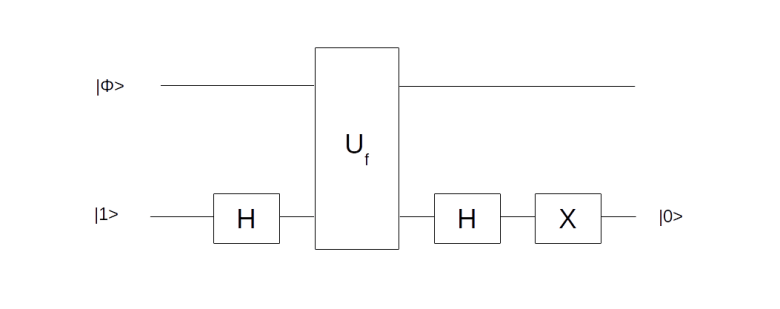
Given a function f, this circuit will create the state |\psi \rangle from the | \Phi_0 \rangle with only one application of Uf. It uses an ancilla qubit that is initialized in the state |1\rangle . The graphical representation is as follows.

ConditionalPhaseShift

Let us quickly check that the circuit is doing what we want. It starts with the superposition across all states x that we denote by
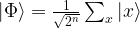
| \Phi  \rangle =  \frac{1}{\sqrt{2^n}} \sum_x |x\rangle

Then we add an ancilla qubit initialized to |1\rangle to which we apply the Hadamard transformation. Now our state is

| \Phi  \rangle \otimes H|1\rangle =  \frac{1}{\sqrt{2^{n+1}}} \sum_x (|x, 0 \rangle - |x,1 \rangle)

We now let Uf act on this state. If f(x) is zero for some value of x, this transformation maps |x, 0 \rangle to itself and |x, 1 \rangle to itself. If, however, f(x) is one, it maps |x, 0 \rangle to |x, 1 \rangle and |x, 1 \rangle to |x, 0 \rangle . Thus we find that

U_f \sum_x (|x, 0 \rangle - |x,1 \rangle) = \sum_x (-1)^{f(x)} ( |x, 0 \rangle - |x,1 \rangle)

and consequently

U_f | \Phi  \rangle \otimes H|1\rangle =  \frac{1}{\sqrt{2^{n+1}}} \sum_x (-1)^{f(x)}  (|x, 0 \rangle - |x,1 \rangle)

which is the same as

\frac{1}{\sqrt{2^n}}  (\sum_x (-1)^{f(x)} |x\rangle) \otimes H|1\rangle

Now applying the Hadamard operator once more to the ancilla qubit followed by the negation operator X transforms the ancilla qubit to |0 \rangle and we end up with the state |\psi \rangle as claimed.

The Deutsch-Jozsa algorithm is widely acknowledged as the first real quantum algorithm that leverages the potential of a quantum computer and achieves a real improvement compared to classical hardware, while still yielding a deterministic result despite the stochastic nature of quantum systems. Of course, the problem solved by the algorithm is mainly of academical interest. In the next few posts, we will move on to study other algorithms that have been developed in the sequel that are more relevant for actual applications.

References

1. G. Benenti, G. Casati, G. Strini, Principles of Quantum Computation and Information, Volume 1, World Scientific
2. E. Rieffel, W. Polak, Quantum computing – a gentle introduction, MIT Press
3. D. Deutsch, Quantum Theory, the Church-Turing principle and the Universal Quantum Computer, Proceedings of the Royal Society of London A. Vol. 400, No. 1818 (1985), pp. 97-117
4. D. Deutsch, R. Jozsa, Rapid Solution of Problems by Quantum Computation, Proceedings of the Royal Society of London A, Vol. 439, No. 1907 (1992), pp. 553-558
5. R. Cleve, A. Ekert, C. Macchiavello, M. Mosca, Quantum algorithms revisited, arXiv:quant-ph/9708016

Why building an operating system from scratch?

What happens if you turn on a PC? How is an operating system able to run multiple tasks in parallel? What happens if you hit a key on your keyboard? And what actually is a process? If you have ever thought for more than a second about one of these things, then read on…

A few years back, actually in late 2010 or early 2011, I was at a point where my growing interest in computer science naturally lead me to those questions. So I did what most of us would probably do – I started to search for information on this and tried to understand what I got.

One day, I hit upon a tutorial that explained the boot process of a PC, and actually contained a short instruction on how to write a very simple program that would act as a boot loader – you would copy this program to a floppy disk (yes, that still existed in some machines at this time) or a CD-ROM and boot from there, and – voila – instead of a Windows or Linux coming up, the system would run your program and print some deep wisdom like “Hello World!” onto the screen.

Now printing something is easy, but what if I wanted the user to be able to enter something and print a response? Obviously, this requires some sort of communication with the keyboard and there is no operating system around that can help you with that, so I needed to learn about a thing called keyboard controller. But wait, why could I only use a few kB of memory? I found that I needed to switch from real mode to protected mode, install interrupt handlers … and slowly, the attempt to just build something that would boot turned into more.

Over the next roughly 18 months, I continued to walk down this path, and eventually had build a small Unix operating system kernel. I then added a simple command line interface, graphics mode and a C library and eventually got to a point where I was able to take simple programs originally written for Linux or other Unix-like operating systems, and compile and run them on my new operating system, which I did call ctOS. Here is a screenshot – my OS is running in a virtual machine on the left, and on the right you see a few measurements of the physical CPU load while running some multi-threading tests within ctOS.

ctOS_SMP_Test

As you might imagine, this required quite some work, and I eventually got to a point where I spend more time working on other things and further development came to an end.

Earlier this year, I was cleaning up a few things on my hard drive and – more or less by accident – hit upon my old code archive again. Being a curious person, I was wondering whether I would still be able to compile and run the system – and of course it badly failed when I tried it. This was not really surprising – my development environment had changed from a 32 bit system to a 64 bit system, and the emulators that I used to run and test the OS had changed quite a bit as well, fixing defects that did actually hide away some bugs in my OS. And of course the “average PC” had changed quite a lot since 2011. The BIOS is now a thing of the past, PCs use UEFI to boot and ACPI tables to store their configuration instead of BIOS tables, and you will hardly ever find a system with a floppy disk drive and only one CPU any more.

So I decided to invest some time to make my OS work again and to adapt it to the current generation of hardware. This included building a new development environment, fixing some defects that become suddenly apparent as the emulator had changed, making the system ACPI aware, removing all dependencies on the BIOS etc. I did also clean up the source code and migrated everything to a Github repository and added a few additional ports.

I have a realistic view on how much time I will probably have in the future to further develop and improve my OS. However, it can still serve a purpose – education. After all, this is what it was created for: helping me to understand some of the inner workings of an operating system.

In fact, my plan is to publish a series of blog posts on the principles and structures behind a Unix operating system, using ctOS to illustrate these concepts and linking to the documentation I have created over the years for the details. This will cover topics like the overall structure of an operating system, processes and the scheduler, interrupts, memory management, device driver and the networking stack. So if you ever wanted to understand how an operating system really works this is the time for you to learn it – stay tuned and join me again for the first part of the series. Until then, you might want to check out the ctOS source code on Github and the documentation that comes with it – if you want, you can even download some of the binary packages on the release page and play with it.

Quantum gates

So far, we have looked at states of a quantum computer and expressed these states in terms of qubits. However, just having a static state is of very limited use – to perform actual computations, we of course have to change our state over time.

In quantum mechanics, state changes are described by unitary transformations on the Hilbert space describing our quantum system. In analogy with a classical computer, where signals traverse logical gates and are manipulated by these gates to perform calculations, these transformations are called quantum gates. However, please keep in mind that in most actual implementations of quantum computers, these gates are not circuits or building blocks in the classical sense through which the qubits somehow travel. Instead, the qubits are mostly at a fixed point in space, and a gate is applied to a quantum state by manipulating the system, using for instance laser beams or magnetic fields.

One qubit quantum gates

Let us again start with the case of a single qubit, i.e. with a two-dimensional Hilbert space. With respect to the standard basis \{ |0\rangle, |1\rangle \} , a unitary transformation is of course given by a unitary 2×2 matrix.
As a first example, let us consider the matrix

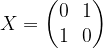
X = \begin{pmatrix} 0 & 1 \\ 1 & 0\end{pmatrix}

Obviously, this operator exchanges the states |0 \rangle and |1 \rangle and is therefore sometimes called the bit-flip or negation. Its eigenvalues are 1 and -1, with a pair of orthogonal and normed eigenvectors given by


|+\rangle = \frac{1}{\sqrt{2}} (|0\rangle + |1 \rangle)

and

|-\rangle = \frac{1}{\sqrt{2}} (|0\rangle - |1 \rangle)

A second commonly used operator is the operator conventionally denoted by Z and given by

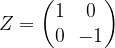
Z = \begin{pmatrix} 1 & 0 \\ 0 & -1 \end{pmatrix}

Clearly, the eigenvalues of this operator are again +1 and -1, but this time, an eigenbasis is given by the standard basis. On a superposition, this operator changes the relative phase, so it is often called the phase change or phase flip operator. A reader with a background in quantum physics might recognize these two operators as being two of the three Pauli operators. They all have determinant -1, trace 0, are hermitian and unitary and their square is the identity operator.

The eigenstates of X form an orthogonal basis, and hence they can be mapped into the standard basis by applying a unitary transformation. The corresponding operator is the Hadamard operator given by

H = \frac{1}{\sqrt{2}}\begin{pmatrix} 1 & 1 \\ 1 & -1 \end{pmatrix}

As we can see, H |0\rangle = |+ \rangle and H |1 \rangle = |- \rangle , and, as H^2 = 1 , vice versa. Similarly, the phase operator
S = \begin{pmatrix} 1 & 0 \\ 0 & i \end{pmatrix}

that changes the relative phase to an imaginary value transforms between the eigenstates of X and the third Pauli operator. The two gates H and S are sometimes referred to as Clifford gates (they have the property that conjugation with them takes the set of Pauli matrices onto itself).

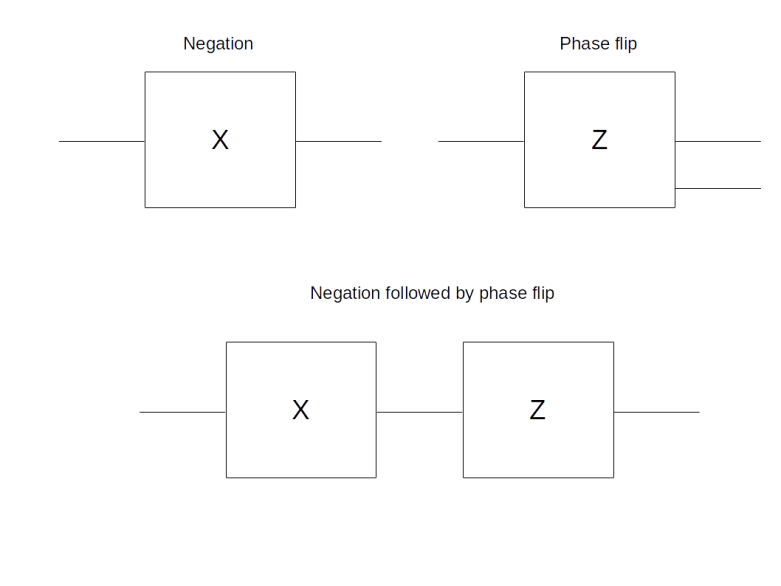
Similar to classical circuits, quantum gates and combinations of quantum gates are often represented graphically. A single quantum gate is represented by a box, with incoming qubits (i.e. the qubits on which the transformation acts) being indicated by incoming lines on the left and the result being represented by outgoing lines on the right.

SingleQubitGates

In the example above, the first line shows two individual gates, the negation and the phase flip operator. The second line graphically represents the process of applying to a single qubit first the negation and then the phase flip. Of course, the resulting matrix is given by the matrix product

ZX = \begin{pmatrix} 1 & 0 \\ 0 & -1 \end{pmatrix} \begin{pmatrix} 0 & 1 \\ 1 & 0 \end{pmatrix}  = \begin{pmatrix} 0 & 1 \\ -1 & 0 \end{pmatrix}

Note that the order of the matrix product is reversed, as we first apply X and then Z, reading the diagram from the left to the right which is the usual convention. We also note that this matrix is sometimes called Y, whereas other authors use Y to denote -i times this matrix. We stick to the convention to use Y for the product ZX given above.

Multi-qubit gates – the CNOT and other controlled gates

Having discussed some of the fundamental quantum gates acting on one qubit, let us now turn again to multi-qubit systems. Of course, we can always create transformations on a multi-qubit system by acting on each qubit individually with a given unitary operator, i.e. by forming the tensor product of operators. Graphically, this would be represented as gates placed below each other, each acting only on one line, i.e. qubit. However, things get more interesting when we use gates that are actually combining multiple qubits to model some non-trivial logic.

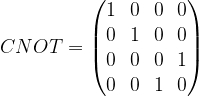
As an example, let us consider a gate acting on two qubits that is commonly known as the CNOT gate. To express this gate as a matrix, we have to agree on an order of the basis of the tensor product, and is is natural to use the order |0 \rangle, |1\rangle, |2\rangle, |3\rangle for this. In this basis, the CNOT gate is given by the following 4 x 4 matrix:
CNOT = \begin{pmatrix} 1 & 0 & 0 & 0 \\ 0 & 1 & 0 & 0 \\ 0 & 0 & 0 & 1  \\ 0 & 0 & 1 & 0  \end{pmatrix}

To understand what this operator is actually doing, let us see how it acts on a basis. Clearly, it maps |0 \rangle = |00 \rangle and |1 \rangle = |0 1 \rangle to itself and swaps the vectors |2 \rangle = |10 \rangle and |3 \rangle = |11 \rangle . Thus, expressed in terms of bits, it negates the second bit if the first bit is ON and keeps the second bit as it is if the first bit is OFF. Thus, the first bit can be thought of as a control bit that controls whether the second bit – the target bit – is toggled or not, and this is where the name comes from, CNOT being the abbreviation for “controlled NOT”. Graphically, the CNOT gate is represented by a small circle on the control bit and an encircled plus sign on the target bit (this is the convention used in [1], whereas some other authors, for instance [2], use a slightly different symbol).
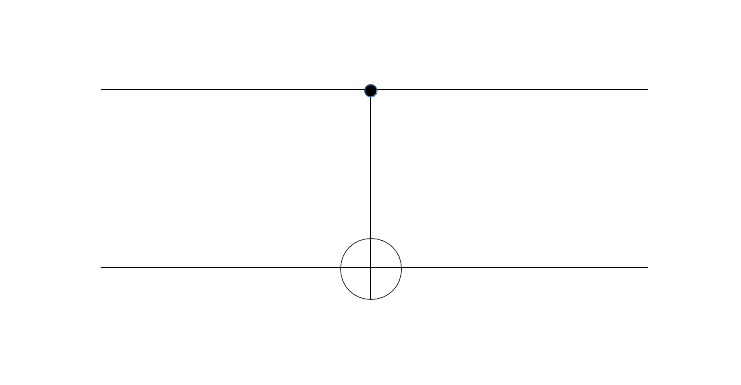
CNOTGate

An interesting property of the CNOT gate is that it takes separable states to entangled states. Let us for instance compute the action of the CNOT gate on the state (|0 \rangle + |1 \rangle) |0 \rangle . This state can as well be written as

|00 \rangle + |10 \rangle = |0 \rangle + |2\rangle

from which we can read off that

CNOT( (|0 \rangle + |1 \rangle) |0 \rangle) = |00 \rangle + |11 \rangle

which, up to a normalization factor, is an entangled Bell state. Thus we can use the CNOT gate to create entangled states. We also see that, other than the symbol does suggest, the operator does act on the control bit as well.

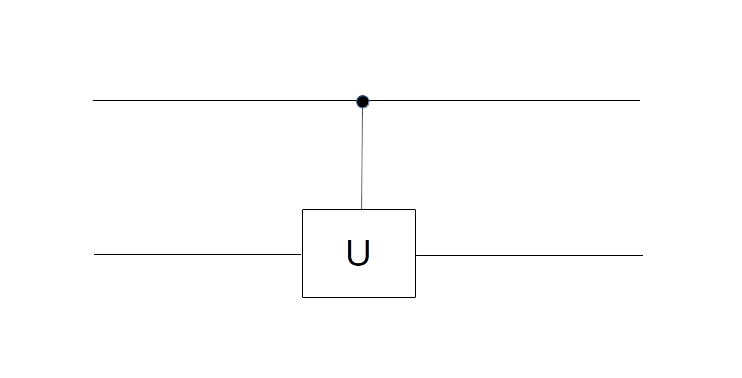
The notation of a controlled NOT gate can be extended to cover more general gates. Given any unitary one-qubit transformation U, we can in fact consider the two-qubit operator that applies the identify to the second qubit if the first qubit (the control bit) is |0 \rangle and U otherwise. As a matrix, this is given by a 4 x 4 block matrix, with the identity matrix in the upper left corner and the matrix representing U in the lower right corner, and graphically, such a gate is represented as below.

ControlledUGate

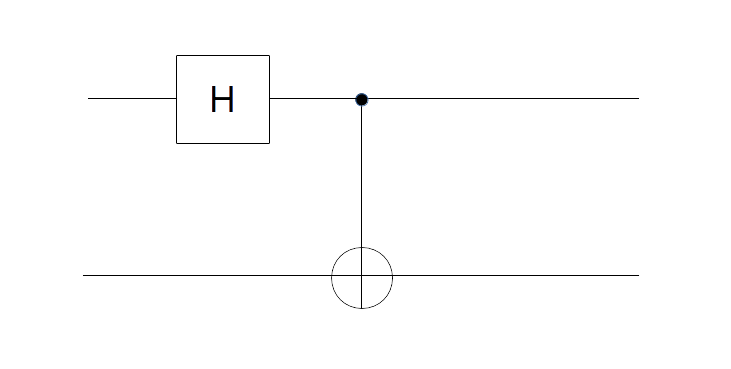
To get used to the graphical notation, let us take a look at the following two-qubit circuit and try to understand what it does to the standard basis.

EntanglementCircuit

There are several approaches to figure out what this circuit is doing. First, we can look at its action on each of the basis vectors. Let us do this for the basis vector |00 \rangle . We read the circuit from the left to the right and the top to the bottom. Thus, the first part of the circuit acts with H on the first qubit and with the identity on the second qubit. It therefore maps the state

|00 \rangle = |0 \rangle \otimes |0 \rangle

to the state

H|0 \rangle \otimes |0 \rangle = \frac{1}{\sqrt{2}} (|0 \rangle + |1 \rangle) \otimes |0 \rangle = \frac{1}{\sqrt{2}} (|00 \rangle + |10 \rangle)

The second part of the circuit, the CNOT gate, then maps |00 \rangle to itself and |10 \rangle to |11 \rangle . Thus the entire circuit maps the vector |00 \rangle to
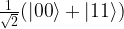
\frac{1}{\sqrt{2}} (|00 \rangle +|11 \rangle)

which again is an entangled Bell state. We could now proceed like this for the other basis vectors. Alternatively, we can find the answer by multiplying out the matrices and will arrive at the same result.

Universal quantum gates

In classical computing, a general circuit with n input bits and one output bit can be described by a function taking \{0, \dots, 2^n - 1 \} to \{0,1\} , and it is well known that any such function can be expressed as a combination of gates from a small set of standard gates called universal gates. In fact, it is even true that one gate is sufficient – the NAND gate. It is natural to ask whether the same is true for quantum gates. More precisely, can we find a finite set of unitary transformations such that any n-qubit unitary transformation can be composed from them using a few standard operations like the tensor product?

Unfortunately, this does not work in the quantum world. The problem is that the group of unitary matrices is not discrete, but continuous, and thus we can never hope to be able to generate it fully using only a finite number of different gates. However, something very similar is true – every gate can be approximated by combining gates from a small, universal set.

This result is typically presented and derived in two steps (see for instance [1], chapter 3). First, one shows that every unitary transformation of an n-qubit system can be reduced to a combination of single qubit operations (tensored with the identity) and CNOT gates. This is still exact, i.e. no approximation takes place (for the mathematically inclined reader, this might ring a bell – in fact, there is a relation to Cartan decompositions of unitary matrices, see for instance [3] for a discussion).

Then, in a second step, one shows that every single qubit transformation can be approximated arbitrarily close by products of a finite universal set of gates – this is known as the Solovay-Kitaev theorem. It turns out (see for instance [4]) that a possible choice for such a universal set consists of the Hadamard gate H, the phase flip gate Z and only one additional gate

\begin{pmatrix} 1 & 0 \\ 0 &  e^{i\frac{\pi}{4}} \end{pmatrix}

which is confusingly sometimes called the \pi / 8 phase gate.

Finally, we mention that a three-qubit gate that is often used to construct universal sets of quantum gates is the Toffoli gate. This is like a CNOT gate, except that it has two control bits and the target bit is only flipped if both control bits are ON. It is known that the set consisting of the Toffoli gate and the Hadamard gate only is already universal in a similar sense (see this paper by D. Aharonov for a short proof of this result that goes back to Y. Shi). This result is of a certain importance because one can also show that the classical version of the Toffoli gate alone is sufficient to implement (a reversible version of) any classical circuit. Thus we do not only see that any computation that can be done by a classical circuit can also be done by a quantum circuit, but also that without the Hadamard gate, quantum computing would not be more powerful than classical computing.

This closes our short discussion of elementary quantum gates. In the next few posts, we will start to combine quantum gates into quantum algorithms to perform actual computations. Stay tuned!

References

1. G. Benenti, G. Casati, G. Strini, Principles of Quantum Computation and Information, Volume 1, World Scientific
2. E. Rieffel, W. Polak, Quantum computing – a gentle introduction, MIT Press
3. N. Khaneja, S.J. Glaser, Cartan Decomposition of SU(2 n ), Constructive Controllability of Spin Systems and Universal Quantum Computing, arXiv:quant-ph/0010100v1
4. P. Boykin, T. Mor, M. Pulver, V. Roychowdhury, F. Vatan, A new universal and fault-tolerant quantum basis
5. D. Aharonov,A Simple Proof that Toffoli and Hadamard are Quantum Universal, arXiv:quant-ph/0301040

Qubits and Hilbert spaces

When you use your favorite search engine to search for information on quantum computing, the first term that will most likely jump at you is the qubit. In this post, I will try to explain what this is and how it is related to the usual framework of quantum mechanics.

Please be aware that this post is not meant to be a general introduction into quantum mechanics. I will have to assume some familiarity with the basics of quantum mechanics and the underlying mathematics (Hilbert spaces, states and measurements, operators, eigenvalues and so forth).

Qubits

In classical computing, the world is binary – information is expressed in terms of bits, i.e. units of information that can take on two values only – 1 or 0, true or false, high or low and so on, depending on the actual physical representation.

In the world of quantum computing, the smallest unit of information is represented by “the smallest quantum system”. But what is the smallest quantum system? Any nontrivial quantum system can actually be in an infinite number of states, and therefore it does not make sense any more to look for systems with only two states. What we can do, however, is to look for systems that have only two degrees of freedom. Mathematically, these are quantum mechanical systems that are described by a two-dimensional Hilbert space. In a certain sense, these are the smallest nontrivial quantum systems one can conceive, and similar to the classical world, where is a bit is the smallest nontrivial unit, these systems are called qubits and the fundamental building blocks in quantum computing.

I admit that this definition is a bit abstract, to let us look at some examples. An example that is often cited but mostly of theoretical interest is the spin. Imagine we are looking at a single, isolated charged particle, say an electron. Classically, this particle is described by its current position and its current movement (speed and direction). On a quantum mechanical level, it turns out that there is an additional property that becomes important – the electron somehow behaves as if it were rotating around an internal axis (this is only a very vague analogy as an electron is a point particle and does not have a classical size, but it is a useful description). Classically, you would expect that that rotation can happen in two ways – clockwise and counterclockwise. Let us use the notation |0 \rangle and |1 \rangle for these two possibilities. In a classical setting, we could then try to encode one bit in the state of such a system, where TRUE might correspond to |1 \rangle and FALSE to |0 \rangle .

However, quantum mechanics is more complicated than this. In fact, it turns out that the correct description for all possible states of such a system is not just the two options |0 \rangle and |1 \rangle . Rather, the system can be in so called superposition of these two states. Mathematically, the two states |0 \rangle and |1 \rangle are taken to be the basis of a two-dimensional Hilbert space, and the superposition is described by a linear combination

a |0 \rangle + b |1 \rangle

with complex numbers a and b (more precisely, by the ray in the projective space of that Hilbert space).

There is no good classical analogy for such a state – trying to imagine that something is spinning “a little bit clockwise” and at the same time “a little bit counterclockwise” will make your head spin in either direction, but not take you anywhere. However, we get closer to the classical world if we conduct a measurement. In quantum mechanics, a measurable quantity is described by a hermitian operator, the possible outcomes are the eigenvalues of this operators and after the measurement, the system will be in the state described by one of the (normed) eigenvectors of the operators. In our case, a measurement might be set up in such a way that this operator has the basis \{ |0 \rangle, |1 \rangle \} as eigenvectors, with eigenvalues 0 and 1, i.e. it is given by the matrix

\begin{pmatrix} 1 & 0 \\ 0 & 0 \end{pmatrix}

Of course, any two quantum systems which are described by a two-dimensional Hilbert space are equivalent, so every other system with that property could serve as a physical implementation of a qubit as well. This could for instance be a linearly polarized photon, with an eigenbasis given by the two orthogonal directions of polarization, or it could be a hydrogen atom with the ground state and the first excited state as the states |0 \rangle and |1 \rangle . From a theoretical point of view, all these systems will do, but of course there are huge differences when it comes to a physical implementation of a quantum computer that we will discuss in a later post in this series.

Multi-qubit systems and Hilbert spaces

It is nice to have a qubit, but you will probably anticipate that there is not so much we can do with a single qubit. Instead, we will need a large number of qubits that can interact. As always in quantum mechanics, the state of such a combined system is described by another Hilbert space, namely the tensor product of the single qubit Hilbert spaces.

So suppose that we are describing a single qubit by a two-dimensional Hilbert space H. A system of n identical qubits would then be described by the n-fold tensor product

H \otimes H \dots \otimes H

of H with itself. Given states |\psi_i \rangle , we can form the tensor product

| \psi_1 \rangle \otimes | \psi_2 \rangle  \dots \otimes | \psi_n \rangle

of these states. This gives us elements of the tensor product, but conversely, not every element of the tensor product can be written in this way (this is an important fact to which we will return below). It is, however, true that every state in the tensor product is a finite linear combination of product states. This is a major difference to the other common way to define a product of vector spaces, the direct product. In a direct product, the dimensions add up, in a tensor product, they multiply. Thus when we add a qubit, the dimension of our Hilbert space doubles and therefore grows exponentially with the number of qubits.

This is a good point in time to simplify our notation a bit. First, it is common to suppress the tensor product when it comes to states and to express the vector above simply as

| \psi_1 \rangle | \psi_2 \rangle  \dots | \psi_n \rangle

Going further, we can also combine everything into one bra and write

| \psi_1 \psi_2 \dots \psi_n \rangle

If we do this for the elements of a basis, we can simplify our notation even more. Let us do this for the states of a 2-qubit system first. By building tensor products of the base states |0 \rangle and |1 \rangle , we obtain four vectors

|00 \rangle, |01 \rangle, |10 \rangle  and |11 \rangle

These four states actually form a basis for the tensor product. This is true in general – all possible tensor products of the vectors of a basis are a basis of the tensor product space. Now recall that, in binary notation, the 2-bit sequences 00, 01, 10 and 11 stand for the number 0 – 3. Using this, we could also write this basis as

|0 \rangle, |1 \rangle, |2 \rangle  and |3 \rangle

For a three qubit system, we could use the same notation to arrive at the basis

|0 \rangle = |000 \rangle, |1 \rangle = |001\rangle, \dots 7 = |111 \rangle

and so forth. In general, for a combined system of n qubits, we can label our basis with the numbers 0 to 2n-1, and our tensor product will have dimension 2n, with a general element being given as a sum

|\psi \rangle = \sum_0^{2^n-1} a_i |i\rangle

Entangled states

To close this post, let us come back to one very important point that is a major ingredient to the theoretical power of quantum computing – entanglement. Suppose we are given a two-qubit system. We have seen that certain states can be obtained by taking the tensor product of single qubit states. Can every state in the tensor product be obtained in this way?

Let us try this out. If we take the tensor product of two arbitrary single qubit states a |0\rangle + b |1 \rangle and c |0\rangle + d |1 \rangle , we obtain

ac |00\rangle + ad |01 \rangle + bc |10 \rangle + bd |11 \rangle

Now let us consider the state

| \psi \rangle = \frac{1}{\sqrt{2}} ( |00\rangle + |11 \rangle )

To decompose this state as a product, we would need ad = 0 and ac = 1, which is only possible if d = 0. However, then bd = 0 as well, and we get the wrong coefficient for |11 \rangle . Thus this is an example of a state which cannot be written as a tensor product of two single qubit states (but it can be written, of course, as a sum of such states). States that can be decomposed as a product are called separable states, and states that are not separable are called entangled states.

The state above is often called a Bell state and it is worth mentioning that states like this and entanglement features in one of the most famous though experiments in the history of quantum mechanics, the so called Einstein-Podolsky-Rosen paradox or ERP paradox – a broad topic that we will not even try to cover here. We note, however, that it is entanglement that is responsible for the fact that the dimension of the state space grows exponentially with the number of qubits, and most quantum algorithms use entangled states somehow, so entanglement does seem to play a vital role in explaining why quantum computing seems to be superior to classical computing, see for instance section 13.9 of “Quantum computing – a gentle introduction” for a more in-depth discussion of the role of entanglement in quantum algorithms.

Visualizing quantum states

Before closing this post and turning to quantum gates in the next post in this series, let us quickly describe a way how to visualize a multi-qubit quantum state. Our starting point is the expression

|\psi \rangle = \sum_0^{2^n-1} a_i |i\rangle

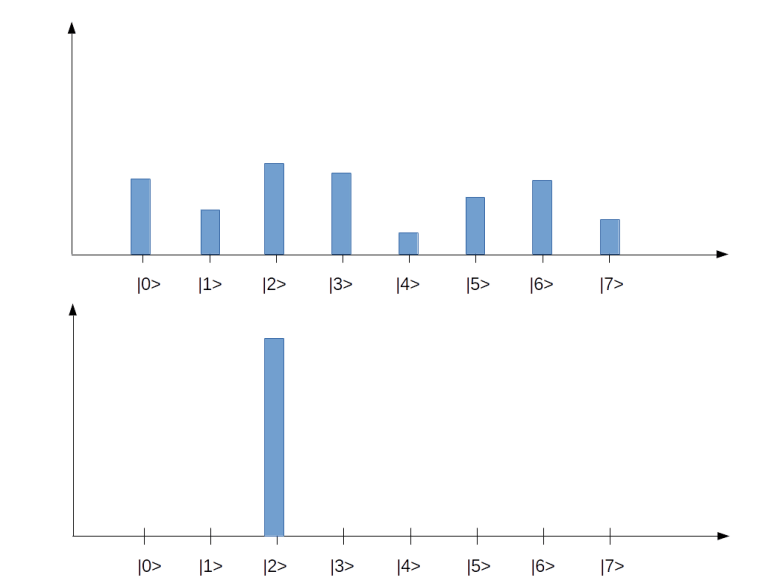
for the most general superposition in an n-qubit system. To visualize that state, we could use a bar char as in the diagram below.

Quantum

Each tick on the horizontal axis represents one of the basis states |i \rangle . In our example, we have eight basis states, corresponding to a quantum system with 3 qubits. The bar represents the amplitude, i.e. the number a_i in the superposition above (of course this is only a very incomplete representation, as it represents the amplitudes as real numbers, whereas in reality they are complex numbers). The upper state in the diagram represents a superposition for which all of the amplitudes are different from zero. The second diagram represents a state in which all but one amplitude is zero, i.e. a state that is equivalent to one of the basis vectors (|2\rangle in this case). These states correspond to the eight states of a corresponding classical system with three bits, whereas all states with more than one bar are true superpositions which have no direct equivalent in the classical case. We will later see how similar diagrams can be used to visualize the inner workings of simple quantum algorithms.
Qubits are nice, but in order to perform computations, we have to manipulate them somehow. This is done using quantum gates which I will discuss in my next post.

Networking basics – the TCP protocol

In our discussion of the IP protocol, the reader might have noticed that there are many desirable features that the IP protocol does not have. Suppose for instance that we are building an application that needs to transmit data in a stream oriented way – this could be a video, an MP3 file or a data transfer modelling a conversation. When we simply split our data into IP packets and send them directly via IP, there are many issues that we have to solve. IP does not guarantee us that packets even arrive, so we will have to deal with lost packets and build some acknowledgement and retransmission mechanism. Even if the packets arrive, the order in which they arrive is not guaranteed – different packets could be routed along different paths and arrive in reversed order. So we need a mechanism to encode the order and reassemble them at the destination in the right order. If the receiver needs some time to process the packets, we might want to control and dynamically adjust the rate of transmission. And finally, IP only assigns one address to a host (more precisely, a network card), so our transmission might conflict with other applications running on the same host and we need a way to deal with this.

Fortunately, the internet protocol stack offers a protocol sitting on top of IP and offering all this – the transmission control protocol, commonly known as TCP (there are other protocols on top of IP like ICMP that we have already seen in action and UDP, but we will focus on TCP in this post).

The main properties of the TCP protocol are:

  • It is reliable – the transmission of each piece of data is guaranteed by acknowledgement and retransmission capabilities of the protocol
  • It is connection oriented. When TCP is used, a connection with endpoints on both hosts is established first through a handshake procedure. Once the connection is established, both parties can write and read from the connection at the same time until all the data is transferred, then the connection is closed again. A connection endpoint (a socket) is identified using the IP address and an additional number, called the port number so that different connections originating or ending at the same host can operate independently.
  • It is stream oriented. An application dealing with TCP does not have to know anything about packet sizes, fragmentation, reassembly, MTUs and so forth – it just writes data sequentially into a socket or reads data sequentially from a socket. Most operating systems make writing to and reading from a socket as easy as dealing with a file. The protocol makes sure that the bytes that are written into one of the endpoints arrive at the second endpoint completely and in the same order.
  • And finally, TCP offers congestion control, i.e. the protocol automatically throttles the transmission speed if it realizes congestion.

TCP is a rather complicated protocol, and it is hopeless to cover it entirely in one post. Instead, we will look at a few of those points in more detail in the following sections.

Connection endpoints and ports

The TCP protocol has first been standardized in RFC 793 (and since then adapted and enhanced by many other RFCs). This is were we also find the structure of a TCP header (see section 3.1 of the document). The first two 16 bit words in the header are called source port and destination port.

Together with the IP address, the port number defines the full address relevant for a TCP connection. The combination of an IP address with a port number is sometimes called a socket in the RFC and is conventionally denoted by prefixing the port number by the IP address followed by a colon, for instance 192.168.178.1:23 for the port number 23 on the host with IP address 192.168.178.1. However, the port number does not simply supplement the IP address. Instead, TCP operates by building connections which are determined by the full endpoints – IP address and port numbers – on both sides.

Let us look at an example to explain this. Suppose you are running a web server on a host with IP address 10.0.2.20. Traditionally, a web server uses the port number 80.

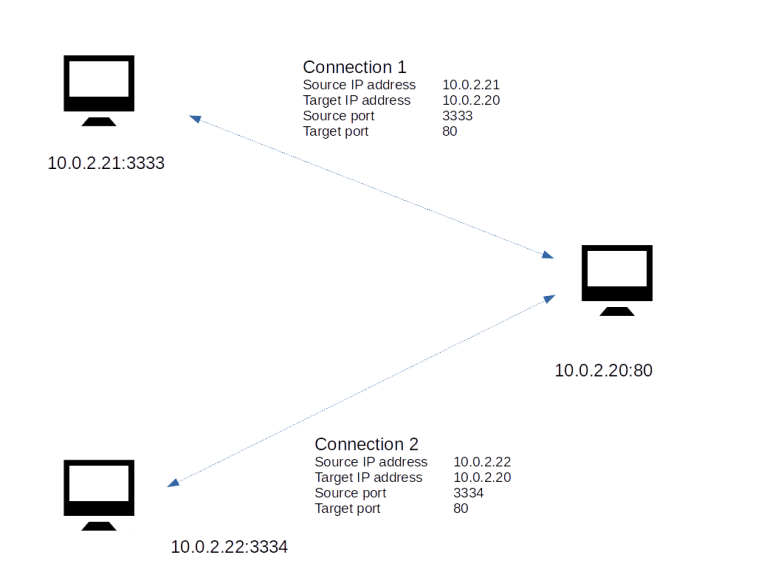
Now suppose a first client connects to this web server. Let us assume that the client has the IP address 10.0.2.21 and that the operating system of the client decides to use the port number 3333 on the client to establish the connection (we will see below how exactly that works). When this connection is established, the web server will typically spawn off a separate thread to handle the communication with this client. So there is now one connection

10.0.2.21:3333 — 10.0.2.20:80

Now a second client might connect to the web server as well – of course we want this to be possible. If this client is running on a machine with IP address 10.0.2.22 and using port 3334, we obtain a second connection

10.0.2.22:3334 — 10.0.2.20:80

The situation is displayed in the image below.

TCPConnections

The web server will create a second thread that serves HTTP requests that are placed using this connection. Now the point is that even though both connections share the same endpoint 10.0.2.20:80, they operate completely independently! If a TCP message arrives at port 80 of the web server, the operating system will inspect the source IP address and source port number to match the message to an existing open connection. It will then forward the message to the thread responsible for this connection and to no other thread. Thus a connection, identified by the quadruple IP source address, IP target address, TCP source port, TCP target port, serves as a channel through which data can flow independently of any other connections, even if they share a common endpoint. This makes TCP compatible with the paradigm of multi-threaded servers.

Handshakes and the TCP state machine

The connection based approach of TCP obviously requires a mechanism to establish a connection when the communication between two nodes begins. It also implies that a TCP connection has a state. This is a major difference between TCP and pure IP. In the IP protocol, every packet is treated the same – the processing of a packet is independent of any previously received packet (which is strictly speaking only true if we ignore fragmentation for a moment). For TCP, this is not true. A TCP connection has a state and the processing triggered by the arrival of a packet is in the context of that state.

Thus, from a theoretical point of view, a TCP connection can be described as a state machine. There is a (finite) number of states, and the connection will move from one state to the next state triggered by events and packets.

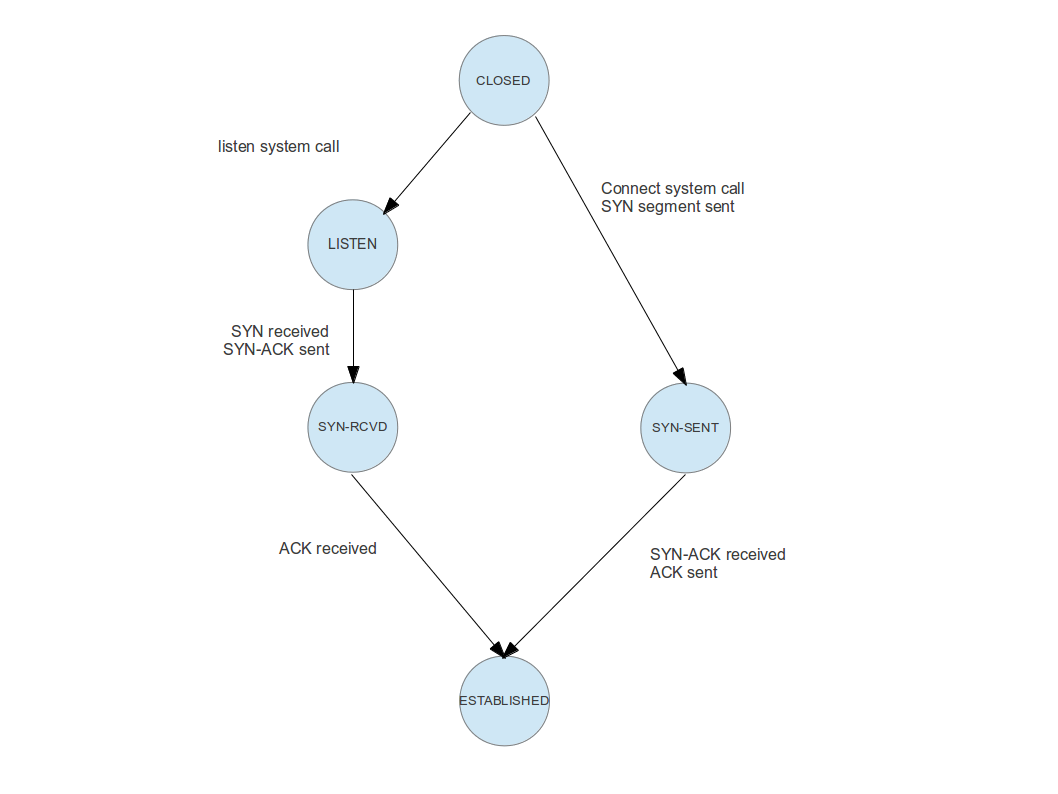
The full TCP state machine is rather complicated, and we will not discuss all possible transitions. Rather, we will focus on those transitions that a connection goes through until it is fully established. A graphical representation of this part of the state machine would look as follows.

TCPStateMachine

To understand this image, let us go through the transitions and events one by one for a real world example. Suppose you are pointing your web browser to a specific site on the WWW, say http://www.wordpress.com. Your browser will then use a DNS service to turn this human readable address into an IP address, say 192.0.78.13. At this IP address, a web server is listening on port 80.

When this web server was started, it did ask the operating system on which it is running to reserve port 80 for it, so that it is automatically owning all incoming connections on this port. Technically, this is done using an operating system call called listen on most operating systems. The operating system now knows that the web server is claiming this port. It will establish an object called a socket and move this socket into the state “listening”. Thus, the endpoint on the server side does actually go through the transition at the top left of the image above – transitioning a connection from “closed” (i.e. not existing in this case) to “listening”.

You can use the command netstat -tln -4 on a Linux machine to get a list of all listening TCP connections (for IPv4). Depending on your configuration, you might see sockets listening on the ports 53 (DNS server), 445 (Microsoft Windows shares/CIFS), 80 (Web server) or 139 (Microsoft NetBios).

Back to our example – what is the web browser doing? After having resolved the IP address, it will try to establish a connection to the IP address / port number 192.0.78.13:80. To do this, it will assemble and send a special TCP packet called a SYN packet. This packet does not contain any data, but a special bit (the SYN bit) in the TCP header of this packet is set. After sending this packet, the client side endpoint is now in the state “SYN-SENT”, i.e. the client part of the connection did traverse the path on the upper right of our image.

Once the SYN packet arrives at the server side, the server will reply with a packet that has the acknowledgement bit set in its header, to let the client know that the SYN packet was received. It will then move into the next state – SYN-RCVD. As the SYN packet does contain the IP address and port number of the client, the server know knows the other endpoint of the connection.

Next, the client will receive the acknowledgement of the SYN packet. It will then reply with another acknowledgement, this time to let in turn the server know that is has received the servers acknowledgement. It then moves into the final state “ESTABLISHED”. Once the server receives the acknowledgement, it will do the same. At this point, the connection between both parties is fully established and the exchange of data can start.

Acknowledgement and retransmission

During the initial handshake, we have already seen an important mechanisms – acknowledgements. TCP is a reliable protocol, i.e. it guarantees that packets are received by the other endpoint. To make this work, each endpoint acknowledges receipt of all packets so that the sender knows that the data has been received. If a packet is not acknowledged within a certain period of time, it is retransmitted.

To allow for a retransmission, a sender needs to maintain a buffer of data which has been sent, but not yet acknowledged by the peer, so that the data is still available for retransmission. When data is eventually acknowledged, the part of the buffer containing that data can be emptied.

Conversely, the receiver will typically also have to maintain a buffer, as the application might need some time to read and process all the data. This raises another complication – how can we make sure that this buffer does not overflow? What we need is a mechanism for the receiver to inform the sender about the size of the available buffer. This is called the send window.

To explain these concepts in a bit more detail, let us take a look at the following diagram.

What we see here is a short piece of a longer stream of data that needs to be transmitted. Each of the little boxes is one byte of data, and the number within the box contains the offset of this byte within the stream. This number is reflected during the transition by a sequence number which is part of the header of a TCP packet and marks where in the stream the data within the packet is located. When a receiver acknowledges receipt of a packet, it adds the sequence number of the acknowledged data to the acknowledgement message to avoid a dependency on the physical order of packets.

To keep track of the stream status, the sender maintains two numbers. The first number, usually abbreviated as SND_UNA, contains the smallest sequence number that has been sent, but not yet acknowledged by the peer. Thus every byte with a smaller offset has been acknowledged and can safely be removed from the buffer.

The pointer SND_NXT contains the next sequence number that can be sent. Thus the bytes between SND_UNA and SND_NXT have been sent, but not yet acknowledged, and the bytes after SND_NXT have been passed to the operating system on the sender side, but not yet transmitted. If additional data is passed to the operating system for sending, they are stored in the buffer and SND_NXT is incremented. When an acknowledgement is received, SND_UNA is incremented and older bytes are removed from the buffer.

An additional restriction is now given by the size of the send window. During the initial handshake, both endpoints exchange their desired send windows. The send window is then used as an upper bound for the number of bytes that are allowed to be in transit. Thus, in the example above, the bytes starting at offset 110 have already been handed over to the operating system for sending, but are in fact not yet ready to be sent as the send window of the peer is only 10 bytes.

All this sounds still comparatively simple, but can in fact become quite complicated. Complex algorithms have been defined in several RFCs to determine when exactly data is to be sent, what happens if an acknowledgement is not received, when exactly acknowledgements are sent, how the send rate is to be adapted to the capacity of the connection (congestion control) and so forth. Discussing all this would go far beyond the scope of this blog post. For those interested in the details, I recommend the two volumes of TCP/IP Illustrated by W. R. Stevens. If you prefer to look at source code, there are the implementations in the open source operating systems like FreeBSD and Linux. In addition, there is the implementation that I coded for my own toy operating system, especially the documentation of the networking stack and the source code of the TCP module.

Quantum computing

When I started this blog, my intention was to document my own attempts to learn and understand some of the topics at the intersection of computer science, physics and mathematics that have the potential to change the world in which we work and live. After spending some time with one of these topics – machine learning and artificial intelligence – I have now started to look into one of the most exciting combinations of these subjects – quantum computing.

Roughly speaking, quantum computing refers to leveraging the laws of quantum mechanics – like superposition and entanglement – to build computing devices that operate in a way fundamentally different from traditional computers and allow us to solve traditionally hard computational problems in a reasonable amount of time.

How exactly this works is difficult to explain without referring to non-trivial quantum mechanics and mathematics. It is often said that quantum computing is exploiting the superposition principle – the fact that the state of a quantum system can be described as a superposition of many different fundamental states at the same time – to perform many calculations parallel in one step that a classical computer can only perform serially. However, we will see that this is a bit of an oversimplification as it ignores the fact that a measurement destroys this parallelism.

In addition, even though a quantum computer is theoretically able to perform any calculation that a classical computer can do, it is not clear that we will see a drastic speedup for arbitrarily chosen classically hard problems. In fact, as of today, we know a few problems – like the factorization of large composite numbers into primes – that can be solved using quantum computers while being intractable for traditional hardware, and we know of some areas of applications like simulations or optimization and machine learning, where we have good reasons to expect that quantum computing will provide a massive gain in speed and capacity, but there is strong evidence that not all classically hard problems can be solved efficiently on a quantum computer (see for instance [1]). And sometimes, we find a fast quantum algorithm for something that so far could not be done efficiently on a classical computer, but this algorithm then inspires a classical solution providing the same speedup (the recommendation problem seems to be an example for that fruitful interaction between quantum computing and classical computer science).

So even a fully operational universal quantum computer would not out of a sudden make classical computing obsolete and perform better in all known instances. Rather, we should expect that at least in the near future, the main applications of quantum computing will be restricted to a few dedicated fields, with classical computing evolving in parallel (see for instance [2] for a discussion).

This does not make quantum computing less exciting. After all, quantum computing changes the way how we think about things like information and algorithms substantially. However, implementing a working quantum computer remains hard. In later posts, we will look at some of the technologies like quantzum error correction, superconducting devices and ion traps that are currently used by researchers around the globe to build quantum computing devices at scale. We have seen some very exciting progress recently, with e.g. Google announcing its new Bristlecone device with 72 qubits or IBM making a 5 qubit quantum computer publicly accessible in the cloud as part of their Q Experience program. There are even simulators like Quirk that allow you to put together quantum circuits online and play with the results or frameworks like Microsofts quantum development kit or the API and framework developed by 1QBit that support the development and debugging of quantum algorithms before trying them on a real quantum device. So it is definitely a good point in time to get to know some of the basics of quantum computing, covering theory, applications and implementation – and this is the goal of this new series.

Currently, my plans are to cover the following topics in the upcoming posts.

Networking basics – IP routing and the ARP protocol

In the last post in this series, we have covered the basics of the IP protocol – the layout of a network message and the process of fragmentation. However, there is one point which we have not yet discussed. Assume that an application or operating system has actually assembled a message and applied fragmentation so that the message is now ready to be sent. How would that actually work?

Routing in local networks: the ARP protocol

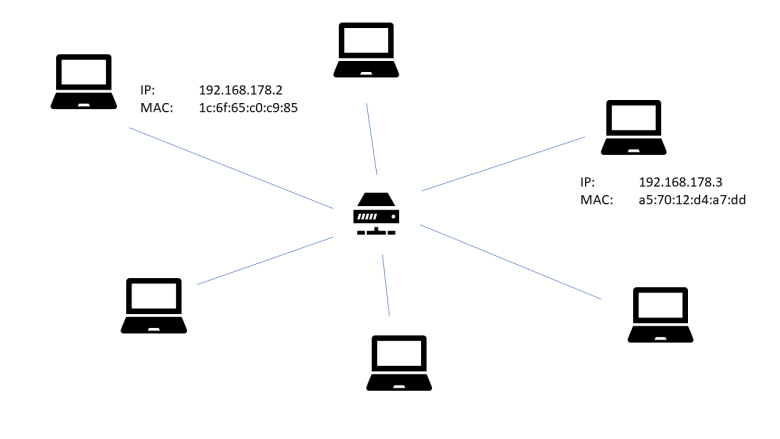
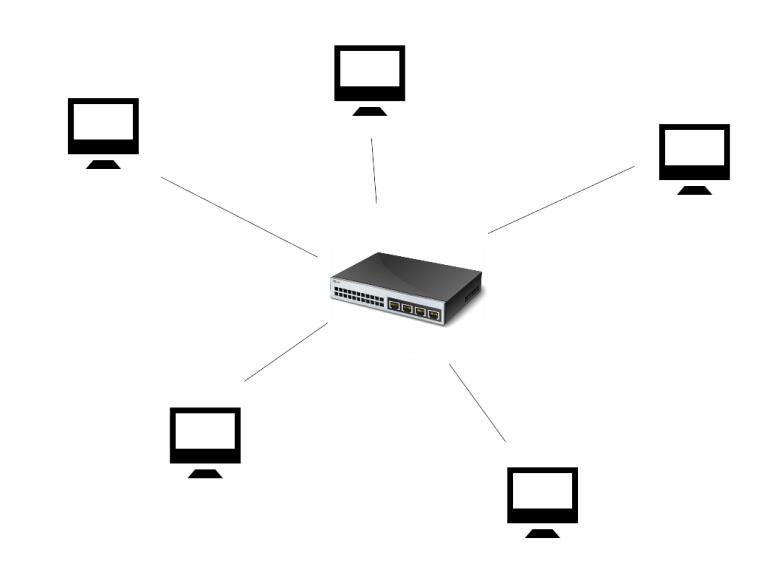
To understand the situation, assume for a moment that we are dealing with a very simple network topology. We are looking at a host which is part of a small network, and the host is directly connected to the same Ethernet network segment as the destination host, as illustrated in the following diagram.

RoutingI

Here we are considering a network consisting of a small number of workstations and one Ethernet switch (in the middle of the diagram). Each workstation is equipped with a network interface card (NIC) which has an Ethernet (MAC) address. Thanks to the switch, Ethernet frames sent out by one NIC can be directly read by any other NIC.

At configuration time, each NIC receives an assigned IP address. This is usually done using a technology like DHCP, but can also be done manually as long as no IP address is used twice.

Now suppose that the workstation with IP address 192.168.178.2 (more precisely: the workstation to which the network interface card with assigned IP address 192.168.178.2 is attached) wishes to send an IP packet to the workstation with IP address 192.168.178.3. It then needs to make several decisions:

  • which network interface card should be used to transmit the packet?
  • which Ethernet target address should be used?

In the simple case that we consider, the answer to the first question is obvious, as there is only one NIC attached to the workstation, but this question will become more relevant in the more complex setup that we will study later. The second question is more interesting – to answer it, the workstation somehow needs a way to translate an IP address into the MAC address of the corresponding NIC.

To do this, the ARP protocol is at our disposal. ARP is the abbreviation for Address resolution protocol and is defined in RFC 826. ARP messages are designed to travel on top of Ethernet or other link layer protocols. Essentially, the ARP protocol is request-reply based. If a host wishes to translate an IP address into an Ethernet address, it will send an ARP request to all hosts on the local network, using an Ethernet broadcast. This message will contain the own IP and MAC address and the IP address that the host is looking for. Each host on the network will compare the IP address to its own IP address. If they match, it will respond with a reply message that again contains the own IP and MAC address. The requesting host can then use this message to retrieve the correct MAC address and use it for further communication.

Of course this procedure is not repeated every time a host wants to send a packet to another host in the local network. Instead, a host will cache a mapping of IP addresses to Ethernet MAC address in a so called ARP cache. As the assignment of IP addresses to network interface cards can vary over time, entries in this cache typically have a timeout so that they become invalid after some time. On a Linux workstation, the arp command can be used to print the current content of the ARP cache, i.e. the set of hosts to which the workstation has a direct connection that has been recently used. On my PC, the output looks as follows.

$ arp -n
Address                  HWtype  HWaddress           Flags Mask            Iface
192.168.178.1            ether   08:96:d7:75:7e:80   C                     enp4s0
192.168.178.33           ether   ac:b5:7d:34:3a:a6   C                     enp4s0
192.168.178.28           ether   00:11:32:77:fe:46   C                     enp4s0

Here we see that the network card of my PC is able to connect directly to three other hosts on the same Ethernet network. The first one is my router, the second one is a laptop connected to the same router via WLAN (the router actually contains a switch that makes the devices connected via WLAN to appear on the network as an Ethernet device) and the third one is a NAS.

Summarizing, here are the steps that a host would typically take to send an IP packet to another host on the local network.

  • Look up the target IP address in the ARP cache
  • If there is a match, retrieve the MAC address from the ARP cache entry, assemble an Ethernet frame with that target address and send it
  • If there is no match, send an ARP request as broadcast into the local network. Once a reply arrives, add a corresponding entry to the ARP cache. Then proceed as above by assembling and sending the Ethernet frame
  • If no ARP reply arrives, give up – this will typically result in an error message like “destination host unreachable”

Note that the ARP protocol is designed to determine the target Ethernet address inside a local network. ARP requests will be dropped at network boundaries. Now, the Internet is by design a network of network – it consists of many small networks that are connected to each other. Obviously, the ARP protocol is no longer sufficient to solve the routing challenge in these more complex networks, and we need additional tools. This will be discussed in the next section.

Routing across network boundaries

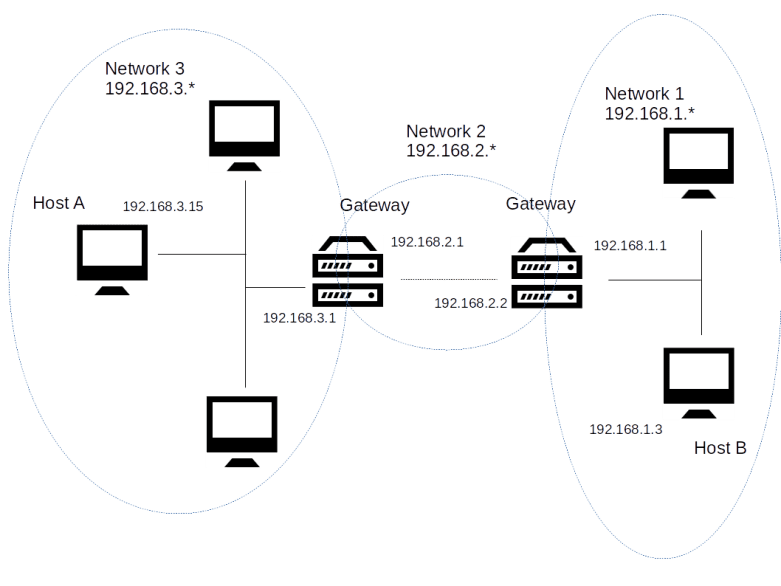
For the sake of concreteness, let us again take a look at a slighly modified version of the example network that we have already used earlier in this series.

MultiNetworkRouting

In this example, our entire network is comprised of three different networks, called network 1, network 2 and network 3. In each of these networks, each host is reachable from any other host directly via an Ethernet medium. Thus for the communication within each of these networks, the mechanisms explained in the previous section apply – a host uses the ARP protocol to translate IP addresses into MAC addresses and sends IP messages directly as payload of Ethernet frames.

Now let us walk through the chain of events that takes place when in this topology, host B wishes to send an IP packet to host A. The first thing that host B needs to detect is that host A is not part of the same Ethernet network. To be able to do this, an additional configuration item is used that we have ignored so far – the subnet mask.

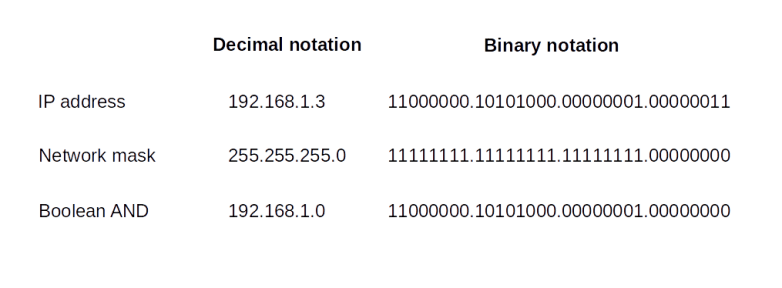
When a network interface card is set up, we typically do not only assign an IP address to it, but also a network mask. Technically speaking, a network mask is – as the IP address itself – a sequence of four bytes, using the same decimal dot notation that we use for the IP address. Thus, as the IP address, it is a sequence of 32 bits. We can therefore apply a boolean AND operation to the IP address and the network mask. The result is, by definition, the network part of the IP address, the remaining part is the host part of the IP address. All IP addresses which share a common network part are considered to be part of the same subset, and the standard IP routing algorithms assume that they are connected directly via Ethernet or another link layer protocol.

Let us look at an example to make this clearer. In our case, the network mask for all three subnets is 255.255.255.0. When we take the IP address 192.168.1.3 of host B and apply a logical AND to this and the network mask, we obtain the network part 192.168.1.0, as displayed in the table below.

NetworkMask

When we apply the same procedure to host A, we obtain the network 192.168.3.0. Thus the two hosts are not in the same subnet, and host B can use that information to determine that a direct routing attempt via ARP will not work (this is actually a bit of a simplification – typically, the host will use an algorithm known as longest match prefix algorithm involving the network mask).

Instead, in order to reach host A, host B will have to make use of a so-called gateway or router. Roughly speaking, a gateway is a host that is connected to more than one network and can therefore transmit or route (hence the name router which is often used as a synonym, even though this is not entirely correct, see RFC 4949 for a discussion of the terminology) packets between the networks.

In our example, there are two gateways. The first gateway connects the networks 1 and 2. It has two network interface cards. The first NIC is connected to network 1 and has the assigned IP address 192.168.1.1. The second NIC attached to this host is part of network 2 and has the assigned IP address 192.168.2.2 (this example makes it clear that, strictly speaking, the IP address is not an attribute of a host but of the network interfaces attached to it).

When host A wishes to send an IP packet to host B, it will send the packet to this gateway via the NIC attached to network 1. As this NIC is on the same Ethernet network, this can be done using the ARP resolution protocol discussed earlier. The gateway will then inspect the destination IP address of the packet and consult a table of possible next stations called the routing table. Based on that table, it will decide that the best next station is the gateway connecting network 2 and network 3. This gateway will finally determine that the destination IP address is part of network 3 to which it is directly attached and eventually deliver the packet to host B.

Thus our IP packet did have to pass several intermediate hosts on its way from source to destination. Each such host is called a hop. The traceroute utility can be used to print out the hops that are required to find a way to a given destination address. Essentially, the way this utility works is as follows. It will send out sequences of packets (typically UDP) towards a given destination, with increasing value of the TTL (time-to-live) field. If the value of this field is n, it will only survice n hops, until it will be dropped. The host dropping the packet will send an ICMP packet back to the host on which traceroute runs. This ICMP packet is used by the utility to determine that the sender of the ICMP packet is part of the route and is sitting at station n in the route. By increasing the TTL further until no packets are dropped anymore, the entire route to the destination can be probed in this way.

Here is the output of a traceroute on the workstation on which I am writing this post.

$ traceroute www.wordpress.com
traceroute to www.wordpress.com (192.0.78.13), 30 hops max, 60 byte packets
 1  fritz.box (192.168.178.1)  2.289 ms  3.190 ms  5.086 ms
 2  dslb-178-004-200-001.178.004.pools.vodafone-ip.de (178.4.200.1)  22.503 ms  24.686 ms  25.227 ms
 3  * * *
 4  * * *
 5  92.79.212.61 (92.79.212.61)  33.985 ms 92.79.212.45 (92.79.212.45)  35.649 ms  36.373 ms
 6  145.254.2.175 (145.254.2.175)  38.205 ms 145.254.2.191 (145.254.2.191)  23.090 ms  25.321 ms
 7  edge-a01.fra.automattic.net (80.81.193.69)  25.815 ms  18.981 ms  19.729 ms
 8  192.0.78.13 (192.0.78.13)  22.331 ms  19.813 ms  19.593 ms

We can see that the first station in the path to the destination http://www.wordpress.com is my local DSL router (192.168.178.1), which, not surprising, acts as a default gateway for my local home network. The DSL router than forwards the packet to the next hop (178.4.200.1), which, judging by its name, is part of the DSL infrastructure of my ISP (Vodafone). The next two lines indicate that for the packets with TTL 3 and 4, the utility did not get an answer, most likely because some firewalls were preventing either the probing UDP packet from reaching its destination or because the ICMP message was not sent or not received. Finally, there are three more hops, corresponding to the TTL values 5,6 and 7, before the final destination is reached.

This sounds simple, but in fact routing is a fairly complex process. In a home network, routing is comparatively easy and the routing table is fairly short (you can use the command route on a Linux system to print out the routing table of your machine). Typically, there are only two entries in the routing table of an ordinary PC at home. One entry tells the operating system that all packets that are targeted to an IP address in the local network are to be sent to the local network interface without any gateway. The second entry is the so-called default gateway and simply defines that all other entries are to be sent to a default router, which is for instance the cable modem or DSL router that you use to connect to your ISP.

However, once we leave a home network, life becomes more complicated as there is typically more than one possible path from a source host to a destination host. Thus a host might have more than one possible choice for the next hop, and a lot hinges on routers correctly building their routing tables. Several routing protocols exist that routers use to exchange information among each other to find the best path to the destination efficiently, like ICMP, OSPF, BGP or IS-IS, see RFC 1812, RFC 1142 or RFC 1247 for more details.

There are many topics related to IP networking and routing that we have not yet discussed, for instance network address translation (NAT), details on the ICPM protocol, CIDR notation and address classes, and IP version 6. Instead of getting further into these details, however, we will devote the next post in this series to a protocol sitting on top of IP – the TCP protocol.

Networking basics – IP

In the previous post in my networking series, we have looked in detail at the Ethernet protocol. We now understand how two machines can communicate via Ethernet frames. We have also seen that an Ethernet frame consists of an Ethernet header and some payload which can be used to transmit data using higher level protocols.

So the road to implementing the IP protocol appears to be well-paved. We will probably need some IP header that contains metadata like source and destination, combine this header with the actual IP payload to form an Ethernet payload and happily hand this over to the Ethernet layer of our networking stack to do the real work.

Is is really that easy? Well, almost – but before looking into the subtleties, let us again take a look at a real world example which will show us that our simple approach is not so far off as you might think.

Structure of an IP packet

We will use the same example that we did already examine in the post in this series that did cover the Ethernet protocol. In this post, we used the ping command to create a network packet. Ping is using a protocol called ICMP that actually travels on top of IP, so the packet generated was in fact an IP packet. The output that we did obtain using tcpdump was

21:28:18.410185 IP your.host > your.router: ICMP echo request, id 6182, seq 1, length 64
0x0000: 0896 d775 7e80 1c6f 65c0 c985 0800 4500
0x0010: 0054 e6a3 4000 4001 6e97 c0a8 b21b c0a8
0x0020: b201 0800 4135 1826 0001 d233 de5a 0000
0x0030: 0000 2942 0600 0000 0000 1011 1213 1415
0x0040: 1617 1819 1a1b 1c1d 1e1f 2021 2223 2425
0x0050: 2627 2829 2a2b 2c2d 2e2f 3031 3233 3435
0x0060: 3637

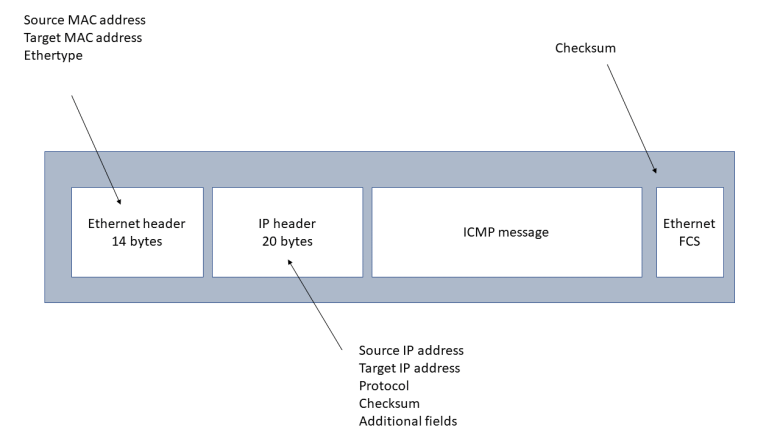
We have already seen that the first few bytes form the Ethernet header. The last two bytes (0x0800) of the Ethernet header are called the Ethertype and indicate that the payload is to be interpreted as an IP packet. As expected, this packet again starts with a header.

The IP header can vary in length, but is at least 20 bytes long. Its exact layout is specified in RFC 791. We will now go through the individual fields in detail, but can already note that there are some interesting similarities between the Ethernet header and the IP header. Both contain a source and target address for the respective layer – the Ethernet header contains the source and target Ethernet (MAC) address, the IP header contains the source and target IP address. Also, both headers contain a field (the Ethertype for the Ethernet header and the protocol field for the IP header) that defines the type of the payload and thus establishes the link to the next layer of the protocol stack. And there are checksums – the Ethernet checksum (FCS) being located at the end of the packet while the IP checksum is part of the header.

IP

The first byte (0x45) of the IP header is in fact a combination of two fields. The first part (0x4) is the IP protocol version. The value 0x4 indicates IPv4, which is more and more replaced by IPv6. The second nibble (0x5) is the length of the header in units of 32 bit words, i.e. 20 bytes in this case.

The next byte (0x00 in our case) is called type of service and not used in our example. This field has been redefined several times in the history of the IP protocol but never been widely used – see the short article on Wikipedia for a summary.

The two bytes after the type of service are the total length of the packet, and are followed by two bytes called identification that are related to fragmentation that we will discuss further below. The same applies to
the next two bytes (0x4000 in hexadecimal notation or 0100000000000000 in binary notation).

The following two 8-bit fields are called time to live and the protocol. The time to live (TTL), 0x40 or 64 decimal in our case, specifies the time a packet will survive while being transmitted through the internet network. Whenever an IP packet is routed by a host in the network, the field will be reduced by one. When the value of the field reaches zero, the packet will be dropped. The idea of this is to avoid that a packet which cannot be delivered to its final destination circulates in the network forever. We will learn more about the process of routing in one of the following posts in this series.

The protocol field (0x1 in our case) is the equivalent of the ethertype in the Ethernet header. It indicates which protocol the payload belongs to. The valid values are specified in RFC790. Looking up the value 0x1 there, we find that it stands for ICMP as expected.

After the following two bytes which are the header checksum, we find the source address and destination address. Both addresses are encoded as 32 bit values, to be read as a sequence of four 8 bit values. The source address, for instance, is

c0 a8 b2 1b

If we translate each byte into a decimal value, this becomes

192 168 178 27

which corresponds to the usual notation 192.168.178.27 of the IP address of the PC on which the packet was generated. Similarly, the target address is 192.168.178.1.

In our case, the IP header is 20 bytes long, with the target address being the last field. The general layout allows for some additional options to be added to the header which we will not discuss here. Instead, we will now look at a more subtle point of the protocol – fragmentation.

Fragmentation

What is the underlying problem that fragmentation tries to solve? When looking at how the Ethernet protocol works, we have seen that the basic idea is to enable several stations to share a common medium. This only works because each station occupies the medium for a limited time, i.e. because an Ethernet frame has a limited size. Traditionally, an Ethernet frame is not allowed to be longer than 1518 bytes, where 18 bytes are reserved for the header and the checksum. Thus, the actual payload that one frame can carry is limited to 1500 bytes.

This number is called the maximum tranmission unit (MTU) of the medium. Other media like PPP or WLAN have different MTUs, but the size of a packet is also limited there.

Now suppose that a host on the internet wishes to assemble an IP packet with a certain payload. If the payload is so small that the payload including the header fit into the MTU of all network segments that the packet has to cross until it reaches its final destination, there is no issue. If, however, the total size of the packet exceeds the smallest MTU of all the network segments that the packet will visit (called the path MTU), we need a way to split the packet into pieces.

This is exactly what fragmentation is doing. Fragmentation refers to the process of splitting an IP packet into smaller pieces that are then reassembled by the receiver. This process involves the fields in the IP header that we have not described so far – the identification field and the two bytes immediately following it which consist of a 3 bit flags field and a 13 bit fragment offset field.

When a host needs to fragment an IP packet, it will split the payload into pieces that are small enough to pass all segments without further fragmentation (the host will typically use ICMP to determine the path MTU to the destination as we will see below). Each fragment receives its own IP header, with all fragments sharing the same values for the source IP address, target IP address, identification and protocol. The flags field is used to indicate whether a given fragment is the last one or is followed by additional fragments, and the fragment offset field indicates where the fragment belongs to in the overall message.

When a host receives fragments, it will reassemble them, using again the four fields identification, source address, target address and protocol. It can use the fragment offset to see where the fragment at hand belongs in the overall message to be assembled and the flags field to see whether a given fragment is the last one – so that the processing of the message can start – or further fragments need to be waited for. Note that the host cannot assume that the fragments arrive in the correct order, as they might travel along different network paths.

Note that the flags field also contains a bit which, if set, instructs all hosts not to fragment this datagram. Thus if the datagram exceeds one of the MTUs, it will be dropped and the sender will be informed by a so specific ICMP message. This process can be used by a sender to determine the path MTU on the way to the destination and is called path MTU discovery.

Packets can be dropped, of course, for other reasons as well. IP is inherently not establishing any guarantees that a message arrives at the destination, there are no handshakes, connections or acknowledgements. This is the purpose of the higher layer protocols like TCP that we will look at in a later post.

So far, we have ignored one point. When a host assembles an IP packet, it needs to determine the physical network interface to use for the transmission and the Ethernet address of the destination. And what if the target host is not even part of the same network? These decisions are part of a process called routing that we will discuss in the next post in this series.

Networking basics – Ethernet

In the previous post in this series, we have looked at the layered architecture of a typical network stack. In this post, we will dive into the lowest layer of a typical TCP/IP implementation – the Ethernet protocol.

The term Ethernet originally refers to a set of standards initially developed in the seventies by Xerox and then standardized jointly with DEC and Intel (see for instance this link to the original specification of what became knowns as Ethernet II). These standards describe both the physical layer (PHY), i.e. physical media, encoding, voltage levels, timing and so forth, as well as the data link layer that specifies the layout of the messages and the handling of collisions.

To understand how Ethernet works, it is useful to look at a typical network topology used by the early versions of the Ethernet standard. In such a setup, several hosts would be connected to a common medium in a bus topology, as indicated in the diagram below.EthernetBusTopology

 
Here, a shared medium – initially a coaxial cable – was used to transmit messages, indicated by the thick horizontal line in the diagram. Each station in the network is connected to this cable. When a station wants to transmit a message, it translates this message into a sequence of bits (Ethernet is inherently a serial protocol), checks that no other message is currently in transit and forces a corresponding voltage pattern onto the medium. Any other station can sense that voltage pattern and translate the message back.

Each station in the network is identified by a unique address. This address is an 48 bit number called the MAC address. When a station detects an Ethernet message (called a frame) on the shared medium, it extracts the target address from that frame and compares it to its own MAC address. If they do not match, the frame is ignored (there are a few exceptions to this rule, as there are broadcast addresses and a device can be operated in promiscuity mode in which it will pick up all frames regardless of their target address).

There is one problem, though. What happens if several stations want to transmit messages at the same time? If that happens, the signals overlap and the transmission is disturbed. This is called a collision. Part of the Ethernet protocol is a mechanism called CSMA/CD (carrier sense multiple access with collision detection) that specifies how these situations are detected and handled. Essentially, the idea is that a a station that detects a collision will wait for a certain random time and simply retry. If that fails again, it will again wait, using a different value for the wait time. After a certain number of failed attempts, the transmission will be aborted.

This mechanisms works a bit like a conference call. As you cannot see the other participants, it is very hard to tell whether someone wants to speak. So you first wait for some time, and if nobody else has started to talk, you start. If there is still a collision, both speakers will back off and wait for some time, hoping that their next attempt will be successful. Given the random wait times, it is rather likely that using this procedure, one of the speakers will be able to start talking after a few attempts.

This is nice and worked well for smaller networks, but has certain disadvantages when striving for larget networks with higher transfer rates. First, collision resolution consumes time and slows down the traffic significantly if too many collisions occur. Second, communication in this topology is half-duplex: every station can either transmit or receive, but not both at the same time. Both issues are addressed in more modern networks where a switch-based topology is used.

A switch or bridge is an Ethernet device that can connect several physical network segments. A switch has several ports to which network segments are connected. A switch knows (in fact, it learns that information over time) which host is connected to which port. When an Ethernet frame arrives at one of the ports, the switch uses that information to determine the port to which the frame needs to be directed and forwards the frame to this port.

EthernetSwitchedTopology

In such a topology, collisions can be entirely avoided once the switch has learned which device is behind which port. Each station is connected to the switch using a twisted pair cable and can talk to the switch in full duplex mode (if the connection allows for it), i.e. receive and transmit at the same point in time.  Most switches have the ability to buffer a certain amount of data to effectively serialize the communication at the individual ports, so that collisions can be avoided even if two frames for the same destination port arrive at the switch simultaneously. This sort of setup is more expensive due to the additional costs for the switches, but has become the standard topology even in small home networks.

Having looked at the physical realization of an Ethernet network, let us now try to observe this in action.  For these tests, I have used my home PC running Ubuntu Linux 16.04 which is connected to a home network via an Ethernet adapter.  This adapter is known to the operating system as enp4s0 (on older Ubuntu versions, this would be eth0).

First, let us collect some information about the local network setup using the tool ifconfig.

$ ifconfig enp4s0
enp4s0    Link encap:Ethernet  HWaddr 1c:6f:65:c0:c9:85  
          inet addr:192.168.178.27  Bcast:192.168.178.255  Mask:255.255.255.0
          inet6 addr: fe80::dd59:ad15:4f8e:6a87/64 Scope:Link
          UP BROADCAST RUNNING MULTICAST  MTU:1500  Metric:1
          RX packets:48431 errors:0 dropped:0 overruns:0 frame:0
          TX packets:37871 errors:0 dropped:0 overruns:0 carrier:0
          collisions:0 txqueuelen:1000 
          RX bytes:46537519 (46.5 MB)  TX bytes:7483354 (7.4 MB)

Here we see that our network device enps4s0 is an Ethernet device with the MAC address 1c:6f:65:c0:c9:85. Here the 48 bit MAC address is printed as a sequence of 6 bytes, separated by colons.

Now open a terminal, become root and enter the following command:

tcpdump -i enp4s0 -xxx

This will instruct tcpdump to dump packages going over enp4s0, printing all details including the Ethernet header (-xxx). On another terminal, execute

ping 192.168.178.1

Then tcpdump will produce the following output (plus a lot of other stuff, depending on what you currently run in parallel):

21:28:18.410185 IP your.host > your.router: ICMP echo request, id 6182, seq 1, length 64
0x0000: 0896 d775 7e80 1c6f 65c0 c985 0800 4500
0x0010: 0054 e6a3 4000 4001 6e97 c0a8 b21b c0a8
0x0020: b201 0800 4135 1826 0001 d233 de5a 0000
0x0030: 0000 2942 0600 0000 0000 1011 1213 1415
0x0040: 1617 1819 1a1b 1c1d 1e1f 2021 2223 2425
0x0050: 2627 2829 2a2b 2c2d 2e2f 3031 3233 3435
0x0060: 3637
21:28:18.412823 IP your.router > your.host: ICMP echo reply, id 6182, seq 1, length 64
0x0000: 1c6f 65c0 c985 0896 d775 7e80 0800 4500
0x0010: 0054 0b2c 0000 4001 8a0f c0a8 b201 c0a8
0x0020: b21b 0000 4935 1826 0001 d233 de5a 0000
0x0030: 0000 2942 0600 0000 0000 1011 1213 1415
0x0040: 1617 1819 1a1b 1c1d 1e1f 2021 2223 2425
0x0050: 2627 2829 2a2b 2c2d 2e2f 3031 3233 3435
0x0060: 3637

Let us examine this output in detail. Each packet printed by tcpdump is an Ethernet frame. Every frame starts with an Ethernet specific part called the Ethernet header followed by a part determined by the higher layers of the protocol stack that we will not discuss in this but in later posts.

The first Ethernet frame starts with the destination MAC address 08:96:d7:75:7e:80 which in this case is the MAC address of my router (you can figure out the MAC address of your router using the `arp` command).

The next six bytes in the frame contain the source MAC address 1c:6f:65:c0:c9:85, i.e. the MAC address of my network card in this case. Note that this matches the output of `ifconfig` displayed above.

The next two bytes of the Ethernet frame are still part of the header and are called the ethertype. This field holds a number that specifies the higher layer protocol to which the data in the Ethernet frame refers. This field is not used by the Ethernet protocol itself, but is relevant for an operating system as it determines to which protocol stack the content of the Ethernet frame is routed for further processing. In our case, the ethertype is 0x800, indicating that this is an IP request.

The next bytes starting with the value 0x45 form the data part of the Ethernet frame and contain the actual payload.

In addition to the data displayed by tcpdump, there are additional bytes at the start and end of each Ethernet frame that are handled by the network card and usually not visible to applications. Preceding the Ethernet header, there is a so called preamble which is a fixed 56 bit pattern designed to allow the stations to synchronize their clock. The preamble is followed by an 8-bit pattern called the start frame delimiter (SDF), which is again a fixed value indicating the start of the actual frame (in some sources, the SFD is considered to be part of the preamble). These bits are then followed by the fields described above:

  • Destination MAC address
  • Source MAC address
  • Ethertype
  • Data

Finally, the Ethernet frame ends with a checksum called Frame check sequence which is used to detect transmission errors.

This simple structure of an Ethernet frame is virtually unchanged compared to the original Ethernet II specification. However, over time, some extensions and protocol variations have been defined. The most notable one is VLAN tagging according to the IEEE 802.1Q standard.

A VLAN or virtual LAN is a technology to split a single Ethernet network into logically separated areas. One way to do this is to program switches in such a way that they assign stations and the corresponding ports to different virtual LANs and allow traffic to flow only within each VLAN. However, this simple implementation fails if the network spans more than one switch. To support these cases as well, an Ethernet frame can contain an optional field – the VLAN tag – that contains the ID of the virtual LAN in which the frame is supposed to be distributed. This tag is placed right after the ethertype. To indicate its presence, the dummy ethertype 0x8100 is used, followed by the VLAN tag and the actual ethertype.

This concludes our short introduction to the Ethernet protocol. In the next post, we will discuss the network layer and the IP protocol before we then move on to ARP and routing.

References


Networking basics – the layered networking model

Recently, I picked up an old project of mine – implementing a Unix like operating kernel from scratch. I will post more on this later, but one of the first things I stumbled across when browsing my old code and my old documentation was the networking stack. I used this as an opportunity to refresh my own understanding of networking basics, and reckoned it might help others to post my findings here. So I decided to write a short series of posts on the basics of networking – ethernet, ARP, IP, TCP/UDP and all that stuff.

Before we start to get into details on the different networking technologies, let me first explain the idea of a layered networking architecture.

Ultimately, networking is about physical media (copper cables, for instance) connecting physical machines. Each of these machines will be connected to the network using a network adapter. These adapters will write messages into the network, i.e. create a certain sequence of electrical signals on the medium, and read other messages coming from the network.

However, the magic of a modern networking architecture is that the same physical network can be used to connect different machines with different operating systems using different networking protocols. When you use your web browser to connect to some page on the web – this one for instance – your web browser will use a protocol called HTTP(S) for that purpose. From the web browsers point of view, this appears to be a direct connection to the web server. The underlying physical network can be quite different – it can be a combination of Ethernet or WLAN to connect your PC to a router, some technology specific to your ISP or even a mobile network. The beauty of that is that the browser does not have to care. As often in computer science, this becomes possible by an abstract model organizing networking capabilities into layers.

Several models for this layering exist, like the OSI model and the TCP/IP layered model defined in RFC1122. For the sake of simplicity, let us use the four-layer TCP/IP model as an example.


TCPIPLayers


The lowest layer in this model is called the link layer. Roughly speaking, this layer is the layer which is responsible for the actual physical connection between hosts. This covers things like the physical media connecting the machines and the mechanisms used to avoid collisions on the media, but also the addressing of network interfaces on this level.

One of the most commonly used link layer protocols is the Ethernet protocol. When the Ethernet protocol is used, hosts in the network are addressed using the so-called MAC address which uniquely identifies a network card within the network. In the Ethernet protocol (and probably in most other protocols), the data is transmitted in small units called packets or frames. Each packet contains a header with some control data like source and destination, the actual data and maybe a checksum and some end-of-data marker.

Now Ethernet is the most common, but by far not the only available link layer protocol. Another protocol which was quite popular at some point at the end of the last century is the Token Ring protocol, and in modern networks, a part of the path between two stations could be bridged by a provider specific technology or a mobile network. So we need a way to make hosts talk to each other which are not necessarily connected via a direct Ethernet link.

The approach taken by the layered TCP/IP model to this is as follows. Suppose you have – as in the diagram below – two sets of machines that are organized in networks. On the left hand side, we see an Ethernet network with three hosts that can talk to each other using Ethernet. On the right hand side, there is a smaller network that consists of two hosts, also connected with each other via Ethernet (this picture is a bit misleading, as in a real modern network, the topology would be different, but let us ignore this for a moment).

NetworksAndGatewaysBoth networks are connected by a third network, indicated by the dashed line. This network can use any other link layer technology. Each network contains a dedicated host called the gateway that connects the network to this third network.

Now suppose host A wants to send a network message to host B. Then, instead of directly using the link layer protocol in its network, i.e. Ethernet, it composes a network message according to a protocol that is in the second layer of the TCP/IP networking model, called the Internet layer which uses the IP protocol. Similar to an Ethernet packet, this IP packet contains again a header with target and source address, the actual data and a checksum.

Then host A takes this message, puts that into an Ethernet packet and sends it to the gateway. The gateway will now extract the IP message from the Ethernet packet, put it into a message specific to the networking connecting the two gateways and transmit this message.

When the message arrives at the gateway on the right hand side, this gateway will again extract the IP message, put it into an Ethernet message and send this via Ethernet to host B. So eventually, the unchanged IP message will reach host B, after traveling through several networks, piggybacked on messages specific to the used network protocols. However, for applications running on host A and B, all this is irrelevant – they will only get to see IP messages and do not have to care about the details and layer below.

In this way, the internet connects many different networks using various different technologies – you can access hosts on the internet from your mobile device using mobile link layer protocols, and still communicate with a host in a traditional data center using Ethernet or something else. In this sense, the internet is a network of networks, powered by the layer model.

But we are not yet done. The IP layer is nice – it allows us to send messages across the internet to other hosts, using the addresses specific to the IP layer (yes, this is the IP address). But it does, for instance, not yet guarantee that the message ever arrives, nor does it provide a way to distinguish between different communication end points (aka ports) on one host.

These items are the concern of the next layer, the transport layer. The best known example of a transport layer protocol is TCP. On top of IP, TCP offers features like stream oriented processing, re-transmission of lost messages and ports as additional address components. For an application using TCP, a TCP connection appears a bit like a file into which bytes can be written and out of which bytes can be read, in a well defined order and with guaranteed delivery.

Finally, the last layer is the application layer. Common application layer protocols are HTTP (the basis of the world wide web), FTP (the file transfer protocol), or SMTP (the mail transport protocol).

The transitions between the different layers work very much like the transition between the internet layer and the link layer. For instance, if an application uses TCP to send a message, the operating system will take the message (not exactly true, as TCP is byte oriented and not message oriented, but let us gracefully ignore this), add a TCP header, an IP header and finally an Ethernet header, and ask the network card to transmit the message on the Ethernet network. When the message is received by the target host, the operating system of that host strips off the various headers one by one and finally obtains the original data sent by the first host.

The part of the operating system responsible for this mechanism is naturally itself organized in layers  – there could for instance be an IP layer that receives data from higher layers without having to care whether the data represents a TCP message or a UDP message. This layer then adds an IP header and forwards the resulting message to another layer responsible for operating the Ethernet network device and so forth. Due to this layered architecture stacking different components on top of each other, the part of the operating system handling networking is often called the networking stack. The Linux kernel, for instance, is loosely organized in this way (see for instance this article).

This completes our short overview of the networking stack. In the next few posts, we will look at each layer one by one, getting our hands dirty again, i.e. we will create and inspect actual network messages and see the entire stack in action.