Running the Deutsch-Jozsa algorithm on IBMs Q experience

In one of the previous posts, we have looked at the basics of the Qiskit package that allows us to create and run quantum algorithms in Python. In this post, we will apply this to model and execute a real quantum algorithm – the Deutsch-Jozsa algorithm.

Recall that the Deutsch-Jozsa algorithm is designed to solve the following problem. We are given a boolean function f

f \colon \{0,1\}^n \rightarrow \{0,1\}

in n variables. We know that the function is either constant or it is balanced (i.e. the number of times it is zero is equal to the number of times it is equal to 1). The task is to determine which of the to properties – balanced or constant – the function f has.

The first choice that we need to make is of course a suitable function f. To keep things simple, we will use a function with two variables. Maybe the most straightforward example for a balanced function in two variables is the classical XOR function.

f(x_0, x_1) = x_0 \oplus x_1

Thus our first task is to develop a quantum equivalent of this function, i.e. a reversible version of f.

Recall that in general, given a boolean function f, we can define a unitary transformation Uf by the following rule

U_f(|x \rangle |y \rangle) = |x \rangle |y \oplus f(x) \rangle

Thus Uf flips the target qubit y if f(x) is one and leaves it unchanged otherwise. In our case, combining this with the definition of the XOR function implies that we are looking for a circuit acting on three qubits – two input qubits and one target qubit – that flips the target qubit if and only if the two input qubits are not equal. From this textual description, it is obvious that this can be constructed using a sequence of two CNOT gates.

DeutschJozsaOracle

Let us now go through the individual steps of the Deutsch-Jozsa algorithm, using the optimized version published 1997 in this paper by R. Cleve, A. Ekert, C. Macchiavello and M. Mosca (this version is also described in one of my earlier posts but is does not hurt to recap some of that). The first step of the algorithm is to prepare a superposition state

|\psi_0 \rangle = \frac{1}{2} \sum_x |x \rangle

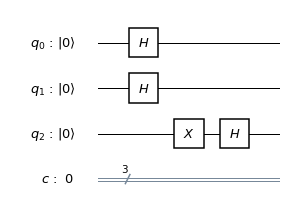
This is accomplished by applying a Hadamard gate to each of the two qubits that make up our primary register in which the variable x lives. We then add an ancilla qubit that is in the state H|1 \rangle, so that our state is now

\frac{1}{2} \sum_x |x \rangle \otimes H |1 \rangle = \frac{1}{2\sqrt{2}} \sum_x |x , 0 \rangle - |x, 1 \rangle

So far our circuit looks as follows.

DeutschJozsaPreparation

Next we apply the oracle Uf to our state. According to the definition of the oracle, we have

U_f |x, 0 \rangle = |x\rangle |f(x) \rangle

and

U_f |x, 1 \rangle = |x\rangle |f(x) \oplus 1\rangle

Therefore we find that

U_f \colon: |x, 0 \rangle - |x, 1 \rangle \mapsto |x\rangle |f(x)\rangle - |x\rangle |f(x) \oplus 1 \rangle

From this formula, we can read off how Uf acts depending on the value of f(x). If f(x) is 0, the right hand side is equal to the left hand side and Uf acts trivially. If, however, f(x) is one, the right hand side is simply minus the left hand side, and Uf acts as multiplication by -1. Combining this with our previous formula, we obtain

U_f \colon: \frac{1}{2} \sum_x |x \rangle \otimes H |1 \rangle \mapsto \frac{1}{2} \sum_x (-1)^{f(x)}|x \rangle \otimes H |1 \rangle

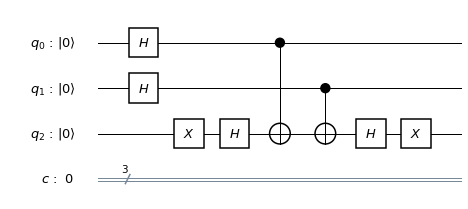
Next, we apply again the Hadamard operator followed by the Pauli X gate to the third qubit (the ancilla), i.e. we uncompute the ancilla qubit. From the expression above, we can read off directly that the result left in the first two qubits will be

|\psi \rangle = \frac{1}{2} \sum_x (-1)^{f(x)}|x \rangle

This is the vector that we will have in the first two qubits of our quantum register when we have processed the following circuit.

DeutschJozsaUncomputed

Let us now calculate the overlap, i.e. the scalar product, between this vector and the initial superposition |\psi_0 \rangle. Clearly,

\langle \psi_0 |\psi \rangle = \frac{1}{4} \sum_x (-1)^{f(x)}

We find that this overlap is zero if and only if the function f is balanced. But how can we measure this scalar product? To see this, recall that the initial state |\psi_0 \rangle is the result of applying the tensor product H2 of the two Hadamard operators to the first two qubits in the fiducial state. Thus we can write our scalar product as

\langle \psi_0 |\psi \rangle = \langle 0 | H^2 |\psi \rangle = \langle 0 | H^2 \psi \rangle

In other words, we can determine the scalar product by again applying a Hadamard operator to each of the first two qubits and measuring the overlap of the resulting state with the basis state |00 \rangle which is the same thing as the probability to measure |00 \rangle when we perform a measurement in the computational basis. Thus we finally obtain the following circuit

DeutschJozsaComplete

and the function f is balanced if and only if the probability to measure |00 \rangle is zero.

Let us now turn this into Python code using Qiskit. I found it useful to create subroutines that act on a given circuit and build parts of the circuit which can then be tested independently from each other on a simulator before combining them. Here is the code to create the oracle for our balanced function f.

def createOracleBalanced(q,c):
    circuit = QuantumCircuit(q,c)
    circuit.cx(q[0], q[2])
    circuit.cx(q[1], q[2])
    circuit.barrier(q)
    return circuit

Similarly, we can write routines that create the initial state and join the ancilla qubit.

def createInitialState(circuit):
    circuit.h(q[0])
    circuit.h(q[1])
    circuit.barrier(q)

def addAncilla(circuit):
    circuit.x(q[2])
    circuit.h(q[2])
    circuit.barrier(q)

Finally, we need to be able to uncompute the ancilla and to add the final measurements.

def uncomputeAncilla(circuit):
    circuit.h(q[2])
    circuit.x(q[2])
    circuit.barrier(q)

def addMeasurement(circuit):
    circuit.h(q[0])
    circuit.h(q[1])
    circuit.barrier(q)
    circuit.measure(q[0], c[0])
    circuit.measure(q[1], c[1])
    circuit.barrier(q)

A word on barriers. In this example code, we have added barriers after each part of the circuit. Barriers are an element of the OpenQASM specification and instruct the compiler not to combine gates placed on different sides of a barrier during optimization. In Qiskit, barriers have the additional benefit of structuring the visualization of a circuit, and this is the main reason I have included them here. In an optimized version, it would probably be safe to remove them.

After all these preparations, it is now easy to compile the full circuit. This is done by the following code snippet – note that we can apply the + operator to two circuits to tell Qiskit to concatenate the circuits.

q = QuantumRegister(3,"q")
c = ClassicalRegister(3,"c")
circuit = QuantumCircuit(q,c)
createInitialState(circuit)
addAncilla(circuit)
circuit = circuit + (createOracleBalanced(q,c))
uncomputeAncilla(circuit)
addMeasurement(circuit)

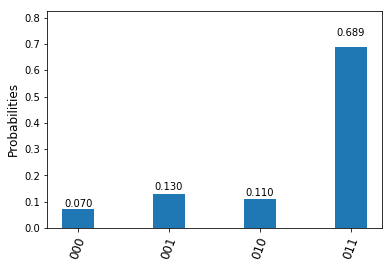
We can then compile this code for a simulator or a backend as explained in my last post on the IBM Q experience (you can also find the full source code here). The following histogramm shows the result of the final measurement after running this on the ibmqx4 5 qubit quantum computer.

DeutschJozsaResults

We see, as in the experiments conducted before, that the theoretically expected result (confirmed by running the circuit on a simulator) is blurred by noise – we get the value 00 in a few instances, even though the function is balanced. Even though the outcome can still be derived with a reasonable likelihood, we start to get a feeling for the issues that we might have with noise for more complex functions and circuits.

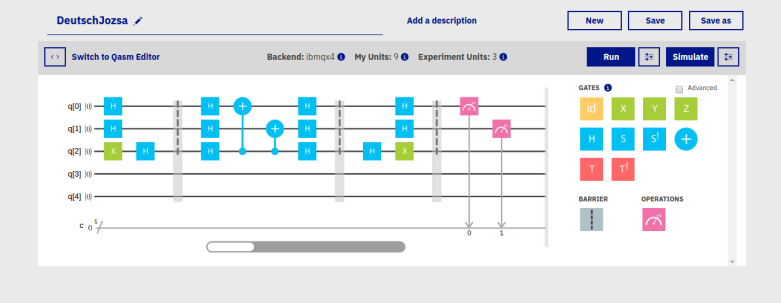
It is instructive to extract the compiled QASM from the resulting qobj and load that code into the IBM Q Experience composer. After a few beautifications, the resulting code (which you can get here) is displayed as follows in the composer.

DeutschJozsaComposer

If we compare this to the original circuit, we see that the compiler has in fact rearranged the CNOT gates that make up our oracle. The reason is that the IBMQX4 device can only realize specific CNOT gates. It can, for instance, implement a CNOT gate with q[1] as control as q[0] as target, but not vice versa. Therefore the compiler has added Hadamard gates to swap control and target qubit. We also see that the compiler has respected the barriers and not cancelled some of the double Hadamard gates. If we remove the barriers and remove all Hadamard gates that clearly cancel each other, we finally obtain a greatly simplified version of the circuit which looks as follows.

DeutschJozsaComposerSimplified

Of course this simplification hinges on the special choice of the function f. Nevertheless, it is useful – fewer gates mean fewer errors. If we compare the error rates of the optimized circuit with the new circuit, we find that while the original version had an error (i.e. an unexpected amplitude of |00 \rangle) of roughly 10%, a run with the optimized circuit showed an error of only 5,5%.

This completes our post. The next algorithm that we will implement is Shor’s algorithm and the quantum Fourier transform.

Using Python to access IBMs quantum computers

In a previous post, we have looked at IBMs Q experience and the graphical composer that you can use to build simple circuits and run them on the IBM hardware. Alternatively, the quantum hardware can be addressed using an API and a Python library called Qiskit which we investigate in this post.

Installation and setup

To be able to use Qiskit, there are some setup steps that we need to complete. First, we obviously have to install Qiskit. This is easy – we can simply use pip.

pip install qiskit

This will download the latest version of Qiskit, in my case (at the time of writing this) this was version 0.6.1. The next thing that you need is an API token to be able to access the IBM API. Assuming that you are already a registered user, you can create your token on the advanced tab of your user profile page.

In order to easily access your token from a Python script, it is useful to store the token locally on your hard drive. Qiskit uses a file qiskitrc in the ~/.qiskit folder in your home directory to store your credentials. The easiest way to create this file is the following code snippet

python -c 'from qiskit import IBMQ ; IBMQ.save_account("your_token")'

where obviously you need to replace the text inside the quotes with your token. After running this, you should find a file ~/.qiskit/qiskitrc containing your saved token (in clear text).

Once that file is in place, you can now easily load the credentials from within a Python program using the following code snippet

from qiskit import IBMQ
IBMQ.load_accounts()

The method IBMQ.active_accounts() will also return a list of currently available accounts which can be useful for debugging purposes. Loading an account is only needed if we want to connect to the IBM site to use their quantum hardware or the online simulator, not if we use a local backend – more on this later.

Circuits, gates and measurements

Let us now take a look at the basic data structures of Qiskit. A QuantumCircuit is what you expect – a collection of gates and registers. In Qiskit, a circuit operates on a QuantumRegister and optionally contains a ClassicalRegister which holds the results of a measurement. The following code snippet will create a quantum register with two qubits, a classical register with two qubits and a quantum circuit based on those registers.

from qiskit import QuantumCircuit
from qiskit import ClassicalRegister
from qiskit import QuantumRegister
q = QuantumRegister(2,"q")
c = ClassicalRegister(2,"c")
circuit = QuantumCircuit(q,c)

Next, we need to add gates to our circuit. Adding gates is done by calling the appropriate methods of the circuit object. The gate model of Qiskit is based on the OpenQASM language described in [1].

First, there are one qubit gates. The basic one qubit gates are rotations, defined as usual, for instance

R_X(\Theta) = \exp \left( -i \frac{\Theta}{2} \sigma_X \right) = \cos \frac{\Theta}{2} - i \sigma_X \sin \frac{\Theta}{2}

and similarly for the other Pauli matrices. Now it is well known that any rotation of the Bloch sphere can be written as a product of three rotations around y- and z-axis, i.e. in the form

R_Z(\Phi)R_Y(\Theta)R_Z(\lambda)

which is denoted by

U(\Theta,\Phi,\lambda)

in OpenQASM and Qiskit. For instance, U(0, 0, \lambda) is a rotation around the z-axis and so forth. A short calculation shows that

U(\Theta,\Phi,\lambda) = \begin{pmatrix} \exp \left(-\frac{i}{2}(\Phi + \lambda)\right) \cos \frac{\Theta}{2} & - \exp \left(-\frac{i}{2}(\Phi - \lambda)\right) \sin \frac{\Theta}{2} \\ \exp \left(\frac{i}{2}(\Phi - \lambda)\right) \sin \frac{\Theta}{2} & \exp \left(\frac{i}{2}(\Phi + \lambda)\right) \cos \frac{\Theta}{2} \end{pmatrix}

Other gates can then be built from this family of one qubit gates. When it comes to multi-qubit gates, the only multi-qubit gate specified by OpenQASM is the CNOT gate denoted by CX, which can then again be combined with other gates to obtain gates operating on three and more qubits.

For qiskit, the available gates are specified in QASM syntax in the file qelib1.inc (see https://github.com/Qiskit/qiskit-terra/blob/master/qiskit/qasm/libs/qelib1.inc). Note that global phases are suppressed, so if you carry out the calculations, you will sometimes find a difference in the (unimportant) global phase between the result of the calculation and the results in Qiskit.

There is a couple of gates that you will often use in your circuits and that are summarized in the following table.

Gate Description
X Pauli X gate
Y Pauli Y gate
Z Pauli Z gate
S Phase gate \text{diag}(1,i)
T T gate \text{diag}(1,e^{i\frac{\pi}{4}})
CX CNOT gate

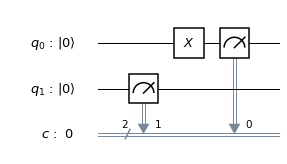
Gates take arguments that specify the qubits on which the gates operate. Individual qubits in a register can be addressed using an array-like notation. For example, to implement a circuit that applies an X gate to the first (least significant) qubit and then a controlled-NOT gate with this qubit as control qubit and the second qubit as target qubit, the following code can be used.

q = QuantumRegister(2,"q")
c = ClassicalRegister(2,"c")
circuit = QuantumCircuit(q,c)
circuit.x(q[0])
circuit.cx(q[0], q[1])

On real hardware, CNOTs can only be applied to specific combinations of qubits as specified in the coupling map of the device. However, when a circuit is prepared for execution on a specific device – a process called compilation – the compiler will deal with that by either reordering the qubits or adding additional swap operations.

Now we have gates, but to be able to run the circuit and measure the outputs, we still need measurements. These can easily been added with the measure method of a circuit, which accepts two parameters – the quantum register to measure and the corresponding classical register.

circuit.measure(q,c)

When the measurement step is reached during the processing of the circuit, the measurement is done – resulting in the projection of the state vector to the corresponding subspace – and the results of the measurements are copied into the classical register from which they can then be retrieved.

A nice property of Qiskit is its ability to visualize a quantum circuit. For that purpose, several classes called drawers are available in qiskit.tools.visualization. The circuit above, for instance, can be plotted with only one command

from qiskit.tools.visualization import matplotlib_circuit_drawer as drawer
my_style = {'cregbundle': True}
drawer(circuit, style=my_style)

and gives the nice representation

CNOT

Compiling and running circuits

Let us now actually run the circuit. To do this, we need a Qiskit backend. Qiskit offers several backends. The Aer package contains a few simulators that are installed locally and can be executed directly from a Python script or a notebook. Some of these simulators calculate the actual state vectors (the unitary simulator and the state vector simulator), but cannot deal with measurements, others – the QASM simulator – only provide statistical results but can simulate the entire circuit including measurements.

The IBMQ package can be used to connect to the devices offered by the IBM Q experience program, including an online simulator with up to 32 qubits and the actual devices. As for the composer, accessing the IBM Q experience devices does obviously require an account and available units.

In order to run a circuit, we first compile the circuit, which will create a version of the circuit that is tailored for the specific hardware, and then submit the circuit as a job.

backend = IBMQ.get_backend('ibmq_16_melbourne') 
from qiskit import compile
qobj = compile(circuit, backend=backend, shots=1024)
job = backend.run(qobj)

Once the job has been submitted, we can poll its status using job.status() every few seconds. When the job has completed, we can access the results using job.result(). Every job consists of a certain number of shots, i.e. individual executions, and the method result.get_counts() will return a hash map that lists the measured outcomes along with how often that outcome was obtained. The following gist shows a basic Python script that assembles a circuit, compiles it, submits a job to the Q experience and prints the results.

Loading
Sorry, something went wrong. Reload?
Sorry, we cannot display this file.
Sorry, this file is invalid so it cannot be displayed.

A few more features of the Qiskit package, including working with different simulators and visualization options as well as QASM output, are demonstrated in this script on my GitHub page. In one of the next posts, we will try to implement a real quantum algorithm, namely the Deutsch-Jozsa algorithm, and run it on IBMs device.

References

1. Andrew W. Cross, Lev S. Bishop, John A. Smolin, Jay M. Gambetta, Open Quantum Assembly Language, arXiv:1707.03429v2 [quant-ph]
2. The Qiskit tutorial on basic quantum operations
3. The Qiskit documentation

Shor’s quantum factoring algorithm

Until the nineties of the last century, quantum computing seemed to be an interesting theoretical possibility, but it was far from clear whether it could be useful to tackle computationally hard problems with high relevance for actual complications. This changed dramatically in 1994, when the mathematician P. Shor announced a quantum algorithm that could efficiently solve one of the most intriguing problems in applied mathematics – factoring large numbers into their constituent primes, which, for instance, can be used to break commonly used public key cryptography schemes like RSA.

Shor’s algorithm is significantly more complicated than the quantum algorithms that we have studied so far, so we start with a short overview and then look at the individual pieces in more detail.

Given a number M that we want to factorize, the first part of Shor’s algorithm is to find a number x which has no common divisor with M so that it is a unit modulo M. In practice, we can just guess some x and compute the greatest common divisor gcd(x,M) – if this is not one, we have found a factor of M and are done, if this is one, we have the number x that we need. This step can still be done efficiently on a classical computer and does not require a quantum computer.

The next part of the algorithm now uses a quantum algorithm to determine the period of x. The period is the smallest non-zero number r such that

x^r \equiv 1 \mod M

The core of this step is the quantum algorithm that we will study below. However, the quantum algorithm does not exactly return the number r, but it returns a number s which is close to a multiple of \frac{N}{r}, where N is a power of two. Getting r out of this information is again a classical step that uses the theory of continued fractions. The number N that appears here is N = 2n where n is the number of qubits that the quantum part requires, and needs to be chosen such that M2 can be represented with n bits.

Finally, the third part of the algorithm uses the period r to find a factor of M, which is again done classically using elementary number theory. Thus the overall layout of the algorithm is as follows.

  • Find the smallest number n (the number of qubits that we will need) such that M^2  \leq N = 2^n and a number x < M such that gcd(x,M) = 1
  • Use the quantum part of the algorithm to find a number s which is approximately an integer multiple of N / r
  • Use the theory of continued fractions to extract the period r from this information
  • Use the period to find a factor of M

We will know look at each of these steps in turn (yes, this is going to be a bit of a lengthy post). To make this more tangible, we use a real example and assume that we wanted to factor the number M = 21. This is of course a toy example, but it allows us to simulate and visualize the procedure efficiently on a classical computer.

Determine n and x

The first step is easy. First, we need to determine the number n of qubits that we need. As mentioned above, this is simply the bit length of M2. In our case, M2 = 441, and the next power of two is 512 = 29, so we need n = 9 qubits.

The next step is to find the number x. This can easily be done by just randomly picking some x and checking that is has no common prime factor with M. In our example, let us choose x = 11 (which is a prime number, but this is just by accident and not needed). It is important to choose this rather randomly, as the algorithm might fail in some rare instances and we need to start over, but this only makes sense if we do not pick the same choice again for our second trial.

The quantum part of the algorithm

Now the quantum part of the algorithm starts. We want to calculate the period of x = 11, i.e. the smallest number r such that xr – 1 is a multiple of M = 21.

Of course, as our numbers are small, we could easily calculate the period classically by taking successive powers of 11 and reducing modulo 21, and this would quickly tell us that the period is 6. This, however, is no longer feasible with larger numbers, and this is where our quantum algorithm comes into play.

The algorithm uses two quantum registers. The first register has n qubits, the second can have less, in fact any number of qubits will do as long as we can store all numbers up to M in it, i.e. the bit length of M will suffice. Initially, we bring the system into the superposition

\frac{1}{\sqrt{N}} \sum_k |k \rangle |0 \rangle

which we can for instance do by starting with the state with all qubits being zero and then applying the Hadamard-Walsh transformation to the first register.

Next, we consider the function f that maps a number k to xk modulo M. As for every classical function, we can again find a quantum circuit Uf that represents this function on the level of qubits and apply it to our state to obtain the state

\frac{1}{\sqrt{N}} \sum_k |k \rangle |x^k \mod M \rangle

In his original paper [2], Shor calls this part the modular exponentiation and shows that this is actually the part of the quantum algorithm where most gates are needed (not the quantum Fourier transform).

This state has already some periodicity built into it, as xk modulo M is periodic with period r. If we could measure all the amplitudes, we could easily determine r. However, every such measurement destroys the quantum state and we have to start again, so this algorithm will not be very efficient. So again, the measurement is an issue.

Now, Shor’s idea is to solve the measurement issue by first applying (the inverse of) a quantum Fourier transform to the first register and then measure the first register (we apply the inverse of the quantum Fourier transform while other sources will state that the algorithm uses the quantum Fourier transform itself, but this is just a matter of convention as to which transformation you call the Fourier transform). The outcome s of this measurement will then give us the period!

To get an idea why this is true, let us look at a simpler case. Assume that, before applying the quantum Fourier transform, we measure the value of the second register. Let us call this value y. Then, we can write y as a power of x modulo M. Let k0 be the smallest exponent such that

x^{k_0} = y

Then, due to the periodicity, all values of k such that xk = y modulo M are given by

k = k_0 + jr

Here the index j needs to be chosen such that k0 + jr is still smaller than M. Let A denote the number of possible choices for j. Then, after the measurement, our state will have collapsed to

\frac{1}{\sqrt{A}} \sum_{j=0}^{A-1} |k_0 + jr \rangle  |y \rangle

Let us now apply the inverse of the quantum Fourier transform to this state. The result will be the state

\frac{1}{\sqrt{AN}} \sum_{j=0}^{A-1} \sum_{s=0}^{N-1} \eta^{(x_0 + jr)s} |s \rangle

Now let us measure the first register. From the expression above, we can read off the probability P(s) to measure a certain value of s – we just have to add up the squares of all amplitudes with this value of s. This gives us

P(s) = \frac{1}{AN} \big| \sum_{j=0}^{A-1}  \eta^{jrs} \big|^2

This looks complicated, but in fact this is again a geometric series with coefficient q = \eta^{rs} . To see how the value of the series depends on s, let us assume for a moment that the period divides N (which is very unlikely in practice as N is a power of two, but let us assume this anyway just for the sake of argument), i.e. that N = r u with the frequency u being an integer. Thus, if s is a multiple of u, the coefficient q is equal to one (as \eta^N = 1 ) and the geometric series sums up to A, giving probability 1 / N to measure this value. If, however, s is not a multiple of u, the value of the geometric series is

\frac{1 - q^A}{1 - q}

But in our case, A is of course simply equal to u, and therefore qA is equal to one. Thus the amplitude is zero! We find – note the similarity to our analysis of the Fourier transform of a periodic sequence – that P(s) is sharply peaked at multiples of u = \frac{N}{r} !

We were able to derive this result using a few simplifications – an additional measurement and the assumption that the frequency is an integer. However, as carried out by Shor in [2], a careful analysis shows that these assumptions are not needed. In fact, one can show (if you want to see all the nitty-gritty details, you could look at Shor’s paper or at my notes on GitHub that are based on an argument that I have seen first in Preskill’s lecture notes) that with reasonably high probability, the result s of the measurement will be such that

\big| \{sr\}_N \big| \leq \frac{r}{2}

where \{sr\}_N denotes the residual of sr modulo N. Intuitively, this means that with high probability, the residual is very small, i.e. rs is close to a multiple of N, i.e. s is close to a multiple of N / r. In other words, it shows that in fact, P(s) has peaks at multiples of N / r.

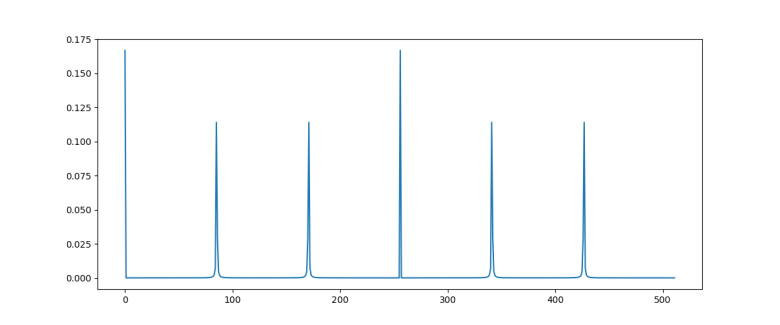
The diagram below plots the probability distribution P(s) for our example, i.e. N = 512 and r = 6 (this plot has been generated using the demo Shor.py available in my GitHub account which uses the numpy package to simulate a run of Shor’s algorithm on a classical computer)
ShorSampleOutput

As expected, we see sharp peaks, located roughly at multiples of 512 / 6 = 85.33. So when we measure the first register, the value s will be close to a multiple of 512 / 6 with a very high probability.

So the quantum algorithm can be summarized as follows.

  • Prepare a superposition \frac{1}{\sqrt{N}} \sum_k |k \rangle |x^k \mod M \rangle
  • Apply the (inverse of the) quantum Fourier transform to this state
  • Measure the value of the first register and call the result s

When running the simulation during which the diagram above was created, I did in fact get a measurement at s = 427 which is very close to 5*512 / 6.

Extracting the period

So having our measurement s = 427 in our hands, how can we use this to determine the period r? We know from the considerations above that s is close to a multiple of N / r, i.e. we know that there is an integer d such that
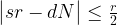
\big| sr - dN \big| \leq \frac{r}{2}

which we can rewrite as

\big| \frac{s}{N} - \frac{d}{r} \big| \leq \frac{1}{2N} < \frac{1}{M^2}

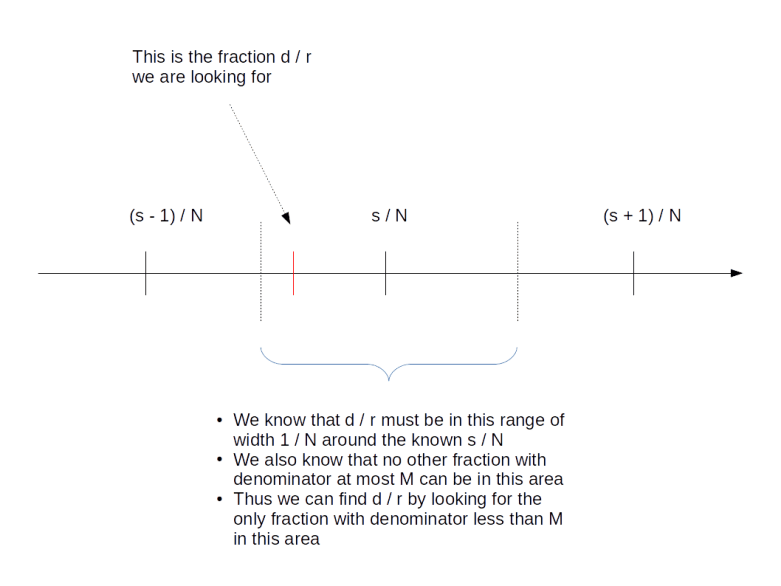
Thus we are given two rational numbers – s / N and d / r – which we know to be very close to each other. We have the first number s / N in our hands and want to determine the second number. We also know that the denominator r of the second number is smaller than M. Is this sufficient to determine d and r?

Surprisingly, the answer is “yes”. We will not go into details at this point and gloss over some of the number theory, but refer the reader to the classical reference [1] or to my notes for more details). The first good news is that two different fractions with denominators less than M need to be at least by 1 / M2 apart, so the number d / r is unique. The situation is indicated in the diagram below.
ShorContinuedFraction

But how to find it? Luckily, the theory of continued fractions comes to the rescue. If you are not familiar with continued fractions, you can find out more in the appendix of my notes or on the very good Wikipedia page on this. Here, we will just go through the general procedure using our example at hand.

First, we write

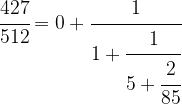
\cfrac{427}{512} = 0 + \cfrac{1}{\cfrac{512}{427}}  = 0 + \cfrac{1}{1 + \cfrac{85}{427}}

We can do the same with 85 / 427, i.e. we can write

\cfrac{85}{427} = \cfrac{1}{\cfrac{427}{85}} =  \cfrac{1}{5 + \cfrac{2}{85}}

which will give us the decomposition

\cfrac{427}{512} = 0 + \cfrac{1}{1 + \cfrac{1}{5 + \cfrac{2}{85}}}

Driving this one step further, we finally obtain
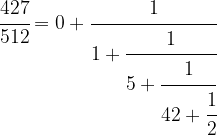
\cfrac{427}{512} = 0 + \cfrac{1}{1 + \cfrac{1}{5 + \cfrac{1}{42 + \cfrac{1}{2}}}}

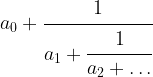
This is called the continued fraction expansion of the rational number 427 / 512. More generally, for every sequence [a_0 ; a_1, a_2, \dots ], we can form the continued fraction

a_0 + \cfrac{1}{a_1 + \cfrac{1}{a_2 + \dots}}

given by that sequence of coefficients, which is obviously a rational number. One can show that in fact every rational number has a representation as a continued fraction, and our calculation has shown that

\cfrac{427}{512} = [0; 1,5,42,2]

This sequence has five coefficients. Now given a number m, we can of course look at the sequence that we obtain by looking at the cofficients up to index m only. For instance, for m = 3, this would give us the sequence

[0; 1,5,42]

The rational number represented by this sequence is

0 + \cfrac{1}{1 + \cfrac{1}{5 + \cfrac{1}{42}}}  = \cfrac{211}{253}

and is called the m-th convergent of the original continued fraction. We have such a convergent for every m, and thus get a (finite) series of rational numbers with the last one being the original number.

One can now show that given any rational number x, the series of m-th convergents of its continued fraction expansion has the following properties.

  • The convergents are in their lowest terms
  • With increasing m, the difference between x and the m-th convergent gets smaller and smaller, i.e. the convergents form an approximation of x that gets better and better
  • The denominators of the convergents are increasing

So the convergents can be used to approximate the rational number x by fractions with smaller denominator – and this is exactly what we need: we wish to approximate the rational number s / N by a ratio d / r with smaller denominator which we then know to be the period. Thus we need to look at the convergents of 427 / 512. These can be easily calculated and turn out to be
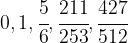
0, 1, \cfrac{5}{6}, \cfrac{211}{253}, \cfrac{427}{512}

The last convergent whose denominator is still smaller than M = 21 is 5 / 6, and thus we obtain r = 6. This is the period that we are looking for!

So in general, the recipe to get from the measured value s to r is to calculate the convergents of the rational number s / N and pick the denominator of the last convergent that has a denominator less than M. Again, if you want to see the exact algorithm, you can take a look at my script Shor.py.

Find the factor

We are almost done. We have run the quantum algorithm to obtain an approximate multiple of N / r. We have then applied the theory of continued fractions to derive the period r of x from this measurement. The last step – which is again a purely classical step – is now to use this to find a factor of M. This is in fact comparatively easy.

Recall that – by definition of the period – we get one if we raise x to the power of r and than reduce module M. In other words, xr minus one is a multiple of M. Now assume that we are lucky and the period r is even. Then

(x^{\frac{r}{2}} - 1)(x^{\frac{r}{2}} + 1) = (x^r - 1) \equiv 0 \mod M

With a bit of elementary number theory, one can now show that this implies that the greatest common divisor gcd(xr/2-1, M) is a factor of M (unless, in fact, xr/2 is minus one modulo M, in which case the argument fails). So to get from the period to a potential factor of M, we simply calculate this greatest common divisor and check whether it divides M!

Let us do this for our case. Our period is r = 6. With x = 11, we have x3 = 1331, which is 8 module M. Thus

\text{gcd}(x^{\frac{r}{2}} - 1 \mod M, M) =  \text{gcd}(7,21) = 7

which is the factor of M = 21 that we were looking for.

Performance of the algorithm

In our derivation, we have ignored a few special cases which can make the algorithm fail. For instance, suppose we had not measured s = 427, but s = 341 after applying the Fourier transform. Then the corresponding approximation to 341 / 512 would have been 4 / 6. However, the continued fraction algorithm always produces a result that is in its lowest terms, i.e. it would give us not 4 / 6, but 2 / 3. Looking at this, we would infer that r = 3, which is not the correct result.

There are a few other things that can go wrong. For instance, we could find a period r which is odd, so that our step to derive a factor of M from r does not work, or we might measure an unlikely value of s.

In all these cases, we need to start over and repeat the algorithm. Fortunately, Shor could show that the probability that any of this happens is bounded from below. This bound is decreasing with larger values of M, but it is decreasing so slowly that the expected number of trials that we need grows at most logarithmically and does not destroy the overall performance of the algorithm.

Taking all these considerations into account and deriving bounds for the number of gates required to perform the quantum part of the algorithm, Shor was able to show that the number of steps to obtain a result grows at most polynomially with the number of bits that the number M has. This is obviously much better than the best classical algorithm that requires a bit less than exponential time to factor M. Thus, assuming that we are able to build a working quantum computer with the required number of gates and qubits, this algorithm would be able to factorize large numbers exponentially faster than any known classical algorithm.

Shor’s algorithm provides an example for a problem that is believed to be in the class NP (but not in P) on a classical computer, but in the class BQP on a quantum computer – this is the class of all problems that can be solved in polynomial time with a finite probability of success. However, even though factorization is generally believed not to be in P, i.e. not doable in polynomial time on classical hardware, there is not proof for that. And, even more important, it is not proved that factorization is NP-complete. Thus, Shor’s algorithm does not render every problem in NP solvable in polynomial time on a quantum computer. It does, however, still imply that all public key cryptography systems like RSA that rely on the assumption that large numbers are difficult to factor become inherently insecure once a large scale reliable quantum computer becomes available.

References

1. G.H. Hardy, E.M. Wright, An introduction to the theory of numbers, Oxford University Press, Oxford, 1975
2. P. Shor, Polynomial-Time Algorithms for Prime Factorization and Discrete Logarithms on a Quantum Computer, SIAM J.Sci.Statist.Comput. Vol. 26 Issue 5 (1997), pp 1484–1509, available as arXiv:quant-ph/9508027v2

More on Paperspace Gradient

Its been a few days since I started to play with Paperspace, and I have come across a couple of interesting features that the platform has – enough for a second post on this topic.

First, GIT integration. Recall that the usual process is to zip the current working directory and submit the resulting file along with the job, the ZIP file is then unzipped in the container in which the job is running and the contents of the ZIP file constitute the working directory. However, if you want to run code that requires, for instance, custom libraries, it is much easier to instruct Paperspace to get the contents of the working directory from GitHub. You can do that by supplying a GIT URL using the --workspace switch. The example below, for instance, instructs Paperspace to pull my code for an RBM from GitHub and to run it as a job.

#!/bin/sh
#
# Run the RBM as a job on Paperspace. Assume that you have the paperspace NodeJS
# CLI and have done a paperspace login before to store your credentials
#
#
~/node_modules/.bin/paperspace jobs create  \
        --workspace "git+https://github.com/christianb93/MachineLearning" \
        --command "export MPLBACKEND=AGG ; python3 RBM.py \
        --N=28 --data=MNIST \
        --save=1 \
        --tmpdir=/artifacts \
        --hidden=128 \
        --pattern=256 --batch_size=128 \
        --epochs=40000 \
        --run_samples=1 \
        --sample_size=6,6 \
        --beta=1.0 --sample=200000 \
        --algorithm=PCDTF --precision=32" \
        --machineType K80 \
        --container "paperspace/tensorflow-python" \
        --project "MachineLearning"

Be careful, the spelling of the URL must be exactly like this to be recognized as a GIT URL, i.e. “git+https” followed by the hostname without the “www”, if you use http instead of https or http://www.github.com instead of github.com, the job will fail (the documentation at this point could be better, and I have even had to look at the source code of the CLI to figure out the syntax). This is a nice feature, using that along with the job logs, I can easily reconstruct which version of the code has actually been executed, and it supports working in a team that is sharing GitHub repositories well.

Quite recently, Paperspace did apparently also add the option to use persistent storage in jobs to store data across job runs (see this announcement). Theoretically, the storage should be shared between notebooks and jobs in the same region, but as I have not yet found out how to start a notebook in a specific region, I could not try this out.

Another feature that I liked is that the container that you specify can actually be any container from the Docker Hub, for instance ubuntu. The only restriction is that Paperspace seems to overwrite the entrypoint in any case and will try to run bashinside the container to finally execute the command that you provide, so containers that do not have a bash in the standard execution path will not work. Still, you could use this to prepare your own containers, maybe with pre-installed data sets or libraries, and ask Paperspace to run them.

Finally, for those of us who are Python addicts, there is also a Python API for submitting and managing jobs in Paperspace. Actually, this API offers you two ways to run a Python script on Paperspace. First, you can import the paperspace package into your script and then, inside the script, do a paperspace.run(), as in the following example.

import paperspace
paperspace.run()
print('This will only be running on Paperspace')

What will happen behind the scenes is that the paperspace module takes your code, removes any occurrences of the paperspace package itself, puts the code into a temporary file and submits that as a job to Paperspace. You can then work with that job as with any other job, like monitoring it on the console or via the CLI.

That is nice and easy, but not everyone likes to hardcode the execution environment into the code. Fortunately, you can also simply import the paperspace package and use it to submit an arbitrary job, much like the NodeJs based CLI can do it. The code below demonstrates how to create a job using the Python API and download the output automatically (this script can also be found on GitHub).

import paperspace.jobs
from paperspace.login import apikey
import paperspace.config

import requests


#
# Define parameters
#
params = {}
# 
# We want to use GIT, so we use the parameter workspaceFileName
# instead of workspace
#
params['workspaceFileName'] = "git+https://github.com/christianb93/MachineLearning"
params['machineType'] = "K80"
params['command'] = "export MPLBACKEND=AGG ; python3 RBM.py \
                --N=28 --data=MNIST \
                --save=1 \
                --tmpdir=/artifacts \
                --hidden=128 \
                --pattern=256 --batch_size=128 \
                --epochs=40000 \
                --run_samples=1 \
                --sample_size=6,6 \
                --beta=1.0 --sample=200000 \
                --algorithm=PCDTF --precision=32"
params['container'] = 'paperspace/tensorflow-python'
params['project'] = "MachineLearning"
params['dest'] = "/tmp"

#
# Get API key
#
apiKey = apikey()
print("Using API key ", apiKey)
#
# Create the job. We do NOT use the create method as it cannot
# handle the GIT feature, but assemble the request ourselves
#
http_method = 'POST'
path = '/' + 'jobs' + '/' + 'createJob'


r = requests.request(http_method, paperspace.config.CONFIG_HOST + path,
                             headers={'x-api-key': apiKey},
                             params=params, files={})
job = r.json()
    
if 'id' not in job:
    print("Error, could not get jobId")
    print(job)
    exit(1)

jobId = job['id']
print("Started job with jobId ", jobId)
params['jobId']  = jobId

#
# Now poll until the job is complete

if job['state'] == 'Pending':
    print('Waiting for job to run...')
    job = paperspace.jobs.waitfor({'jobId': jobId, 'state': 'Running'})

print("Job is now running")
print("Use the following command to observe its logs: ~/node_modules/.bin/paperspace jobs logs --jobId ", jobId, "--tail")

job = paperspace.jobs.waitfor({'jobId': jobId, 'state': 'Stopped'})
print("Job is complete: ", job)

#
# Finally get artifacts
#
print("Downloading artifacts to directory ", params['dest'])
paperspace.jobs.artifactsGet(params)

There are some additional features that the Python API seems to have that I have not yet tried out. First, you can apparently specify an init script that will be run before the command that you provide (though the use of that is limited, as you could put this into your command as well). Second, and more important, you can provide a requirements file according to the pip standard to ask Paperspace to install any libraries that are not available in the container before running your command.

Overall, my impression is that these APIs make it comparatively easy to work with jobs on Paperspace. You can submit jobs, monitor them and get their outputs, and you enjoy the benefit that you are only billed for the actual duration of the job. So if you are interested in a job based execution environment for your Machine Learning models, it is definitely worth a try, even though it takes some time to get familiar with the environment.

First steps with Paperspace Gradient

So far, I have exclusively been using AWS EC2 when I needed access to a GPU – not because I have carefully compared the available offerings and taken a deliberate decision, but simply because I already had an EC2 account and know the platform.

However, I though it would be interesting to try out other platforms as well. In this post, I will talk a bit about my experience with Paperspace. This provider has several offerings – Core, which is basically an IaaS service, and Gradient, which allows you to access Jupyter notebooks and run jobs in ready-made environments optimized for Machine Learning – and of course I wanted to try this.

It should be noted that some time has passed between trying this out for the first time (roughly in May) and publication of this post in July, so bear with me when some of the details have changed in the meantime – Paperspace is still under development.

First steps

After signing up, you are routed to a page where you can choose between two products – Paperspace Core and Paperspace Gradient. I did choose Gradient (after providing the requested credit card information). The first thing I did try was to bring up a Jupyter notebook.

When you select that option, you have to make two choices. First, Jupyter notebooks are started in Docker containers, and you have to pick one of the available containers. Second, and more important, you have to select a machine – you have a choice between several CPU based and several GPU based models with different fees associated with them.

After a few seconds, your notebook is up and running (with the base account, you can only have one notebook server at any point in time). If you hit “Open”, a new tab will open and you will see the usual Jupyter home screen.

Your notebook folder will be prepopulated with some tutorials. The one I tried first is one of the classical MNIST / CNN tutorials. Unfortunately, when I tried to run it, the kernel died several times in a row – not very encouraging (it worked two days later, and overall there seem to be a few sporadic errors that come and go over time..).

Next, I could not resist the temptation to open a terminal. The Docker image seems to be based on a very basic Ubuntu distribution. I could successfully do an apt-get update && apt-get install git. So you could probably start to download things and work directly from the console – but of course this is not really the idea.

After playing for some time with the notebook, you can – again on the Paperspace notebook console stop your notebook (make sure to do this, you will be charged while the notebook is running). Once the notebook has stopped, you can click on the little arrow to the right of the notebook name, which will give you the option to download any files in the notebook directory that you have created in your session.

Once stopped, there is no way to restart a notebook, but you can clone a notebook which will create a copy of the previous notebook and start that copy, so you can continue to work where you left off. This works, but is a bit tiresome as you have to delete the obsolete copy manually.

Jobs

The next thing I tried is to create a job. For that purpose, you will first have to install the Paperspace CLI which in turn requires node.js and npm. So here is what you need to do on Ubuntu:

$ cd ~
$ apt install nodejs
$ apt install npm
$ npm install paperspace-node
$ sudo ln -s /usr/bin/nodejs /usr/bin/node

This will create a directory node_modules in your home directory and within that directory, a directory .bin. To test the paperspace CLI, you can run a command like

$ ./node_modules/.bin/paperspace --version

Next, switch to an empty directory and in that directory, run

$ ~/node_modules/.bin/paperspace project init

This will initiate a new paperspace project, i.e. it will create a subdirectory .ps_project containing a JSON configuration file. Next, you need an API key that you can get on your Paperspace home page. The API key is an authentication token that is used by the API – store that number in a safe place.

Once we have that token, it is time to start our first job.

 ~/node_modules/.bin/paperspace jobs create --container Test-Container --command "nvidia-smi" --apiKey "xxxxx" --machineType K80

where xxxxx needs to be replaced by your API key. Instead of providing your API key with every command, you can also run

$ ~/node_modules/.bin/paperspace login

which will add your credentials to a file in the .paperspace directory in your home directory.

Essentially, what happens when you run a job is that the local directory and all its subdirectories will be zipped into a file, a container will be set up on a Paperspace server, the content of the ZIP file will be extracted into this container and the command that you have specified will execute.

You can now get a list of your processes and their status either on the Paperspace console, where you also have immediate access to the log output, or from the command line using

$ ~/node_modules/.bin/paperspace jobs list

At this point, I was again a bit disappointed – the job appears to be running and is even displayed in the web console, but when it completes, I get an error “503 – Service unavailable” and no log output is provided. I raised a request with the support, and roughly 2 hours later the submission suddenly worked – I have not yet found out whether the support has really done anything or whether a part of the infrastructure was really down at this point in time.

As a temporary workaround, I managed to run a job by redirecting error output and standard output to a file. For instance, to run the script KMeans.py, I did use

$ ~/node_modules/.bin/paperspace jobs create  --command "export MPLBACKEND=AGG ; python KMeans.py > /artifacts/log 2>&1" --machineType C2

Once the job is complete, you can download whatever it has added to the directory /artifacts using

$ ~/node_modules/.bin/paperspace jobs artifactsGet --jobId "js26y3pi6jk056"

where the job ID is the ID of the job and will be displayed by the create command. Finally, the command jobs destroy --jobId=... can be used to delete a job after execution.

So far, I have to admit that I am not so happy with what I have seen. I hit upon several issues in the standard setup, and when playing around, I found that it can take a long time for a job to be scheduled on a GPU (depending very much on the machine type – my impression was that for machine types for which Paperspace uses GCP, like K80 or P100, your job will run quickly, but for other types like GPU+ it can take a long time). In addition, as everything is running in a container, the initial steps in job can be time consuming. TensorFlow, for instance, is known to take longer when it is started the first time, and in a fresh container, every time is a first time, so you will see a significant startup time. This gets worse if you need to download data sets, as this will have to be repeated with every new run. It is apparently not yet possible to mount a permanent volume into your container to avoid this or to reuse a stopped container (update: as of July, Paperspace has announced that the /storage directory is a persistent storage available across notebooks and jobs, but I have not yet tried this).

But maybe this is a premature judgement, and I decided that I will still continue to try it out. In one of the next posts, I will present some more advanced features and in particular the Python API that Paperspace offers.

The EM algorithm and Gaussian mixture models – part II

In this post, I will discuss the general form of the EM algorithm to obtain a maximum likelihood estimator for a model with latent variables.

First, let us describe our model. We suppose that we are given some joint distribution of a random variable X (the observed variables) and and random variable Z (the latent variables) and are interested in maximizing the likelihood of an observed sample x of the visible variable X. We also assume that the joint distribution depends on a parameter \Theta, in practice this could be weights, bias terms or any other parameters. To simplify things a bit, we will also assume that the latent variable is finite. Our aim is to maximize the log likelihood, which we can – under these assumptions – express as follows.

\ln P(x |\Theta) = \ln \sum_z P(x,z | \Theta)

Even if the joint distribution belongs to some exponential family, the fact that we need to consider the logarithm of the sum and not the sum of the logarithms makes this expression and its gradient difficult to calculate. So let us look for a different approach.

To do this, let us assume that we are given a value \Theta of the parameter and let us try to understand how the likelihood changes if we pass from \Theta to some other value \Theta'. For that purpose, we introduce a term that is traditionally called Q and defined as follows (all this is a bit abstract, but will become clearer later when we do an example):

Q(\Theta'; \Theta) = E \left[  \ln P(x,z | \Theta')  | x, \Theta \right]

That looks a bit complicated, so let me explain the notation a bit. We want to define a function Q that will be a function of the new parameter value \Theta'. This function will, in addition, depend on the current value \Theta which we consider as a parameter.

The right hand side is an expectation value. In fact, for each value of the visible variable x and the parameter \Theta, we have a probability distribution on the space in which Z lives, given by the conditional probability of Z given x and \Theta. Whenever we have a function depending on z, we can therefore form the expectation value as usual, i.e. as the weighted sum over all function values, weighted by the probability of z. In particular, we can do this for the function \ln P(x,z | \Theta') of z. Thus the right hand side is, spelled out

E \left[  \ln P(x,z | \Theta')  | x, \Theta \right] = \sum_z \ln P(x,z | \Theta') P(z | x, \Theta)

That is now again a sum of logarithms, not a logarithm of a sum, and we can hope to be able to deal with this much better.

This is nice, but so far we have only introduced a rather complicated additional object – what do we gain? It turns out that essentially, maxizing Q will effectively maximize the likelihood. Let us make this bold statement a bit more precise. Suppose we are able to iteratively maximize Q. Expressed formally, this would mean that we are able to find a sequence \Theta^0, \Theta^1, \dots of parameters such that when passing from \Theta^t to \Theta^{t+1}, the value of Q does not decrease, i.e.


Q(\Theta^{(t+1)};\Theta^{(t)}) \geq Q(\Theta^{(t)} ; \Theta^{(t)})

Then this very same sequence will be a sequence of parameters for which the log-likelihood is non-decreasing as well, i.e.

\ln P(x | \Theta^{(t+1)}) \geq \ln P(x | \Theta^{(t)})

I will not include a proof for this in this post (the proof identifies the difference between any two subsequent steps as a Kullback-Leibler divergence and makes use of the fact that a Kullback-Leibler divergence is never negative, you can find a a proof in the references, in particular in [2], or in my more detailed notes on the EM algorithm and Gaussian mixture models, where I also briefly touch on convergence). Instead, let us try to understand how this can be used in practice.

Suppose that we have already constructed some parameter \Theta^t. The algorithm then proceeds in two steps. First, we calculate Q as a function of the new parameter \Theta^{t+1}. As Q is defined as an expectation value, this step is called the expectation step. Once we have that, we try to maximize Q, i.e. we try to find a value for the parameter \Theta^{t+1} such that Q(\Theta^{t+1}; \Theta^t) is maximized. This part of the algorithm is therefore called the maximization step. Then we start over, using \Theta^{t+1} as new starting point. Thus the algorithm alternates between an expectation and a maximization step, leading to the name EM algorithm.

To see how this works in practice, let us now return to our original example – Gaussian mixtures. Here the parameter \Theta is given by

\Theta = (\mu, \pi, \Sigma)

We consider a random variable X which has N components, each of which being a vector Xn in a d-dimensional space and corresponding to one sample vector (so in the language of machine learning, N will be our batch size). Similarly, Z consists of N components zn which again are subject to the restriction that only one of the znk be different from zero. We assume that the joint representation of our model is given by

P(x , z) = \prod_n \prod_k \pi_k^{z_{nk}}{\mathcal N} (x_n, \mu_k , \Sigma_k)^{z_{nk}}

Now we need to compute Q. The calculation is a bit lengthy, and I will skip most of it here (you can find the details in the references or my notes for this post). To state the result, we have to introduce a quantity called responsibility which is defined as follows.

r_{nk} = \frac{\pi_k {\mathcal N}(x_n ; \mu_k, \Sigma_k)} {\sum_{j} \pi_j {\mathcal N}(x_n ; \mu_j, \Sigma_j) }

From this definition, is it clear that the responsibility is always between zero and one, and in fact is has an interpretation of a (conditional) probability that sample n belongs to cluster k. Note that the responsibility is a function of the model parameters \mu, \pi and \Sigma. Using this notation, we can now write down the result of calculating the Q function:

Q(\Theta'; \Theta) = \sum_n \sum_k r_{nk} \ln \pi'_k + \sum_n \sum_k r_{nk} \ln {\mathcal N}(x ; \mu'_k, \Sigma'_k)

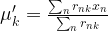
where the responsibilities are calculated using the old parameter set \Theta = (\mu, \pi, \Sigma). For a fixed \Theta, this is a function of the new parameters \mu', \pi' and \Sigma', and we can now try to maximize this function with respect to these parameters. This calculation is not difficult, but again a bit tiresome (and requires the use of Lagrangian multipliers as there is a constraint on the \pi_k), and I again refer to my notes for the details. When the dust settles, we obtain three simple expressions. First, the new values for the cluster means are given by

\mu'_k = \frac{\sum_n r_{nk} x_n}{\sum_n r_{nk}}

This starts to look familiar – this is the same expression that we did obtain for the cluster centers for the k-means algorithm! In fact, if we arrange the rnk as a matrix, the denominator is the sum across column k and the numerators is the weighted sum over all data points. However, there is one important difference – it is no longer true that given n, only one of the rnk will be different from one. Instead, the rnk are soft assignments that model the probability that the data point xn belongs to cluster k.

To write down the expression for the new value of the covariance matrix, we again need a notation first. Set

N_k = \sum_n r_{nk}

which can be interpreted as the number of soft assignments of points to cluster k. With that notation, the new value for the covariance matrix is

\Sigma'_k = \frac{1}{N_k} \sum_n r_{nk} (x_n - {\mu'}_k)(x_n - {\mu'}_k)^T

Finally, we can use the method of Lagrange multipliers to maximize with respect to the weights \pi_k (which always need to sum up to one), and again obtain a rather simple expression for the new value.

\pi'_k = \frac{N_k}{N}

Again, this is intuitively very appealing – the probability to be in cluster k is updated to be the number of points with a soft assignment to k divided by the total number of assignments

We now have all the ingredients in place to apply the algorithm in practice. Let us summarize how this will work. First, we start with some initial value for the parameters – the weights \pi, the covariance matrices \Sigma_k and the means \mu_k – which could, for instance, be chosen randomly. Then, we calculate the responsibilities as above – essentially, this is the expectation step, as it amounts to finding Q.

In the M-step, we then use these responsibilities and the formulas above to calculate the new values of the weights, the means and the covariance matrix. This involves a few matrix operations, which can be nicely expressed by the operations provide by the numpy library.

GMM

In the example above, we have created two sets of 500 sample points from different Gaussian mixture distributions and then applied the k-means algorithm and the EM algorithm. In the top row, we see the results of running the k-means algorithm. The color indicates the result of the algorithm, the shape of the marker indicates the original cluster to which the point belongs. The bottom row displays the results of the EM algorithm, using the same pattern.

We see that while the first sample (diagrams on the left) can be clustered equally well by both algorithms, the k-means algorithm is not able to properly cluster the second sample (diagrams on the right), while the EM algorithm is still able to assign most of the points to the correct cluster.

If you want to run this yourself, you can – as always – find the source code on GitHub. When playing with the code and the parameters, you will notice that the results can differ substantially between two consecutive runs, this is due to the random choice of the initial parameters that have a huge impact on convergence (and sometimes the code will even fail because the covariance matrix can become singular, I have not yet fixed this). Using the switch --data=Iris, you can also apply the EM algorithm to the Iris data set (you need to have a copy of the Iris data file in the current working directory) and find again that the results vary significantly with different starting points.

The EM algorithm has the advantage of being very general, and can therefore be applied to a wide range of problems and not just Gaussian mixture models. A nice example is the Baum Welch algorithm for training Hidden Markov models which is actually an instance of the EM algorithm. The EM algorithm can even be applied to classical multi-layer feed forward networks, treating the hidden units as latent variables, see [3] for an overview and some results. So clearly this algorithm should be part of every Data Scientists toolbox.

References

1. C.M. Bishop, Pattern recognition and machine learning, Springer, New York 2006
2. A.P. Dempster, N.M. Laird, D.B. Rubin, Maximum likelihood from incomplete data via the EM-algorithm, Journ. Royal Stat. Soc. Series B. Vol. 39 No. 1 (1977), pp. 1-38
3. Shu-Kay Ng, G.J. McLachlan, Using the EM Algorithm to Train Neural Networks: Misconceptions and a New Algorithm for Multiclass Classification, IEEE Transaction on Neural Networks, Vol. 15, No. 3, May 2004

The EM algorithm and Gaussian mixture models – part I

In the last few posts on machine learning, we have looked in detail at restricted Boltzmann machines. RBMs are a prime example for unsupervised learning – they learn a given distribution and are able to extract features from a data set, without the need to label the data upfront.

However, there are of course many other, by now almost classical, algorithms for unsupervised learning. In this and the following posts, I will explain one of the most commonly applied algorithms in this field, namely the EM algorithm.

As a preparation, let us start with a very fundamental exercise – clustering. So suppose that we are given a data set which we suspect to consist of K clusters. We want to identify these clusters, i.e. to each point in the dataset, we want to assign the number of the cluster to which the point belongs.

More precisely, let us suppose that we are given a set {\mathcal D} = \{ x_i, \dots, x_N\} of points in some euclidian space and a number K of clusters. We want to identify the centre \mu_i of each cluster and then assign the data points xi to some of the \mu_j, namely to the \mu_j which is closest to xi. We can encode the assignment of data points to clusters in a matrix Rij where Rij = 1 if data point xi belongs to cluster j with centre \mu_j. Thus each row of R corresponds to a data point and is non-zero in exactly one column, where it is one. This is known as 1-of-K encoding.

For each value of i, the squared distance of xi to the centre of the cluster to which it is assigned is then given by

\sum_j R_{ij} \| x_i - \mu_j |^2

where we note that only one of the summands is different from zero. Assigning the data points to the clusters and positioning the centre points of the clusters then amounts to minimizing the loss function

l(\mu, R) = \sum_i \sum_j R_{ij} \langle x_i - \mu_j , x_i - \mu_j \rangle

where the brackets denote the usual euclidean scalar product.

Now let us see how we can optimize this function. For a fixed vector \mu of cluster centers, we can easily minimize Rij by assigning each data point to the cluster whose center is closest to xi. Thus we set

R_{ij} =  \begin{cases} 1 & \text{if} \, j = \arg \min \| x_i - \mu_j \|^2 \\ 0 & \text{otherwise} \end{cases}

Conversely, given a matrix R which we hold fixed, it is likewise easy to minimize \mu_j. As there are no further constraints on \mu_j, we can find the minimum by differentiating the loss function. We find that the derivative is zero if and only if

0 = \sum_i R_{ij}(x_i - \mu_j)

holds for all j. Assuming for a moment that each cluster has at least one data point assigned to it, i.e. that none of the columns of R contains zeroes only, we can solve this by

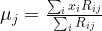
\mu_j = \frac{\sum_i x_i R_{ij}}{\sum_i R_{ij}}

which is also easily seen to be a local minimum by taking the second derivative.

Note that this term has an obvious geometric interpretation. The denominator in this expression is the number of data points that are currently assigned to cluster j. The numerator is the sum of all data points assigned to this cluster. Thus the minimum is the mean value of the positions of the data points that are currently assigned to the cluster (a physicist would call this the center of gravity of the cluster). This is the reason why this method is called the k-means algorithm. If no data points are assigned to the cluster, the loss function does not depend on \mu_j and we can choose any value that we want.

The algorithm now works as follows. First, we choose centers \mu_j at will – it is common to use some of the data points for this purpose. Then we assign each data point to a center using the formula for Rij derived above. We then adjust the center points \mu_j and reallocate the points to the new centers and so forth.

From our discussion above, it is clear that each full iteration of this procedure will reduce the loss function. This does of course not imply that the algorithm converges to a global minimum, as it might get stuck in local minima or saddle points. In practice, the algorithm is executed until the cluster assignments and centers do not change any more substantially or for a given number of steps.

KMeans

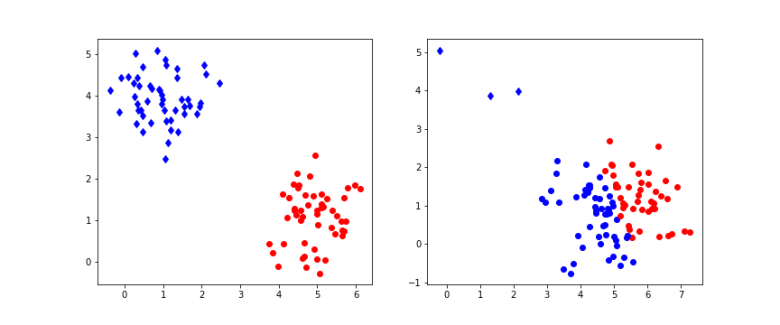
The diagram above shows the result of applying this algorithm to a set of points that is organized in two clusters. To generate the data, 100 samples were drawn from 2-dimensional Gaussian distributions. On the left hand side, half of the the samples were centered at the point (5,1), the other samples at (1,4), and both had standard deviation 0.6. On the right hand side, the same centers were used, but only a small number of samples were drawn from the second distribution which had standard deviation 0.5, whereas most samples came from the first distribution with standard deviation 0.8. Then 10 iterations of the k-means algorithm were applied to the resulting sample set. The points in the sample were then plotted with a color indicating the assignment to clusters resulting from the matrix R. The actual cluster from which the sample was drawn is indicated by the shape – a point is cluster one, a diamond is cluster two.

We see that in the example on the left hand side, the algorithm has correctly assigned all points to their original cluster. For the example on the right hand side, the situation is different – the algorithm did actually assign significantly more points to the blue cluster, i.e. there are many wrong assignments (blue points). This does not change substantially if we increase the number of iterations, even with 100 iterations, we still see many wrong assigments for this example. If you want to reproduce the example and play a bit with the parameters, you can get the sourcecode for a straightforward implementation in Python from my GitHub repository.

The K-means algorithm is very simple and straightforward, but seems to have limitations because it cannot determine the shape of a distribution, only its center. It turns out that K-means is a special case of a broader class of algorithms that we now study, hoping to find more robust algorithms.

In our example, we have generated sample data as a combination of two Gaussian distributions. What if we just change the game and simply assume that our data is of this type? In other words, we assume an underlying probabilistic model for our sample data. Once we have that, we can pull all the tricks that statistical inference can offer – we can calculate maximum likelihood and maximum posterior probability, we can try to determine the posterior or even sample from the model.

Thus let us try to fit our data to a model of the form

P(x) = \sum_k \pi_k {\mathcal N}(x ; \mu_k, \Sigma_k)

where {\mathcal N}(x ; \mu_k, \Sigma_k) is a multivariate Gaussian distribution with mean \mu_k and covariance matrix \Sigma_k, i.e.

{\mathcal N}(x ; \mu_k, \Sigma_k) = \frac{1}{\sqrt{(2\pi)^d \det(\Sigma)}} \exp (-\frac{1}{2} \langle x - \mu_k, \Sigma_k^{-1}(x - \mu_k)\rangle)

and the \pi_k are non-negative real numbers with \sum_k \pi_k = 1.

Let us now see how this equation looks like if we use a 1-of-K encoding. We introduce a random variable Z that takes values in \{ 0, 1\}^K with the additional constraint that only one of the Zk is allowed to be different from zero. We interpret \pi_k as the probability

\pi_k = P(Z_k = 1)

Then

P(Z = z) = \prod_k \pi_k ^{z_k}

and we can write

P(X=x) = \sum_z P(Z=z) P(X=x | Z=z) = \sum_z P(x,z)

where P(z) is as above and

P(X = x | Z = z) = \prod_k {\mathcal N}(x ; \mu_k, \Sigma_k)^{z_k}

This is a very general type of distribution which reflects a common pattern in machine learning, namely the introduction of so called latent or hidden variables. In general, latent or hidden variables are random variables that are a part of the model which cannot be observed, i.e. are not part of the input or the output of the model. We have seen latent variables in action several times – adding hidden units to a neural network introduces latent variables and makes the model much more powerful, the hidden layer of a restricted Boltzmann machine serves as memory to learn features, and latent variables that are used to construct a mixture of Gaussians as above allow us to model a much broader class of distributions than a model with just one Gaussian.

Intuitively, it is also clear how to sample from such a model. In a first step, we sample from Z, in other words we determine the index k randomly according to the distribution given by the \pi_k. Once we have k, we then sample from the conditional distribution P(X = x | Z = z). As we already have k, this amounts to sampling from the Gaussian distribution {\mathcal N}(x ; \mu_k, \Sigma_k) with mean \mu_k and covariance matrix \Sigma_k.
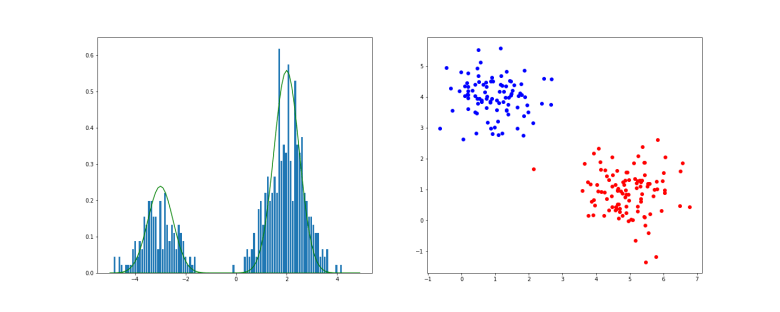
GaussianMixture

In the example above, we have first applied this procedure to a one-dimensional Gaussian mixture with K=2. The histogram shows the result of the sampling procedure, the solid lines are the probability density functions of the two individual Gaussian distributions, multiplied by the respective weight. On the right hand side, the result of sampling a Gaussian mixture in two dimensions is displayed (you can download the notebook used to produce this example here).

When we now try to fit this model to the sample data, we again have to calculate the likelihood function and try to maximize it. However, it turns out that the gradient of the likelihood is not so easy to calculate, and it might very well be that there is no closed form solution or that we obtain rather complicated expressions for the gradient. Fortunately, there is an alternative that works for very general models and does not require knowledge of the gradient – the EM algorithm. In the next post, I will present the algorithm in this general setup, before we apply it to our original problem and compare the results with the k-means algorithm.

References

1. C.M. Bishop, Pattern recognition and machine learning, Springer, New York 2006
2. A.P. Dempster, N.M. Laird, D.B. Rubin, Maximum likelihood from incomplete data via the EM-algorithm, Journ. Royal Stat. Soc. Series B. Vol. 39 No. 1 (1977), pp. 1-38

Controlling Docker container with Python

In the last few posts on the bitcoin blockchain, I have already extensively used Docker container to quickly set up test environments. However, it turned out to be a bit tiresome to run the containers, attach to them, execute commands etc. to get into a defined state. Time to learn how this can be automated easily using our beloved Python – thanks to the wonderful Docker Python SDK.

This package uses the Docker REST API and offers an intuitive object model to represent container, images, networks and so on. The API can be made available via a TCP port in the Docker configuration, but be very careful if you do this – everybody who has access to that port will have full control over your Docker engine. Fortunately, the Python package can also connect via the standard Unix domain socker on the file system which is not exposed to the outside world.

As always, you need to install the package first using

$ pip install docker

Let us now go through some objects and methods in the API one by one. At the end of the post, I will show how you a complete Python notebook that orchestrates the bitcoind container that we have used in our tests in the bitcoin series.

The first object we have to discuss is the client. Essentially, a client encapsulates a connection to the Docker engine. Creating a client with the default configuration is very easy.

import docker
client = docker.client.from_env()

The client object has only very few methods like client.info() or client.version() that return global status information. The more interesting part of this object are the collections attached to it. Let us start with images, which can be accessed via client.images. To retrieve a specific instance, we can use client.images.list(), passing as an argument a name or a filter. For instance, when we know that there is exactly one image called “alice:latest”, we can get a reference to it as follows.

alice = client.images.list("alice:latest")[0]

Other commands, like pull or push, are the equivalents of the corresponding docker CLI commands.

Let us now turn to the client.containers collection. Maybe the most important method that this collection offers is the run method. For instance, to run a container and capture its output, use

output = client.containers.run("alpine", "ls", auto_remove=True)

This will run a container based on the alpine image and pass “ls” as an argument (which will effectively execute ls as alpine container will run a shell for you) and return the output as a sequence of bytes. The container will be removed after execution is complete.

By setting detach=True, the container will run in detached mode and the call will return immediately. In this case, the returned object is not the output, but a reference to the created container which you can use later to work with the container. If, for instance, you wanted to start an instance of the alice container, you could do that using

alice = client.containers.run("alice:latest", auto_remove=True, detach=True)

You could then use the returned handle to inspect the logs (alice.logs()), to commit, to exec code in the container similar to the docker exec command (alice.exec_run) and so forth.

To demonstrate the possibilities that you have, let us look at an example. The following notebook will start two instances (alice, bob) of the bitcoin-alpine image that you hopefully have build when you have followed my series on bitcoin. It then uses the collection client.networks to figure out to which IP address on the bridge network bob is connected. Then, we attach to the alice container and run bitcoin-cli in this container to instruct the bitcoind to connect to the instance running in container bob.

We then use the bitcoin-cli running inside the container alice to move the blockchain into a defined state – we mine a few blocks, import a known private key into the wallet, transfer a certain amount to a defined address and mine a few additional blocks to confirm the transfer. Here is the notebook.

Loading
Sorry, something went wrong. Reload?
Sorry, we cannot display this file.
Sorry, this file is invalid so it cannot be displayed.

Make sure to stop all containers again when you are done, it is comparatively easy to produce a large number of stopped containers if you are not careful and use this for automated tests. I usually run the container with the --rm flag on the command line or the auto_remove=True flag in Python to make sure that they are removed by the Docker engine automatically when they stop.

Of course nobody would use this to simply run a few docker containers with a defined network setup, there are much better tools like Docker Swarm or other container management solutions for this. However, the advantage of using the Python SDK is that we can interact with the containers, run commands, perform tests etc. And all this can be integrated nicely into integration tests using test fixtures, for instance those provided by pytest. A fixture could bring up the environment, could be defined on module level or test level depending on the context, and can add a finalizer to shut down the environment again after the test has been executed. This allows for a very flexible test setup and offers a wide range of options for automated testing.

This post could only give a very brief introduction into the Python Docker SDK and we will not at all discuss pytest and fixtures – but I invite you to browse the Docker SDK documentation and pytest fixtures and hope you enjoy to play with this!

How the number of bitcoins is limited

In some of the previous posts, we did already hit upon the file chainparams.cpp in the source code of the bitcoin reference client. It is interesting to go through this and understand the meaning of the various parameters defined there. One of them should catch your attention:

class CMainParams : public CChainParams {
public:
    CMainParams() {
        strNetworkID = "main";
        consensus.nSubsidyHalvingInterval = 210000;

What does this parameter mean? It is in fact not used awfully often, apart from some unit tests I could only locate it once, namely in validation.cpp.

CAmount GetBlockSubsidy(int nHeight, const Consensus::Params& consensusParams)
{
    int halvings = nHeight / consensusParams.nSubsidyHalvingInterval;
    // Force block reward to zero when right shift is undefined.
    if (halvings >= 64)
        return 0;

    CAmount nSubsidy = 50 * COIN;
    // Subsidy is cut in half every 210,000 blocks which will occur approximately every 4 years.
    nSubsidy >>= halvings;
    return nSubsidy;
}

The output of this function plays an important role when a new block is mined by mine.cpp – this is the amount (in Satoshis) that a miner earns in addition to the fees! Put differently, this is the amount of bitcoins that are created when a block is mined.

What this code tells us is that the amount of bitcoin added during mining starts with 50 and is divided by two every 210.000 blocks. So the amount of bitcoins mined is a given by the formula

210000 \cdot 50 + 210000 \cdot 25 + 210000 \cdot 12.5 + \dots = \sum_{n=0}^\infty  210000 \cdot 50 \cdot  \frac{1}{2}^n

The mathematicians among us will recognize this as a geometric series

210000 \cdot 50 \cdot \sum_{n=0}^\infty q^n

with q = 0.5. This series converges, and its value is

210000 \cdot 50 \cdot 2 = 21 \cdot 10^{6}

Therefore the amount of bitcoins that are created by mining – and thus the overall supply of bitcoins –  can never exceed roughly 21 million bitcoins. You might have heard that before: bitcoins are by designed with a controlled supply which is guaranteed by the continuous reduction of the subsidity as the number of blocks increases (and not because the value of a bitcoin transaction is stored in a 64 bit integer – in fact this would explain why the value of a single transaction output cannot exceed a certain value, but not why the total sum of all ever issued bitcoins is limited). This is the point in the source code that is responsible for this.

Of course I am cheating a bit – the value of a bitcoin is discrete, not a real number. Mining will stop if the value of the block subsidity falls below one Satoshi, as this is the smallest number that can be represented. Let us see when this happens. The subsidity is given by the formula

s = \frac{5 \cdot 10^{9}}{2^n}

where n is obtained by dividing the block height (i.e. length of the chain) by 210000 and converting to an integer. Solving s = 1 for n, we obtain

n = \log_2 (5 \cdot 10^{9}) \approx 32.2

Therefore the bitcoin amount created with a block will drop to zero with block

m = 210000 * 33 = 6.930.000  .

The total number of bitcoins created until then can be approximated (ignoring rounding) by the partial sum

210000 \cdot 50 \cdot \sum_{n=0}^{32} q^n = \frac{50 \cdot 10^{9}(1 - q^{33})}{1 - q}

which gives 20999999.997 bitcoins, i.e. almost exactly 21 million bitcoins as expected. We can also estimate when this will have happened. Looking at blockchain.info, we see that at the time of writing, approximately 513.000 blocks have already been mined. So we still need 6.418.000 blocks. A block is generated roughly every 10 minutes, so there are 6 additional blocks per hour and therefore 52560 blocks being added per year. Thus it will take roughly 122 years from now until all these blocks have been mined, i.e. this will happen somewhere around the year 2140. So still some time to go until then…

If you do not trust the math, you could also simulate this in a little Python program. In fact, this will give you a bit less than what we have calculated above, as the subsidity is rounded to an integer during the calculation, which our geometric series above does not properly reflect.

COIN = 10**8
nHeight = 0
btc = 0.0
while True:
    halvings = nHeight // 210000
    subsidity = (50*COIN) >> halvings
    btc += subsidity
    if subsidity < 1:
        break
    nHeight += 1

print("Total bitcoin amount: ", btc / 10**8 )

You can also easily determine how many bitcoin are available at each point in time. At 513.000 blocks, these are roughly 16.9 million BTC, which, at a price of 10.000 USD, is equivalent to a market capitalization of roughly 160 billion USD.

Mining bitcoins with Python

In this post, we will learn to build a very simple miner in Python. Of course this miner will be comparatively slow and limited and only be useful in our test network, but it will hopefully help to explain the principles behind mining.

When we want to mine a block, we first need some information on the current state of the blockchain, like the hash of the current last block, the current value of the difficulty or the coin base value, i.e. the number of BTC that we earn when mining the block. When we are done building the block, we need to find a way to submit it into the bitcoin network so that it is accepted by all nodes and permanently added to the chain.

If we were member of a mining pool, there would be a mining server that would provide us the required information. As we want to build a solo mining script, we need to communicate with bitcoin core to get that information and to submit our final block. Fortunately, the RPC interface of bitcoin core offers methods to facilitate that communication that were introduced with BIP22.

First, there is the method getblocktemplate. It will deliver all the required information that we need to build a valid block and even propose transactions that we should include in the block. These transactions will be taken from the so called mempool which is a collection of transactions that the bitcoin server knows which have not been added to a block yet (see miner.cpp/BlockAssembler::addPackageTxs in the bitcoin core source code for details on how the selection process works).

If the client is done building the block, it can submit the final block using the method submitblock. This method will run a couple of checks on the block, for instance that it can be correctly decoded, that the first transaction – and only the first – is a coinbase transaction, that it is not a duplicate and that the proof-of-work is valid. If all the checks pass, it will add the block to the local copy of the blockchain. If a check fails, it will return a corresponding error code to the caller.

With that understanding, let us now write down the processing logic for our simple miner, assuming that we only want to mine one additional block. First, we will use getblocktemplate to get the basic parameters that we need and transaction that we can include. Then we will create a new block and a new coinbase transaction. We then add the coinbase transaction followed by all the other transactions to the block.

Once we have that block, we enter a loop. Within the loop, we calculate the hash of the block and compare this against the target. If we can meet the target, we are done and submit the newly created block using submitblock. Otherwise, we increment the nonce and try again.

We have discussed most of these steps in some details in the previous posts, with one exception – coinbase transactions. A coinbase transaction is, by definition, a transaction which generates bitcoin because it has valid outputs, but does not spend any UTXOs. Technically, a coinbase transaction is a transaction which (see CTransaction::IsCoinBase())

  • has exactly one transaction input
  • the previous transaction ID in this input is zero (i.e. a hexadecimal string consisting of 32 zeros “00”)
  • the index of the previous output is -1 (encoded as  0xFFFFFFFF)

As it does not refer to any output, the signature script of a coinbase transaction will never be executed. It can therefore essentially contain an arbitrary value. The only restriction defined by the protocol is described in BIP34, which defines that the first bytes of the signature script should be a valid script that consists of the height of the new block as pushed data. The remainder of the coinbase signature script (which is limited to 100 bytes in total) can be used by the miner at will.

Many miners use this freedom to solve a problem with the length of the nonce in the block header. Here, the nonce is a 32 bit value, which implies that a miner can try 232, i.e. roughly 4 billion different combinations. Modern mining hardware based on ASICs can search that range within fractions of seconds, and the current difficulty is so high that it is rather likely that no solution can be found by just changing the nonce. So we have to change other fields in the block header to try out more hashes.

What are good candidates for this? We could of course use the block creation time, but the bitcoin server validates this field and will reject the block if it deviates significantly from the current time. Instead miners typically use the coinbase signature script as an extra nonce that they modify to increase the range of possible hashes. Therefore the fields after the height are often combinations of an extra nonce and additional data, like the name of the mining pool (increasing the extra nonce is a bit less effective than increasing the nonce in the block header, as it changes the hash of the coinbase transactions and therefore forces us to recalculate the Merkle root, therefore this is most often implemented as an outer loop, with the inner loop being the increments of the nonce in the block header).

To illustrate this, let us look at an example. The coinbase signature script of the coinbase transaction in block #400020 is:

03941a060004c75ccf5604a070c007089dcd1424000202660a636b706f6f6c102f426974667572792f4249503130302f

If we decode this, we find that the first part is in fact a valid script and corresponds to the following sequence of instructions (keep in mind that all integers are encoded as little endian within the script):

OP_PUSH 400020
OP_0
OP_PUSH 1456430279
OP_PUSH 130052256
OP_PUSH 7350439741450669469

As specified by BIP34, the first pushed data is the height of that block as expected. After the OP_0, we see another push instruction, pushing the Unix system time corresponding to Thu Feb 25 20:57:59 2016, which is the creation time of the block.

The next pushed data is a bit less obvious. After looking at the source code of the used mining software, I assume that this is the nanoseconds within the second returned by the Unix system call clock_gettime. This is then followed by an eight byte integer (7350439741450669469) which is the extra nonce.

The next part of the signature script is not actually a valid script, but a string – a newline character (0xa), followed by the string “ckpool”. This is a fixed sequence of bytes that indicates the mining software used.

Finally, there is one last push operation which pushes the string “/Bitfury/BIP100/”, which tells us that the block has been mined by the Bitfury pool and that this pool supports BIP100.

Enough theory – let us put this to work! Using the utility functions in my btc Python package, it is now not difficult to write a short program that performs the actual mining.

However, we need some preparations to set up our test environment that are related to our plan to use the getblocktemplate RPC call. This call performs a few validations that can be a bit tricky in a test environment. First, it will verify that the server is connected, i.e. we need at least one peer. So we need to start two docker container, let us call them alice and bob again, and find out the IP address of the container bob in the Docker bridget network. The three following statements should do this for you.

$ docker run --rm -d -p 18332:18332 --name="alice" alice
$ docker run --rm -d  --name="bob" bitcoin-alpine
$ docker network inspect bridge | grep  -A 4  "bob" - | grep "IPv4" -

Assuming that this gives you 172.17.0.3 (replace this with whatever the result is in your case), we can now again use the addnode RPC call to connect the two nodes.

$ bitcoin-cli --rpcuser=user --rpcpassword=password -regtest addnode "172.17.0.3" add

The next validation that the bitcoin server will perform when we ask for a block template is that the local copy of the blockchain is up to date. It does by verifying that the time stamp of the last block in the chain is less than 24 hours in the past. As it is likely that a bit more time has passed since you have created the Alice container, we therefore need to use the mining functionality built into bitcoin core to create at least one new block.

$ bitcoin-cli --rpcuser=user --rpcpassword=password -regtest generate 1

Now we are ready to run our test. The next few lines will download the code from GitHub, create one transaction that will then be included in the block. We will create this transaction using the script SendMoney.py that we have already used in an earlier post.

$ git clone https://github.com/christianb93/bitcoin.git
$ cd bitcoin
$ python SendMoney.py
$ python Miner.py

You should then see an output telling you that a block with two transactions (one coinbase transaction and the transaction that we have generated) was mined, along with the previous height of the blockchain and the new height which should be higher by one.

Let us now verify that everything works. First, let us get the hash of the current last block.

$ bitcoin-cli --rpcuser=user --rpcpassword=password -regtest getchaintips
[
  {
    "height": 109,
    "hash": "07849d5c8ddcdc609d7acc3090bc48bbe4403c36008d46b5a291185334efe1bf",
    "branchlen": 0,
    "status": "active"
  }
]

Take the value from the hash field in the output and feed it into a call to getblock:

$ bitcoin-cli --rpcuser=user --rpcpassword=password -regtest getblock "07849d5c8ddcdc609d7acc3090bc48bbe4403c36008d46b5a291185334efe1bf"
{
  "hash": "07849d5c8ddcdc609d7acc3090bc48bbe4403c36008d46b5a291185334efe1bf",
  "confirmations": 1,
  "strippedsize": 367,
  "size": 367,
  "weight": 1468,
  "height": 109,
  "version": 536870912,
  "versionHex": "20000000",
  "merkleroot": "8769987458af75adc80d6792848e5cd5cb8178a9584157bb4be79b77cda95909",
  "tx": [
    "7ba3186ca8e5aae750614a3211422423a0a217f5999d0de6dfeb8968aeb01900", 
    "1094360149626a421b4ddbc7eb58a815762700316c36407770b96ffc36a7735b"
  ],
  "time": 1522952768,
  "mediantime": 1521904060,
  "nonce": 1,
  "bits": "207fffff",
  "difficulty": 4.656542373906925e-10,
  "chainwork": "00000000000000000000000000000000000000000000000000000000000000dc",
  "previousblockhash": "2277e40bf4c0ebde3fb5f38fcbd384e39df3471ad192cc46f66ea8d8d96327e7"
}

The second entry in the list tx should now match the ID of the newly created transaction which was displayed when executing the SendMoney.py script. This proves that our new transaction has been included in the block.

Congratulations, you have just mined 50 BTC – unfortunately only in your local installation, not in the production network. Of course, real miners work differently, using mining pools to split the work between many different nodes and modern ASICS to achieve the hash rates that you need to be successful in the production network. But at least we have built a simple miner more or less from scratch, relying only on the content of this and the previous posts in this series and without using any of the many Python bitcoin libraries that are out there.

This concludes my current series on the bitcoin blockchain –  I hope you enjoyed the posts and had a bit of fun. If you want to learn more, here are a few excellent sources of information that I recommend.

  1. Of course the ultimative source of information is always the bitcoin core source code itself that we have already consulted several times
  2. The Bitcoin wiki contains many excellent pages on most of what we have discussed
  3. There is of course the original bitcoin paper which you should now be able to read and understand
  4. and of course there are tons of good books out there, I personally liked Mastering Bitcoin by A. Antonopoulos which is also available online