The examples for LSTMs and RNNs that we have studied so far have one feature in common – the input and the output have the same length. We have seen that this is a natural choice for tasks like creating sentences based on a given prompt or attaching labels to each word in a sentence. There are, however, tasks for which this simple architecture cannot be used as we need to create a sentence based on an input of different length. To address this class of problems, encoder-decoder architectures have been developed which we will discuss today.
A good example to illustrate the challenge is machine translation. Here, we are given a source sequence, i.e. a sequence of token (x1, …, xS), maybe already vectorized, as input. The objective is to create a target sequence (y1, …, yT) as output representing the translation of the source sentence into a target language. Typically, the length T of the target sequence differs from the length S of the source sequence, which a single LSTM cannot easily cover.
Put differently, the objective is now no longer to model conditional probabilities for the completion of a sentence, i.e. probabilities of the form
but conditional probabilities for a target sequence given the source sequence, i.e. the probability distribution
The idea behind encoder-decoder architectures is to split this task into two subtasks, each of which is taken over by a dedicated network. First, there is a network called the encoder, that translates the source sequence into a single vector (or a concatentation of multiple vectors) called the context. The idea is that this vector represents, in a form independent of the length of the source sequence, an internal representation of the source sequence that somehow captures its meaning. Then a second network, the decoder, takes over. This network has access to the context and, given the context, creates the target sequence, as indicated in the diagram below..
In this general form, the idea is not bound to a specific type of network. Often, encoder and decoder are both LSTMs, but we will see in a later post that also transformer networks can be used in this way.
Let us now be a bit more specific on how we can bring this idea to live with LSTMs serving as decoders and encoders and specifically how these models are trained. For the encoder, this is easy – as we want the model to compress the meaning of the source sentence in the context, we of course need to feed the source sentence into the encoder. For the decoder, it is common to again apply teacher forcing. However, to create the first word of the target sentence, we need a starting point for the model. Therefore, the encoded sentences typically contain a “beginning of sentence” token, and it is also common practice to conclude the source sentence with a “end of sentence token”.
During inference, the model receives the source sequence as input and the first item of the target sequence, i.e. the beginning-of-sentence token. We can then apply any of the sampling methods discussed in an earlier post to successively generate the next word, until the model emits an end-of-sentence marker and the translation is complete.
Unfortunately, there is a fundamental problem with this architecture. If you look at the diagram, you will see that the context is the only connection between the encoder and the decoder. Consequently, the network has to compress all information necessary for the generation of the target sequence into the context, which is typically a vector of fixed size. Especially for longer source sentences, this quickly creates a bottleneck.
In 2015, Bahdanau, Cho and Bengio proposed a mechanism called attention to solve this issue. In their paper, they describe an approach which, instead of using a fixed-length context vector shared by all time steps of the decoder, uses a time-dependent context vector.
Specifically, each time step of the decoder receives three different inputs: the decoder input xt (which, as in the diagram above, is the previous word of the target sentence), the previous hidden state ht-1 and, in addition, a step-specific context ct. This context is assembled from the outputs os of the encoder network (these are in fact not exactly the hidden states, as the architecture proposed here uses a so-called bidirectional RNN as encoder, but let us ignore this for the time being). More precisely, each context vector ct is a weighted linear combination
of all outputs of the encoder network at all time steps. Thus, each decoder step has access to the full output of the encoder. However, and this is the crucial point, the way how the weights are calculated is governed by learned parameters which the network can adapt during training. This allows the decoder to focus on specific parts of the input sequence, depending on the current time step, i.e. to put more attention on specific time steps, lending the mechanism its name. Or, as the original paper puts it nicely in section 3.1:
“The decoder decides parts of the source sentence to pay attention to. By letting the decoder have an attention mechanism, we relieve the encoder from the burden of having to encode all information in the source sentence into a fixed length vector.“
To illustrate this, the authors include some examples for the weights used by the network. Let us look at the first of them, which illustrates the weights while translating the english sentence “The agreement on the European Economic Area was signed in 1992.”
We see that, as envisioned, the network learns to focus on the word that is currently being translated, even though the order of words in target and source sentence are different.
Attention turned out to be a very powerful idea. In fact, attention is so useful that it gave rise to a new class of language models which works without the need to have a hidden state which is updated sequentially over time. This new generation of networks is called transformers, and we will start to look at transformers and at attention scores in more detail in the next post.
This blog is all about code – we will implement and train an LSTM on Tolstoys War and Peace and use it to generate new text snippets that (well, at least very remotely) resemble pieces from the original novel. All the code can be found here in my GitHub repository for this series.
First, let us talk about the data we are going to use. Fortunately, the original novel is freely available in a text-only format at Project Gutenberg. The text file in UTF-8 encoding contains roughly 3.3 million characters.
After downloading the book, we need to preprocess the data. The respective code is straightforward – we tokenize the text, build a vocabulary from the list of token and save the vocabulary on disk. We then encode the entire text and save 90% of the data in a training data set and 10% of the data in a validation data set.
The tokenizer requires some thoughts. We cannot simply use the standard english tokenizer that comes with PyTorch, as we want to split the text down to the level of the individual characters. In addition, we want to compress a sequence of multiple spaces into one, remove some special characters and replace line breaks by spaces. Finally, we convert the text into a list of characters. Here is the code for a simple tokenizer that does all this.
def tokenize(text):
    text = re.sub(r"[^A-Za-z0-9 \-\.;,\n\?!]", '', text)
    text = re.sub("\n+", " ", text)
    text = re.sub(" +", " ", text)
    return [_t for _t in text]
The preprocessing step creates three files that we will need later – train.json which contains the encoded training data in JSON format, val.json which contains the part of the text held back for validation and vocab.pt which is the vocabulary.
The next step is to assemble a dataset that loads the encoded book (either the training part or the validation part) from disk and returns the samples required for training. Teacher forcing is implemented in the __getitem__ method of the dataset by setting the targets to be the input shifted by one character to the right.
def __getitem__(self, i):
    if (i < self._len):
        x = self._encoded_book[i: i + self._window_size]
        y = self._encoded_book[i + 1: i + self._window_size + 1]
        return torch.tensor(x), torch.tensor(y)
    else:
        raise KeyError
For testing, it is useful to have an implementation of the dataset that uses only a small part of the data. This is implemented by an additional parameter limit that, if set, restricts the length of the dataset artificially to a given number of token.
Next let us take a look at our model. Nothing here should come as a surprise. We first use an embedding layer to convert the input (a sequence of indices) into a tensor. The actual network consists of an LSTM with four layers and an output layer which converts the data back from the hidden dimension to the vocabulary, as we have used it before. Here is the forward method of the model which again optionally accepts a previously computed hidden layer – the full model can be found here.
def forward(self, x, hidden = None):
    x = self._embedding(x) # shape is now (L, B, E)
    x, hidden = self._lstm(x, hidden) # shape (L, B, H)
    x = self._out(x)
    return x, hidden
Finally, we need a training loop. Training proceeds as in the examples we have seen before. After each epoch, we perform a validation run, record the validation loss and save a model checkpoint. Note, however, that training will take some time, even on a GPU – be prepared for up to an hour on an older GPU. In case you want to skip training, I have included a pretrained model checkpoint in the GitHub repository, so if you want to run the training yourself, remove this first. Assuming that you have set up your environment as described in the README, training therefore proceeds as follows.
cd warandpeace
python3 preprocess.py
# Remove existing model unless you want to pick up from previous model
rm -f model.pt
python3 train.py
Note that the training will look for an existing model model.pt on disk, so you can continue to train using a previously saved checkpoint. If you start the training from scratch and use the default parameters, you will have a validation loss of roughly 1.27 and a training loss of roughly 1.20 at the end of the last epoch. The training losses are saved into a file called losses.dat that you can display using GNUPlot if that is installed on your machine.
In case you want to reproduce the training but do not have access to a GPU, you can use this notebook in which I have put together the entire code for this post and run it in Google Colab, using one of the freely available GPUs. Training time will of course depend on the GPU that Google will assign to your runtime, for me training took roughly 30 minutes.
After training has completed (or in case you want to dive right away into inference using the pretrained model), we can now start to sample from the model.
python3 predict.py
The script has some parameters that you can use to select a sampling method (greedy search, temperature sampling, top-k sampling or top-p sampling), the parameters (temperature, k, p), the length of the sample and the prompt. Invoke the script with
python3 predict.py --help
to get a summary of the available parameters. Here are a few examples created with the standard settings and a length of 500 characters, using the model checked into the repository. Note that sampling is actually fast, even on a CPU, so you can try this also in case you are not working on a CUDA-enabled machine.
She went away and down the state of a sense of self-sacrifice. The officers who rode away and that the soldiers had been the front of the position of the room, and a smile he had been free to see the same time, as if they were struck with him. The ladies galloped over the shoulders and in a bare house. I should be passed about so that the old count struck him before. Having remembered that it was so down in his bridge and in the enemys expression of the footman and promised to reach the old…
Thats a wish to be a continued to be so since the princess in the middle of such thoughts of which it was all would be better. Seeing the beloved the contrary, and do not about that a soul of the water. The princess wished to start for his mother. He was the princess and the old colonel, but after she had been sent for him when they are not being felt at the ground of her face and little brilliant strength. The village of Napoleon was stronger difficult as he came to him and asked the account
Of course this is not even close to Tolstoy, but our model has learned quite a bit. It has learned to assemble characters into words, in fact all the words in the samples are valid english words. It has also learned that at the start of a sentence, words start with a capital letter. We even see some patterns that resemble grammar, like “Having remembered that” or “He was the princess”, which of course does not make too much sense, but is a combination of a pronoun, a verb and an object. Obviously our model is small and our training data set only consists of a few million token, but we start to see that this approach might take us somewhere. I encourage you to play with additional training runs or changed parameters like the number of layers or the model dimension to see how this affects the quality of the output.
In the next post, we will continue our journey through the history of language models and look at encoder-decoder architectures and the rise of attention mechanisms.
Today, we will take a closer look at the process of using a trained LSTM or RNN to actually generate new content, i.e. to predict words. To set the scene, recall that the objective on which we have trained our network is to model the probability
for each word in the vocabulary. More precisely, assume that our vocabulary has length V with elements v0, …, vV-1. Then the model is trained to predict for each i the probability that the next word is vi.
As the network operates in time steps, it will create one corresponding vector p of probabilities with each time step, containing the probability distribution for the next word after having seen the input up to this point. Therefore the output of our model has shape (L, V), but we are only interested in the last output. In addition, recall that in practice, the softmax layer is usually not part of the model but contained in the loss function. Thus, to obtain the vector p of length V, we have to proceed as follows.
First, we take the sentence that we want to complete, the so-called prompt. We then tokenize this sentence and encode it as a tensor of shape L, where L is the number of token in the prompt. We feed this input vector x into the model and obtain the output (and the values of the hidden layer which we ignore). We then take the last element of the output and apply a softmax to obtain our probability distribution p. The corresponding code would look similar to this code snippet.
# x contains encoded prompt
f, _ = model(x)
 p = torch.softmax(f[-1], dim = 0)
which we have already seen in our toy model that was trained to complete a sequence of numbers. In this toy model, we have chosen the most straightforward approach to determine the next token from this probability distribution – take the index with the highest probability, i.e.
idx = torch.argmax(p).item()
This is again an index in our vocabulary. We can now look up the corresponding token in the vocabulary and append this token to our prompt. At this point, we have successfully extended the prompt by one generated token. We can now repeat the process to obtain a second token and so forth, until we have reached a certain specified minimum length. Note that in all steps but the first one, it is more efficient to feed the previously obtained hidden state back into the model, so that the model does not have to go through the entire sequence again. If we do this, however, we need to make sure that we feed only the last (just sampled) token as input, as the information on the previous part of the sentence is already encoded in the hidden state. Thus a complete function to sample could look as follows.
# Tokenize and encode prompt
input_ids = [vocab[t] for t in tokenize(prompt)]
hidden = None
#
# Sample and append indices
#
while (len(input_ids) < length):
    x = torch.tensor(input_ids, dtype = torch.long)
    x = x.to(device)
    #
    # Feed input ids into model
    #
    if hidden is None:
        f, hidden = model(x)
    else:
        f, hidden = model(x[-1].unsqueeze(dim = 0), hidden)
    #
    # f has shape (L, V) or (1,V)
    # Take last element and apply softmax
    #
    p = torch.softmax(f[-1], dim = 0)
    #
    # Sample
    #
    idx = torch.argmax(p).item()
    #
    # and append
    #
    input_ids.append(idx)
This will produce a list of indices which we still need to convert back into a string using the vocabulary.
The sampling method that we have applied here is sometimes called greedy sampling, because it greedily always selects the token with the highest probability weight. This is easy to implement (and fast), but has one major disadvantage – it is fully deterministic. Therefore the model easily gets stuck in loops during sampling and starts to repeat itself. This is in particular a problem if we use a short prompt, for instance “. ” to represent the start of a sentence. What we would actually want is a method that returns a reasonable sentence, but with some built-in randomness so that we do not always get the same sentence.
One way to do this is to actually draw a real sample from the probability distribution given by the vector p. PyTorch comes with a few helper classes to sample from various types of distributions, among them the categorical distribution which is actually nothing but a multinomial distribution. So instead of taking the argmax to determine the next index, we can use the line
to draw an actual sample. Note that we first create a distribution object and then apply its sample method to perform the sampling. As the result is a tensor, we then use the item method to obtain a number that we can use as index into the vocabulary.
This sampling method is often applied with an additional parameter called the temperature. To understand this, let us discuss the impact of scaling the model output by some factor before applying the softmax. The softmax function is of course not linear, and due to the exponential function in the numerator, scaling by a large number will have a higher impact on those dimensions where the model output is already large. Thus scaling by a large number will increase existing spikes in the probability distribution. In the limit where the scaling factor tends to infinity, only the highest spike will survice and our sampling will be almost deterministic, so that we recover greedy search. Conversely, if the scaling factor is very small, the spikes will be softened, and eventually, in the limit when the scaling factor goes to zero, the resulting distribution will be the uniform distribution.
Traditionally, the parameter which is actually adjusted is the inverse of the scaling factor and is called the temperature. So the updated code including temperature looks like this.
# x contains encoded prompt
f, _ = model(x)
p = torch.softmax(f[-1] / temperature, dim = 0)
The discussion above shows that a small temperature value leads to a high scaling factor and therefore our sampling will become more and more deterministic, while a higher temperature will make the output more random (this is why the parameter is called the temperature, as this behaviour is what we also observe in statistical mechanics). Thus low temperatures are helpful if we want the model to stick as closely as possible to the training data, while higher temperatures make the model more creative. It is instructive to plot the probability distributions that different temperatures produce, I have done this in this notebook.
An extension of this sampling approach is known as top-k sampling (this method appears in Hierarchical Neural Story Generation by Fan et al., however, I am not sure whether this is really the first time this was proposed). In top-k sampling, we first pick the k indices with the highest probability weigths, were k is a parameter, rescale this to become a probability distribution again and sample from this modified distribution. The idea behind this is to avoid the tail distribution, i.e. to avoid that we accidentally sample very uncommon continuations, while still being more random than we are with greedy search. With PyTorch, this can be implemented as follows.
#
# Sort and remove all indices after the k-th index
#
_, indices = torch.sort(p, descending = True)
keep = indices[:k_val]
#
# Sample over the items that are left
#
_p = [p[i] for i in keep]
idx = torch.distributions.categorical.Categorical(probs = torch.tensor(_p)).sample()
idx = idx.item()
idx = keep[idx]
Here we first use torch.sort to sort the probability distribution vector p in descending order, and then pick the k_val largest values, where k_val is the value of the k-parameter. So at this point, our array keep contains the indices that we want to sample from. We then collect the probabilities into a new probability vector and build a new multinomial distribution from this vector (which PyTorch will normalize automatically) from which we sample. As the output will be the position in the keep array, we still have to look up the actual index in this array.
Nucleus sampling or top-p sampling was proposed by Holtzman et al. in The curious case of neural text degeneration and extends this approach. Instead of using the k indices with the highest probability weights for a fixed value of k, we use those indices for which the total probability mass accounts for a certain minimum probability p_val, typically 0.9 or 0.95, i.e. we disregard the tail carrying the last 5% or 10% of the probability mass. The code is very similar, except that we first sum up the probabilities to determine the cut-off k and then proceed as for top-k sampling.
Of course, these methods can both be combined with a temperature parameter to control how creative the model can become. In practice, it is worth playing with different sampling methods and different values for the respective parameters (temperature, k, p) to see which combination gives the best results, depending on the use case.
We note that there is a family of sampling methods that we have not explained known as beam search, were instead of a candidate token, one tracks and scores candidates for entire sentences. Beam search is extensively described in the literature, for instance in Deep dive into deep learning section 10.8 or chapter 10 of Speech and Language Processing. Beam search can also be combined with sampling to obtain stochastic beam search. Finding the best method for sampling from large language models continues to be an active area of research. I encourage you to take a look at papers linked above, which provide a good overview of the various approaches to realize sampling and to measure the quality of the outcome.
This is a good point in time to look back at what we have discussed in the previous posts. We have learned how to tokenize a text, how to build a vocabulary and how to encode a text. We have then seen how various types of RNNs are implemented and trained, and finally we have looked at different methods to sample from the trained models. In the next post, we will put all this together and train a model on Tolstoys novel “War and peace”.
In the last post, we have seen how we can implement and train an RNN on a very simple task – learning how to count. In the example, I have chosen a sequence length of L = 6. It is tempting to play around with this parameter to see what happens if we increase the sequence length.
In this notebook, I implemented a very simple measurement. I did create and train RNNs on a slightly different task – remembering the first element of a sequence. We can use the exact same code as in the last post and only change the line in the dataset which prepares the target to
I also changed the initialization approach compared to our previous post by using a random uniform distribution, similar to what PyTorch is doing. I then did training runs for different values of the sequence length, ranging from 4 to 20, and measured the accuracy on the training set after each training run.
The blue curve in the diagram below displays the result, showing the sequence length on the x-axis and the accuracy on the y-axis (we will get to the meaning of the upper curve in a second).
Clearly, the efficiency of the network decreases with larger sequence length, starting at a sequence length of approximately 10, and accuracy drops to less than 60%. I also repeated this with our custom build RNN replaced by PyTorchs RNN to rule out issues with my code, and got similar results.
This seems to indicate that there is a problem with higher sequence lengths in RNNs, and in fact there is one (you might want to take a look at this paper for a more thorough study, which, however, arrives at a similar result – RNNs have problems to learn dependencies in time series with a range of more than 10 or 12 time steps). Given that our task is to simply remember the first item, it appears that an RNNs memory is more of a short-term memory and less of a long term memory.
The upper, orange curve looks much more stable and maintains an accuracy of 100% even for long sequences, and in fact this curve has been generated using a more advanced network architecture called LSTM, which is the topic of todays post.
Before we explain LSTMs, let us try to develop an intuition what the problem is they are trying to solve. For that purpose, it helps to look at how backpropagation actually works for RNNs. Recall that in order to perform automatic differentiation, PyTorch (and similar frameworks) build a computational graph, starting at the inputs and weights and ending at the loss function. Now look at the forward function of our network again.
for t in range(L):
  h = torch.tanh(x[t] @ w_ih.t() + b_ih + h @ w_hh.t() + b_hh)
  out.append(h)
Notice the loop – in every iteration of the loop, we continue our calculation, using the values of the previous loop (the hidden layer!) as one of the inputs. Thus we do not create L independent computational graphs, but in fact one big computational graph. The depth of this graph grows with larger L, and this is where the problem comes from.
Roughly speaking, during backpropagation, we need to go back the entire graph, so that we move “backwards in time” as well, going back through all elements of the graph added during each loop iteration (this is why this procedure is sometimes called backpropagation in time). So the effective length of the computational graph corresponds to that of a deep neural network with L layers. And we therefore face one of the problems that these networks have – vanishing gradients.
In fact, when we run the backpropagation algorithm, we apply the chain rule at least once for every time step. The chain rule involves a multiplication by the derivative of the activation function. As these derivatives tend to be smaller than one, this can, in the worst case, imply that the gradient gets smaller and smaller with each time step, so that eventually the error signal vanishes and the network stops learning. This is the famous vanishing gradient problem (of course this is by no means a proof that this problem really occurs in our case, however, this is at least likely, as it disappears after switching to an LSTM, so let us just assume that this is really the case….).
So what is an LSTM? The key difference between an LSTM and an ordinary RNN is that in addition to the hidden state, there is a second element that allows the model to remember information across time steps called the memory cell c. At time t, the model has access to the hidden state from the previous time step and, in addition, to the memory cell content from the previous time step, and of course there is an input x[t] for the current time step, like a new word in our sequence. The model then produces a new hidden state, but also a new value for the memory cell at time t. So the new value of the hidden state and the new value of the cell are a function of the input and the previous values.
Here is a diagram that displays a single processing step of an LSTM – we fill in the details in the grey box in a minute.
So far this is not so different from an ordinary RNN, as the memory cell is treated similarly to a hidden layer. The key difference is that a memory cell is gated, which simply means that the cell is not directly connected to other parts of the network, but via learnable matrices which are called gates. These gates determine what content present in the cell is made available to the current time step (and thus subject to the flow of gradients during backward processing) and which information is kept back and used either not at all or during the next time step. Gates also control how new information, i.e. parts of the current input, are fed into the cells. In this sense, the memory cell acts a as more flexible memory, and the network can learn rules to erase data in the cell, add data to the cell or use data present in the cell.
Let us make this a bit more tangible by explaining the first processing step in an LSTM time step – forgetting information present in the cell. To realize this, an LSTM contains an additional set of weights and biases that allow it to determine what information to forget based on the current input and the previous value of the hidden layer, called (not surprisingly) the input-forget weight matrix Wif, the input-forget bias bif, and similarly for Whf and bhf. These matrices are then combined with inputs and hidden values and undergo a sigmoid activation to form a tensor known as the forget gate.
In the next step, this gate is multiplied element-wise with the value of the memory cell from the previous time step. Thus, if a dimension in the gate f is close to 1, this value will be taken over. If, however, a dimension is close to zero, the information in the memory cell will be set to zero, will therefore not be available in the upcoming calculation and in the output and will in that sense be forgotten once the time step completes. Thus the tensor f controls which information the memory cell is supposed to forget, explaining its name. Expressed as formula, we build
Let us add this information to our diagram, using the LaTex notation (a circle with a dot inside) to indicate the component-wise product of tensors, sometimes called the Hadamard-Product.
The next step of the calculation is to determine what is sometimes called the candidate cell, i.e. we want to select data derived from the input and the previous hidden layer that is added to the memory cell and thus remembered. Even though I find this a bit confusing I will instead follow the convention employed by PyTorch and other sources to use the letter g to denote this vector and call it the cell gate (the reason I find this confusing is that it is not exactly a gate, but, as we will see in a minute, input that is passed through the gate into the cell). This vector is computed similarly to the value of the hidden layer in an ordinary RNN, using again learnable weight matrices and bias vectors.
However, this information is not directly taken over as next value of the memory cell. Instead, a second gate, the so-called input gate is applied. Then the result of this operation is added to the output of the forget gate times the previous cell value, so that the new cell value is now the combination of a part that survived the forget-gate, i.e. the part which the model remembers, and the part which was allowed into the memory cell as new memorizable content by the input gate. As a formula, this reads as
Let us also update our diagram to reflect how the new value of the memory cell is computed.
We still have to determine the new value of the hidden layer. Again, there is a gate involved, this time the so-called output gate. This gate is applied to the value of the tanh activation function on the new memory cell value to form the output value, i.e.
Adding this to our diagram now yields a complete picture of what happens in an LSTM processing step – note that, to make the terminology even more confusing, sometimes this entire box is also called an LSTM cell.
This sounds complicated, but actually an implementation in PyTorch is more straighforward than you might think. Here is a simple forward method for an LSTM. Note that in order to make the implementation more efficient, we combine the four matrices Wif, Wig, Wio and Wii into one matrix by concatenating them along the first dimension, so that we only have to multiply this large matrix by the input once, and similarly for the hidden layer. The convention that we use here is the same that PyTorch uses – the input gate weights come first, followed by the forget gate, than the cell gate and finally the output gate.,
def forward(x):
    L = x.shape[0]
    hidden = torch.zeros(H)
    cells = torch.zeros(H)
    _hidden = []
    _cells = []
    for i in range(L):
        _x = x[i]
        #
        # multiply w_ih and w_hh by x and h and add biases
        #
        A = w_ih @ _x
        A = A + w_hh @ hidden
        A = A + b_ih + b_hh
        #
        # The value of the forget gate is the second set of H rows of the result
        # with the sigmoid function applied
        #
        ft = torch.sigmoid(A[H:2*H])
        #
        # Similary for the other gates
        #
        it = torch.sigmoid(A[0:H])
        gt = torch.tanh(A[2*H:3*H])
        ot = torch.sigmoid(A[3*H:4*H])
        #
        # New value of cell
        # apply forget gate and add input gate times candidate cell
        #
        cells = ft * cells + it * gt
        #
        # new value of hidden layer is output gate times cell value
        #
        hidden = ot * torch.tanh(cells)
        #
        # append to lists
        #
        _cells.append(cells)
        _hidden.append(hidden)
    return torch.stack(_hidden)
In this notebook, I have implemented this (with a few tweaks that allow the processing of previous values of hidden layer and cell, as we have done it for RNNs) and verified that the implementation is correct by comparing the outputs with the outputs of the torch.nn.LSTM class which is the LSTM implementation that comes with PyTorch.
The good news it that even though LSTMs are more complicated than ordinary RNNs, the way they are used and trained is very much the same. You can see this nicely in the notebook that I have used to create the measurements presented above – using an LSTM instead of an RNN is simply a matter of changing one call, all the other parts of the data preparation, training loop and inference remain the same. This measurement also shows that LSTMs do in fact achieve a much better performance when it comes to detecting long-range dependencies in the data.
LSTMs were first proposed in this paper by Hochreiter and Schmidhuber in 1997. If you consult this paper, you will find that this original version did in fact not contain the forget gate, which was added by Gers, Schmidhuber and Cummins three years later. Over time, other versions of LSTM networks have been developed, like the GRU cell.
Also note that LSTM layers are often stacked on top of each other. In this architecture, the hidden state of an LSTM layer is not passed on directly to an output layer, but to a second LSTM layer, playing the role of the input from this layers point of view.
I hope that this post has given you an intuition for how LSTMs work. Even if our ambition is mainly to understand transformers, LSTMs are still relevant, as the architectures that we will meet when discussing transformers like encoder-decoder model and attention layers, and training methods like teacher forcing have been developed based on RNNs and LSTMs .
There is one last ingredient that we will need to start working on our first project – sampling, i.e. using the output of a neural network to create the next token or word in a sequence. So far, our approach to this has been a bit naive, as we just picked the token with the highest probability. In the next post, we will discuss more advanced methods to do this.
In the previous post, we have discussed recurrent neural networks in the context of language processing, but in fact, they can be used to learn any type of data structured as a time series. To make sure that we really understand how this works before proceeding to more complex models, we will spent some time today and teach a simple RNN on a very specific sequence – we will teach it how to count.
As usual, this post comes with a notebook that you can either run locally (please follow the instructions in the README to set up a local environment, no GPU needed for today) or in Google CoLab using this link. So I will not go through all the details in the code, but focus on the less obvious parts of it.
First, let us discuss our dataset. Today we will in fact not ta ckle language related tasks, but simply train a model to predict the next element in a sequence. These elements are numbers between 0 and 127, and the sequences that make up our training data set are simply all sequences of six consecutive numbers in this range, like [3,4,5,6,7,8] or [56,57,58,59,60,61]. The task that the model will learn is to predict the next element in a given sequence. If, for example, we present it the sequence [3,4,5], we expect it to predict that the next element is 6.
So our dataset is really simple, the only actual work that we have to do is to convert our data items into tensors. Our input data will be one-hot encoded, so that a sequence of length L has shape (L,V) where V = 128. Our targets will just be labels, so the targets for a sequence of length L will be L labels, i.e. a tensor of shape L. Here is the code to generate an item in the dataset.
#
# Input at index is the sequence of length L
# starting at index
#
inputs = torch.arange(index, index + self._L, dtype = torch.long)
targets = torch.arange(index + 1, index + self._L + 1, dtype = torch.long)
#
# Convert inputs to one-hot encoding
#
inputs = torch.nn.functional.one_hot(inputs, num_classes = self._V)
inputs = inputs.to(torch.float32)
Next, let us discuss our model. The heart of the model will of course be an RNN. The input dimension will be V, as we plan to present the input as one-hot encoded vectors. We have already seen the forward function of the RNN in the last blog post, and it is not difficult to put this into a class that is a torch.nn.Module. Keep in mind, however, that the weights need to be wrapped into instances of torch.nn.Parameter so that they are detected by the optimizer during learning.
The output of the RNN will be the output of the hidden layer and will be of shape (L,D), where L is the length of the input sequence and D is the inner dimension of the model. To predict the next elements of the sequence from this, we add a linear layer that maps this back into a tensor of shape (L, V). We then take the last element of the output, which is a tensor of shape V, and apply a softmax to get a probability distribution. To make a prediction, we could now either sample according to this multinomial distribution, or just take the element with the highest probability weight – we will discuss more advanced sampling methods in a later post.
So here is the code for our model – note that we again allow a previous hidden layer value to be used as optional input.
We can now train our model by putting the logic for the generation of samples above into a Torch dataset, firing up a data loader, instantiating a model and going through the usual training procedure. Our data set is sufficiently small to make the model converge quickly (this is of course a massive case of overfitting, but for our purposes this is good enough). I used a hidden dimension of 32 and a batch size corresponding to half of the dataset, so that one epoch involves two gradient updates. Here is a diagram showing the training loss per epoch over time.
Having trained our model, we can now go ahead and make predictions. We have already indicated how this works. To predict the next item of a given sequence, we feed the sequence into the model – note that this sequence can be longer or shorter than those used during training. The output of the model will be a tensor of shape (L, V). We only use the last time step for prediction, apply a softmax to it and pick the element with the highest weight.
#
# Input is the sequence [7,8,9,10]
#
input = torch.arange(7, 11, dtype=torch.long)
print(input)
input = torch.nn.functional.one_hot(input, num_classes = V)
input = input.to(torch.float32)
out, hidden = model(input.to(device))
#
# Output has shape (L, V)
# Strip off last output and apply softmax
# to obtain a probability distribution p of length V
#
p = torch.softmax(out[-1], dim = -1)
#
# Predict
#
guess = torch.argmax(p).item()
print(guess)
If everything worked, the result will be 11, as expected, so our model learns what it is supposed to learn.
There is an important lesson to learn from this simple example. During inference, the output that we actually use is the output of the last time step, i.e. of the last iteration inside the forward method (this is not the case for all tasks on which RNNs are typically trained, but for many of them). At this point, the model has only access to the last input x[t], so that all information about previous time steps that the model needs to make a prediction have to be part of the hidden layer. In that sense, the hidden layer really serves as a memory and helps the model to remember previously seen input in the same sequence.
Of course our example is a bit of an exception, as the model only needs the last value to make the actual prediction. In the next post, we will challenge the model a bit more and ask it to make a prediction that really requires a memory, namely to predict the first element of a sequence, which the model thus needs to remember until the very last element is processed. We will be able to see nicely that this gets more difficult as the sequence length grows and discuss a special type of RNNs called long-short term memory neural networks (LSTM for short) that have been designed to increase the ability of a network to learn long-range dependencies.
When designing neural networks to handle language, one of the central design decisions you have to make is how you model the flow of time. The words in a sentence do not have a random order, but the order in which they appear is central to their meaning and correct grammar. Ignoring this order completely will most likely not allow a network to properly learn the structure of language.
We will later see that the transformer architecture uses a smart approach to incorporate the order of words, but before these architectures were developed, a different of models was commonly used to deal with this challenge – recurrent neural networks (RNNs). The idea of a recurrent neural network is to feed the network one word at a time, but to allow it to maintain a memory of words it has seen, or, more precisely, of their representations. This memory is called the hidden state of the model.
To explain the basic structure of an RNN, let us see how they are used to solve a very specific, but at the same time very fundamental problem – text generation. To generate text with a language model, you typically start with a short piece of text called the prompt and ask the model to generate a next word that makes sense in combination with the prompt. From a mathematical point of view, a word might be a good candidate for a continuation of the prompt if the probability that this word appears after the words in the prompt is high. Thus to build a model that is able to generate language, we train a model on conditional probabilities and, during text generation, choose the next word based on the probabilities that the model spits out. This is what large language models do at the end of the day – they find the most likely continuation of a started sentence or conversation.
Suppose, for instance, that you are using the prompt
“The”
Let us denote this word by w1. We are now asking the model to predict, for every word w in the vocabulary, the conditional probability
that this word appears after the prompt. We then sample a word according to this probability distribution, call it w2 and again calculate all the conditional probabilities
to find the next word in the sentence. We call this w3 and so forth, until we have found a sentence of the desired length.
Let us now think about a neural network that we could use for this purpose. One approach could be an architecture similar to the one that we used for word2vec. We start with an embedding, followed by a hidden layer of a certain size (the internal dimension of the model), and add an output layer to convert back into V dimensions, were, as before, V is the size of our vocabulary.
This model looks like a good fit for the first step of the word generation. If our prompt consists of one word w1, and we need to calculate the conditional probabilities P(w | w1), we could do this by feeding w1 into the model and train it to predict the probabilities P(w | w1) in its softmax layer, very much like a classical classification problem. However, things become more difficult if we have already generated two words and therefore need to calculate a conditional probability P(w | w1, w2) that depends on the two previous words. We could of course simply ignore w1 and only feed w2, which amounts to approximating
This, however, is a very crude approximation (sometimes called a unigram model), in general, the next sentence in a word will not only depend on the previous word, but on all previous words. Just think of the two sentences
Dinosaurs are big animals
Mice are small animals
If we wanted to determine the most likely word after “are”, the first word clearly does make a difference. So we need to find a way to make the previous words somehow available to our model. The approach that an RNN (or, more precisely, an Elman RNN) takes is to use a hidden layer which does not only have one input (the output of the lowest layer) but two inputs. One input is the output of the lowest layer, and the second input is the output of the hidden layer during the previous time step.
Let us go through this one by one. First, we feed word w1 into the model as before. This goes through the input layer, through the hidden layer and finally through the output layer. However, this time, we save the output of the hidden layer and call it h1. In the second step, we feed w2 into the model. Again, this goes through the input layer. But now, we combine the value of the input layer with our previously saved h1 and feed this combined value into the hidden layer to get an output h2. We again save this, but also feed it into the output layer. In the next step, we read word w3, combine the result of the input layer with h2, feed this into the hidden layer and so forth. So at step t, the input the hidden layer is a function of ht-1 (the value of the hidden layer in the previous step) and it (the value of the input layer at time t).
I actually found it difficult to understand this when I first read about RNNs, but sometimes code can help. So let us code this in Python. But before we do this, we need to make it more precise what it means to “combine” the value of the hidden layer from the previous time step with the value of the input layer. Combination here means essentially concatenation. More precisely, we have two weight matrices that determine the value of the hidden layer. The first matrix that we will call Wih (the indices mean input-to-hidden) is applied to the inputs. The second one that we will call Whh (hidden-hidden) is applied to the value of the hidden layer from the previous time step. Taking activation functions and bias into account, the value of the hidden layer at time t is therefore
where xt is the input at time t. Note how the output from the previous step ht-1 sneaks into this equation and realizes the feedback loop indicated in the diagram above.
Armed with this understanding, let us implement a simple RNN forward method that accepts L words (or, more generally, input vectors) and applies the above processing steps, i.e. processes L time steps.
 def forward(x):
    L = x.shape[0]
    h = torch.zeros(d_hidden)
    out = []
    for t in range(L):
        h = torch.tanh(x[t] @ w_ih.t() + b_ih + h @ w_hh.t() + b_hh)
        out.append(h)
    return torch.stack(out)
Here, d_hidden is the dimension of the hidden layer. Note that we not not include the output layer which is actually common practice (the RNN model class that comes with PyTorch does not do this either). We can clearly see that the hidden state h is saved between the individual time steps and can therefore help the model to remember information between time steps, for instance some features of the previous words that are helpful to determine the next word in the sequence.
The output of our forward function has shape (L, d_hidden), so that we have one hidden vector for every time step. We could feed this into an output layer, followed for instance by a softmax layer. Typically, however, we are only interested in the output of the last time step, which we would interpret as the conditional probability for the next word as discussed above.
Unfortunately, our forward function still has a problem. Suppose we start with a prompt with L = 3 words. We encode the words, call the forward function and obtain an output. We take the last element of the output, feed it into a feed forward layer to map back into the vocabulary, apply softmax and sample to get the next word. When we now want to determine the next word, however we would have to repeat the same procedure for the first three words to get our hidden state back that we need for the last time step. To avoid this, it would be useful if we could pass a previous hidden state as optional parameter into our model so that the forward function can pick up where it left. Similarly, we want our forward function to return the hidden layer value at the last time step as well to be able to feed it back with the next call. Here is our modified forward function.
def forward(x, h = None):
    L = x.shape[0]
    if h is None:
        h = torch.zeros(d_hidden)
    out = []
    for t in range(L):
        h = torch.tanh(x[t] @ w_ih.t() + b_ih + h @ w_hh.t() + b_hh)
        out.append(h)
    return torch.stack(out), h
This looks simple enough, but it is actually a working RNN. It is instructive to compare the output that this simple forward function produces with the output of PyTorchs torch.nn.RNN module. The GitHub repository for this series contains a simple notebook doing this, which you can again either run locally (no GPU needed) or in Google Colab using this link. This notebook also shows how to extract the weight and bias vectors from an RNN in PyTorch.
We have not yet explained how an RNN is trained. Suppose again we wanted to train an RNN for text generation. We would then pick a large corpus of text as a training dataset to obtain a large number of sentences. Each sentence would create a training sample. To force the model to predict the next word, the targets that we use to calculate the loss function are obtained by shifting the input sequence by one position to the right. If, for instance, our dataset contains the sentence “I love my cute dog”, we would turn this into a pair of inputs and targets as follows.
In particular, the target label does not depend on the prediction that the model makes during training, but only on the actual data (the “ground truth”). If, for instance, we feed the first word “I” and the model does not predict “love” but something else, we would still continue use the label “my,”, even if this does not make sense in combination with the actual model output.
This method of training is often called teacher forcing. The nice thing about this approach is that it does not require any labeled data, i.e. this is a form of unsupervised learning. The only data that we need is a large number of sentences to learn the probabilities, which we can try to harvest from public data available on the internet, like Wikipedia, social media or projects like Project Gutenberg that make novels freely available. We will actually follow this approach in a later post to train an RNN on a novel.
This concludes our post for today. In the next post, we will make all this much more concrete by implementing a toy model. This model will learn a very simple sequence, in fact we will teach the model to count, which will allow us to demonstrate the full cycle of implementing an RNN, training it using teacher forcing and sampling from it to get some results.
In the last post, we have looked at how a text is pre-processed to make it accessible for a neural network and have seen that the first step is to convert a text into a sequence of numbers, where each number is the index of the corresponding word in a vocabulary. Let us now discuss how we can convert each of these numbers into a vector.
Most machine learning models which are used for natural language processing have a property called the model dimension which we will abbreviate by D. A model dimension of, say, 768, simply means that internally, all words are represented by vectors in a vector space of dimension 768. Thus, a single word is a one-dimensional tensor of length D = 768. Our task is therefore to assign to each word in a vocabulary of size V a vector in a D-dimensional space. This assignment, called the embedding, can be nicely represented as a matrix of dimension D x V, so that the column at position i represents the word with index i in the vocabulary.
Of course there are endless possibilities to construct such an embedding. In most cases, the embedding is a learned parameter, i.e. we start training with a randomly initialized embedding and then apply gradient descent to the embedding matrix as to any other parameter during learning. However, it has become increasingly popular to use an embedding which has already been pre-trained so that training does not start from zero and the model hopefully converges faster. One method that facilitates such a pre-training is called the word2vec algorithm.
The idea of the word2vec algorithm (and of many other approaches to constructing embeddings) is to start with a larger model that contains the embedding we wish to train and a second model part that is adapted to a certain downstream task. We then train the entire model on this downstream task, hoping that the embedding layer will capture not only the specific information required for the downstream task, but more general patterns that are useful for other tasks as well. We then throw away the upper part of the model and reuse the embedding layer for other tasks.
The diagram above shows this architecture. The model consists of an embedding layer which translates a word represented by an index between 0 and V – 1 into a vector of dimension D, the internal model dimension. You can think of this as the combination of a one-hot encoding that turns the index into a vector of dimension V and a linear layer without bias that projects onto D dimensions. This part of the model is, once trained, the actual artefact that we might reuse in other, more complex models.
The upper part of the model is adapted to the specific downstream task on which word2vec has been trained. The original paper actually explains two downstream tasks called CBOW and Skipgram, we will focus on CBOW in this post.
Before describing CBOW, let us first try to explain the underlying objective of the training. We want to construct embeddings that capture not only a word itself, but the meaning of a word. Put differently, we want words that have a similar meaning to end up as nearby vectors. To make this precise, we have to define a notion of similarity for our embeddings, i.e. for D-dimensional vectors, and for words.
For vectors, this is easy. In two-dimensional linear algebra, we would call two vectors similar if they point roughly in the same direction, i.e. if the angle between them is small, or in other words if the cosine of the angle is close to one. There is no good notion of an angle in D-dimensional space, but there is a good replacement for the cosine, namely the dot product. So to measure the similary of two vectors x and y, we can take the normed dot product and simply define this to be the cosine
Defining similarity between words is a bit more complicated. The approach that word2vec takes is to assume that two words have a similar meaning if they tend to appear in the same context, i.e. surrounded by similar sets of words.
To explain this, let us consider a simple sentence (I did not make this up, this sentence actually appears almost verbatim in the training data that we will use later).
“A team of 24 players was selected from an initial pool of 49 candidates”
Let us pick a word in this sentence, say “from”. We can then define the context of this center word to be the set of all words in the sentence that appear within in certain range around the center word. For example if we choose a window size of four, the region that makes up the context extends by two words to the left and two words to the right of the center word. Thus, the context words for the center word “from” are
“was”, “selected”, “an”, “initial”
So the context of a center word is simply the set of all words in the window around the center without the center word itself. The idea of word2vec is that the meaning of a word can be captured by the context words that appear in combination with it. If two center words appear most of the time surrounded by the same context words, then they are considered to have a similar meaning.
To see that this makes sense, consider another example – the sentence “The mighty king is sitting on a golden throne”. If we replace king by “ruler”, the resulting sentence would still be likely to appear in a large corpus of text. As the words “king” and “ruler” can replace each other in their respective context while still making sense, we would consider them to have a similar meaning.
To turn this idea into a training objective, the CBOW algorithm proceeds as follows. First, we go through our data and for each center word, we determine the context as above. Each pair of center word and context will constitute one training sample. We now train the model to predict the center word from the given context. More specifically, we first turn the context into a single vector by feeding each context word into the embedding layer and taking the average of the resulting vectors (this is why the model is called CBOW which is the abbreviation for “continuous bag of words”, as taking the average ignores the position of the word in the context). We now have a single vector of dimension D which we can use as input for a second linear layer which turns it back into a vector of dimension V. This vector is then the input for a softmax so that we eventually obtain an index in the range between 0 and V – 1. The target is our center word and we can apply the usual cross entropy loss function. So CBOW is essentially a classification problem in which the label is the center word and the input is the averaged context.
Note that both the embedding layer and the linear layer do not have a bias, so that they are fully determined by their weight matrices, say U and V. The function to which we apply the softmax is then essentially the matrix product of U with the transpose of V. This in turn is the dot product of the rows of U and the rows of V, which we can both interpret as embeddings. If we write this out in terms of scalar products, you see the cosines emerging and develop an intuition why this training objective does indeed foster the learning of similarities. But instead of diving deeper into this, let us go ahead and discuss the implementation in PyTorch.
To implement the embedding layer without having to make the one-hot encoding explicit, we can use the torch.nn.Embedding class provided by PyTorch. The forward method of this module accepts an index or a sequence of indices and returns a vector or a sequence of vectors, which is exactly what we need. The output layer is an ordinary linear layer. Following the usual practice, we do not add the final softmax layer to our model but use the cross entropy loss function which includes the calculation of the softmax. With this, our model is rather simple:
EMBED_MAX_NORM = 1

class CBOW(torch.nn.Module):

    def __init__(self, model_dim, V, bias = False):
        super().__init__()
        self.embedding = torch.nn.Embedding(
            num_embeddings=V,
            embedding_dim=model_dim,
            max_norm=EMBED_MAX_NORM,
        )
        self.linear = torch.nn.Linear(
            in_features=model_dim,
            out_features=V,
            bias = bias
        )


    def forward(self, Y):
        E = self.embedding(Y).mean(axis=1)
        U = self.linear(E)
        return U
Note the max_norm parameter which re-normalizes the embeddings if they exceed a certain size. Setting this parameter turns out to be helpful during training (a fact that I discovered after reading this excellent blog post by O. Chernytska which turned out to be a very valuable resource when training my model).
We see that the forward method does what we have sketched earlier – we first apply the embeddings which will give us a tensor of shape (B, W, D) where B is the batch size, W is the window size and D is the model dimension. We then take the mean along the middle dimension, i.e. the mean of embedding of all words in the context, which will give us a tensor of shape (B, D). We then apply the output layer to get a batch of shape (B, V) which we use as input to our loss function.
Let us now discuss our data and the preprocessing. To train our model, we will use the WikiText2 dataset which consists of roughly 2 million token taken from Wikipedia and is available via the Torchtext library. Each item in the dataset is a paragraph. Some paragraphs consist of a title only which we remove. We then apply a tokenizer to the remaining paragraphs and collect them in one large list, in which each item is again a list of token.
ds = torchtext.datasets.WikiText2(split="train")
tokenizer = torchtext.data.utils.get_tokenizer("basic_english")
paragraphs = []
for item in ds:
    # Remove trailing whitespace and special characters
    item = re.sub("^\s+", "", item)
    item = re.sub("@", "", item)
    if not re.match("^=", item):
        p = tokenizer(item)
        if len(p):
            paragraphs.append(p)
Next, we build a vocabulary using again the torchtext library. We add a special token “<unk>” to the vocabulary that stands for an unknown word (and is in fact already present in the input data). We also only add token to the vocabulary which appear more than a given number of times, i.e. have a certain minimum frequency.
We can then encode the paragraphs as usual using our vocabulary. Next, we need to create pairs of center word and context out of our training data. Here, it is helpful that we maintain the paragraph structure, as a context that spans across a paragraph is probably less useful, so we want to avoid this. One way to generate the center/context pairs is using a Python generator function, like this.
def yield_context(paragraphs, window_size = 8):
    for p in paragraphs:
        half = window_size // 2
        #
        # If we are not yet at the last token in the paragraph,
        # yield window and advance center.
        #
        for index, center in  enumerate(p):
            context = p[max(0, index - half):index]
            context.extend(p[index + 1:min(len(p), index + half + 1)])
            yield center, context
Here we visit each position in each paragraph and use it as center position. We then carve out half of the window size to the left of the center token and half of the window size to the right and concatenate the result lists, which we return along with the center.
To train our model, we can put all this code into a PyTorch dataset so that we can use it along with a PyTorch data loader. Training is now straightforward. I have used an initial learning rate of 0.1 for a model dimension of 300 and a batch size of 20000. I apply a linear rate scheduler and use an Adam optimizer.
To make it a bit easier for you to try this out, I put together all the code in a notebook that is available in the GitHub repository for this series. To run this, you have several options. First, you can run it locally (or in your favorite cloud environment, of course) by cloning the repository and following the instructions in the README, i.e.
Then navigate to the notebook in the word2vec directory and run it. Alternatively, you can run it in Google Colab by simply clicking on this link. Note that the second cell will install the portalocker package if not yet present, so you might have to restart the runtime afterwards to make sure that the package can be used (use Runtime – restart and run all if you get an error in the third cell saying that portalocker cannot be found).
With the chosen parameters, training is rather smooth and takes less than 10 epochs to achieve reasonable results. In the notebook, I train for 7 epochs to achieve a mean training loss of a bit more than 4.5 in the last epoch (to keep things simple, I do not measure the validation loss).
Once we have trained the model, we can check that it does what we are up to – making sure that similar words or semantically related words receive similar embeddings. To verify this, let us pick a word that appears in the vocabulary and try to find those words in the vocabulary that are closest to it, i.e. have the largest cosines. To do this, we can extract the weights (which PyTorch stores internally with shape (V, D) so that the rows are the embeddings) using the attribute weight of torch.nn.Embedding. Given the embedding of a fixed token, we now need to take the dot product of all rows of the weight matrix with the vector representing the fixed token, which can be conveniently organized as a matrix multiplication. We can then sort the resulting vector and extract the five largest entries. Here is a short piece of code doing this.
 def print_most_similar(token, embeddings, vocab):
    #
    # Normalize embeddings
    #
    _embeddings = torch.nn.functional.normalize(embeddings, dim = 1)
    #
    # get u, the embedding of our token
    #
    u = _embeddings[vocab[token], :]
    #
    # do dot products as one large matrix multiplication
    #
    v = torch.matmul(_embeddings, u)
    #
    # Sort this
    #
    values, indices = torch.sort(v, descending=True)
    print(f"Most similar token for {token}")
    for i in range(5):
        print(f"      {vocab.lookup_token(indices[i])} -- {values[i]}")
If we run this after training for the word “king”, the results we get (which are to some extent random, so you might get slightly different results if you run this yourself) are
king -- 0.9999999403953552
son -- 0.5954159498214722
earl -- 0.59091717004776
archbishop -- 0.57264244556427
pope -- 0.5617164969444275
This is not bad for two minutes of training! Except the second one, all others are clearly some sort of ruler and in that sense will probably appear in similar semantic roles as the word “king”.
There is one more experiment that we can make. Remember that the second layer of our model converts the vectors from the internal dimension back into the vocabulary. This is a linear layer with a weight matrix that has the same shape as that of the embedding! Thus we actually learn two embeddings – the embeddings that we have modelled as a torch.nn.Embedding layer and that we apply to the context vectors (the context embedding) and the embedding that is implicit in the linear layer of type torch.nn.Linear that one might call the center embedding. We can repeat the test above with the center embedding (again, look at the notebook for the details) and get a very similar output.
 king -- 1.0
 pope -- 0.6784377694129944
 lord -- 0.6100903749465942
 henry -- 0.5989689230918884
 queen -- 0.5779016017913818
With this, let us close this post for today. If you want to read more on word2vec, the Skipgram mechanism that we have not presented and more advanced versions of the algorithm, I have listed a few valuable reads below. In this series, we will continue with an introduction to RNNs, a generation of network architectures that are important to understand as many training methods and terms used for transformers as well go back to them.
In the history of AI, progress has always come from several sources – more powerful hardware, more high-quality training data or refined training methods. And sometimes, we have seen a step change triggered by a new and innovative generation of models.
Some of you might remember the time when the term Deep Learning was coined, referring to machine learning models consisting of several stacked layers of neural networks. Later, convolutional neural networks (CNNs) took computer vision and image recognition by storm, and recurrent neural networks and in particular LSTMs where widely applied to boost applications in natural language processing like machine translation or sentiment analysis.
Similarly, the recent revolution in natural language processing has been triggered by a novel type of neural networks called Transformers which is very well adapted to the specific challenges of processing long sentences. In fact, all of the currently hyped language models like GPT , Googles LaMDA or Facebooks LLaMA are based on the transformer architecture – so clearly that is something that everybody interested in machine learning should probably understand.
This is what we will do in this series – take a deeper look at the transformer architecture, understand how these models are implemented and trained and learn how pre-trained, publicly available models can easily be downloaded and used. We will cover both the theory, referring to the original papers on the subject if that makes senses, and practice, using the PyTorch framework to implement some networks and training scripts ourselves.
More specifically, we will cover the following topics in this series:
the basics of NLP – tokenization, vocabularies and language modelling tasks
Obviously, we cannot start from zero to be able to cover all this. So I assume some familiarity with machine learning and neural networks (if this is new to you, you might want to read some of the excellent available introductions like chapter 7 of Speech and Language processing by Jurafsky and Martin, which also covers parts of what we will discuss, chapter 3 and 4 of Dive into Deep Learning or chapter 5 – 7 of Machine learning with neural networks by B. Mehlig). I also assume that you understand the basics of PyTorch, if not, I recommend the excellent introduction to PyTorch which is part of the official documentation.
Tokenization, vocabularies and basis tasks in NLP
After this short outlook of what’s ahead, let us dive right into the content. We start by explaining some terms that you will see over and over again if you get into the field of natural language processing (NLP).
First, let us discuss some of the common problems that NLP tries to solve. Some of these problems can be described as a classification task. The input that machine learning models receive is a text, consisting of a sequence of words or, more generally, token (we get to this in a minute), and the output is a label. An example for this type of task is sentiment analysis. The model is given a text, for instance a review of a movie or a book, and is asked to predict whether the overall sentiment of the review is positive or negative. Note that the input to the model, the text, has a linear structure – each word has a position, so there is a notion of time in the input – while the output is simply a label.
A second class of tasks is sometimes called sequence-to-sequence and consists of receiving a sequence of words as an input and providing a sequence of words as output. The prime example is machine translation, which receives a sequence of words in the source language as input and produces a translation into the target language. Note that the length of the target and length of the source are, in general, different.
Finally, a third class of problems (there are many more in NLP) that we will be concerned with is text generation. Here the task is to create a text which appears natural and fluent (and of course grammatically correct) from scratch, maybe be completing a short piece of text fed into the model called the prompt. We will see later that machine translation can actually be expressed as conditional text generation, i.e. text generation giving some context which, in the case of a translation task will be an encoding of the input sequence.
For all of these tasks, we will have to find a reasonable way to encode a sequence of words as number or, more precisely, as vectors. Typically, this proceeds in several steps. The first step is tokenization which means that we break down our text into a list of tokens. Initially, a token will be a word or a punctuation character, but later we will turn to more general tokens which can be parts of words or even individual characters. The most straightforward way to do this is to split a text along spaces, i.e. to do something like
text = "My name is John. What is your name?"
token = text.split()
print(token)
This is simple, maybe too simple. We combine, for instance, a punctuation mark along with the word after which it follows, which might not be a good idea as a punctuation mark has an independent syntactical meaning. We also do not convert our words to lower- or uppercase, so that “Name” and “name” would be different token. There are many ready-to-use implementations of more sophisticated approaches. For now, we will use the tokenizer that is part of the Torchtext library. To use this, please make sure that you have torch and torchtext installed, I have used version 2.0.0 of PyTorch and version 0.15.1 of Torchtext, but older versions should work as well. We can than tokenize the same text as before as follows.
We see that the tokenizer has converted all words into lower-case and has translated punctuation marks into individual token.
The next stage consists of building a list of all known token that appear in our text, i.e. of all unique token. This can conveniently be done using a counter. Here is a short code snippet that creates a list of all unique token.
import collections
token = tokenizer(text)
counter = collections.Counter(token)
vocabulary = [t for t in counter.keys()]
print(vocabulary)
# Output: ['my', 'name', 'is', 'john', '.', 'what', 'your', '?']
So far, our token are still words. To feed them into a neural network, we will have to encode them as numbers. For that purpose, we replace each token in the original text by its index in the vocabulary, so that the initial text is turned into a sequence of numbers. Note that this sequence still preserves the sequential structure, i.e. the order of numbers is the same as the order of the corresponding words in the original sentence (there are other models, commonly referred to as bag-of-word models, in which only the unordered set of token is considered).
stois = dict()
for idx, t in enumerate(vocabulary):
    stois[t] = idx
encoded_text = [stois[t] for t in token]
print(encoded_text)
# Output: [0, 1, 2, 3, 4, 5, 2, 6, 1, 7]
Of course, we can revert this process by replacing each index in the list by the corresponding token, a process known as decoding.
decoded_text = " ".join([vocabulary[idx] for idx in encoded_text])
print(decoded_text)
# Output: my name is john . what is your name ?
Most tokenizers will, in addition to the token generated by identifying words in the text, use additional special token that represent of instance unknown words (i.e. words which are not in the vocabulary as they have not been part of the text used to build the vocabulary) or the end or beginning of a sentence.
At this point, we have converted text into a sequence of numbers. In order to be meaningful as input to a neural network, we now have to turn each of these numbers into a vector. A straightforward approach would be to use one-hot encoding. Suppose that our vocabulary has V items. Then we can turn an index i into a vector in V-dimensional space which is one at position i and zero at all other positions. In other words, the encodings form a base of the vector space on which the model will then operate. This encoding is simply, but has two major drawbacks. First, it treats all words in the same way, regardless of their meaning. It would be nice to have an embedding that translates words into vectors in such a way that similar words end up as somehow similar vectors. Second, the vector space become huge. A vocabulary can easily be as big as 50 k or more token, so our vector space would have 50.000 dimensions, blowing up the model unnecessarily. For those reasons, other procedures to turn words into vectors are more common, which will be the topic of the next post. If you want to try out what we have discussed today, you can download a notebook here and play with it.
In the previous post in this series, I have presented a simple architecture for an NFT wallet app, written in ReactJS. Today, I will dive a bit deeper into the implementation. The source code for this post can be found here. As most of it is fairly standard ReactJS code, I will not discuss all of it, but only look at a few specific points.
I assume that you are familiar with React. In addition to the React framework, we will also use the web3.js framework to interact with our smart contract. The idea of this post is not to provide a systematic introduction to this framework. In fact, this is not even necessary as the documentation is quite good and – if you have read my previous posts on the corresponding Python framework web3.py – you will soon realize that the structure of the API is quite similar to the Python API that we have used before. There are, however, a few notable differences on which we will focus.
Handling the wallet
One part of web3.js which has no direct counterpart in web3.py is the wallet functionality, available under web3.eth.accounts.wallet. This wallet is essentially an in-memory list of accounts to which you can add accounts and from which you can remove accounts. In addition, the web3 library allows you to store accounts locally, more specifically in browser local storage, encrypted using a password that the caller has to provide.
The wallet component of our sample application loads a wallet from local storage into memory when the page is rendered for the first time (this is realized using a React hook). Once the wallet has been loaded, the list of accounts stored in the wallet is copied to the application state, i.e. the Redux store. When a user adds an account to the wallet or removes an account, the updated wallet is saved again and the wallet is re-synchronized with the list of accounts kept in the state store.
Getting the token image and token data
Another crucial difference between the Python and the JavaScript web3 API becomes apparent if we look at the code that the token details component uses to retrieve the token URI from the smart contract and load the token image. Here is (a simplified version) of the code.
Let us try to understand this code. At the point in time when it executes, the variable nft holds a web3.eth.Contract object that we can use to interact with the smart contract. We then call the method tokenURI of the smart contract, passing, as an argument, the ID of the token. We know that this returns the URI of the token metadata. In the JavaScript code, however, the object that we get back is not yet the URI, but a promise. So internally, web3.js submits the request asynchronously, and the promise resolves when the reply is received.
Once this happens, we use Axios to submit a HTTP GET request for this URI. This again returns a promise, and once this promise resolves, we can extract the token description and the URL of the token image from the metadata returned as a response. When assembling our page, we can then embed the image itself using the image URL, so that the image is only loaded once the page is rendered.
Of course, both promises can raise an error, so we need two catch blocks where we log the respective error. Also note that this code is placed in a hook, and therefore the data is not yet available upon first rendering. We thus need to make sure that we update the state with the received data to trigger a re-rendering, and that the JSX code we use to build the page is prepared to also work if the data we need, like the image URL, is not yet present.
Submitting and tracking transactions
The code that we use to actually submit a transaction, i.e. sell a token, has a very similar structure. Again, let us look at a simplified version of it.
nft.methods.safeTransferFrom(...).estimateGas(..).then((gas) => {
  nft.methods.safeTransferFrom(...).send(...)
    .on("transactionHash", (hash) => {
       // add transaction to transaction list
    })
    .on("receipt", (receipt) => {
       // update transaction status
    })
    .then(() => {
       // success, clear errors
    })
    .catch((err) => {
       // handle error during transaction
    });
  }).catch((err) => {
     // handle error during gas estimation
})
Let us again go through this line by line to see how it works. First, we access the method safeTransferFrom which, as we know, is the recommended way to trigger a transfer. We could now immediately call the send method of the resulting method object, in order to send a transaction to the Ethereum node (by the way: we do not have to sign this transaction manually, as the account that we use is part of the wallet managed by web3.js). The problem with this approach, however, is that we need to provide a gas limit. Of course we could guess, but this would not be very efficient. Instead, we first run a gas estimate, which will result in a first call to the server.
In JavaScript, this call is handled via a corresponding promise. Once this promise resolves, we know that the gas estimation was successful and also know the gast limit – time to call the send method to trigger the actual transaction. What this returns is what the web3.js documentation calls a PromiEvent. This is a promise which has some mixed-in methods of an event emitter, and allows our code to react on events like the availability of a transaction hash or a transaction receipt in a promise-like notation. When we first receive the transaction hash, we add the transaction to the transaction list and force a re-rendering of the list. Similarly, when we receive the receipt, we update the status of the transaction to “mined”. At this point, the promise will resolve and the transaction is complete. Note that we do not wait for a confirmation in the sense that our transaction is not only included in a block (i.e. we have a receipt), but a few additional blocks have been mined so that we can be confident that the transaction is also part of the canonical chain.
Running the sample app
To try out the sample app, clone my repository, then switch to the frontend directory and use npm to install all required packages.
git clone https://github.com/christianb93/nft-bootcamp.git
cd nft-bootcamp/frontend
npm install
This might of course take a while, depending on the speed of your network connection, as it will download and installed all required JavaScript packages and their dependencies. Once the last command completes, you can start the frontend by running
npm start
To use the frontend, you will of course need a running Ethereum node and a copy of the smart contract deployed. To this end, start a copy of geth by executing ./tools/run_geth from a second terminal (assuming that you have installed geth as described in one of my previous posts), open a third terminal, navigate to the root directory of the repository and run
This should set up a few test accounts with sufficient balance, deploy a copy of the smart contract, print out the contract address and mint five token. Having this in place, go back to the welcome page of the wallet app which should look as follows.
Pick a password, enter it in the input field right above the “Refresh” button and hit that button. Next you will have to set up a few test accounts. For starters, enter the private key 0xc65f2e9b1c360d44070ede41d5e999d30c23657e2c5889d3d03cef39289cea7c in the input field next to the button “Add account” and press that button. This should result in the account 0xFC2a2b9A68514E3315f0Bd2a29e900DC1a815a1D being added to the wallet. Mark this account as primary account by activating the radio button next to it. Then, enter the private key 0x2d7bdb58c65480ac5aee00b20d3558fb18a916810d298ed97174cc01bb809cdd to create a second account.
Next, we will add a token to the watch list. Click on “Token Watchlist”, enter the contract address which was spit out by the deployment script and token ID 1 and click on “Add Token”. Repeat this process for the remaining token IDs 2 to 5.
The setup is now complete, and you can start playing with the app. You can, for instance, hit any of the “Details” buttons to display an individual token or to sell a token (make sure to have selected the correct primary account in the wallet first, which needs to match the current owner to be able to sell). This should also populate the list of transactions, with the transactions showing up as mined immediately.
Have fun! There are probably still tons of bugs in the code, after all this is only a bit more than a quick hack to demonstrate how to use the involved libraries – still, if you find one and wish to contribute, I am happy to accept pull requests.
In the last two posts, we have installed geth and implemented our NFT contract in Solidity according to the ERC-721 standard. Today, we will start to dive into the implementation of a React front-end serving as a simple wallet for our NFT.
Overall architecture and components
First, let us pause for a moment and think about which components our application will have overall. Of course, there will be the actual front-end, running in the browser and written in JavaScript using React. If you have not worked with React before, do not worry – this is not a series about JS frameworks but about the Ethereum blockchain, and we will explain what you need to know when we get into the implementation. For today, simply think of React as a framework that allows you to implement components that can render themselves into a DOM tree and react upon changes of the state that they represent.
To store the state of our front-end, like accounts, token and balances, we will use the Redux framework, along with its React binding react-redux. Routing (i.e. choosing which page or component to display) is done using react-router.
But there is more – we need to be able to connect to an Ethereum node in order to talk to our smart contract, and, in order to retrieve token metadata, we also need a JSON request library. I have chosen to use web3.js to connect to the Ethereum node. If you have read my previous posts in this series, the structure and API of that framework should be familiar, simply because the Python library web3.py that we have used before is modelled after web3.js. As a JSON request library, I have picked Axios.
To actually run the Ethereum backend, we have several options. As long as we are in our isolated, private test environment, any of the clients used so far (Go-Ethereum or Ganache) will do. Later, we will learn how to run a client connecting to the Rinkeby test network, or, as an alternative, how to use a provider like Infura. We will also need a web server to server our front-end code (we will use NPM and Node.js to keep things simple, but you could also deploy the web page to a server like NGINX). Finally, I have opted to use DigitalOcean Spaces to host token metadata and the actual images.
Frontend components
Next, let us dive into the components of the actual frontend, as summarized in the diagram below. In this section, we will discuss the screens and React components, leaving the state for the next section.
The first page that will be displayed when a user starts the application is the Login page. Our application will store a few pieces of data in the browser local storage, including the URL of the geth backend and a wallet. To protect this data, the user is required to enter a password. If using the front-end for the first time or if the user has forgotten the password, it can be reset, but then all existing data will be erased. In addition, the user will be prompted to enter or confirm the geth URL on this page.
Once the login is successful, the main screen is displayed. At the top of the screen, there is a navigation bar, followed by a (usually invisible) component that displays errors that have occurred in a previous action. Below this, there are the the following pages.
The first page that the user gets to to see is the wallet. This is simply a list of accounts that the application is aware of. To add an account, the user needs to enter the private key, and the application will import the account and display the corresponding address. A user can also remove accounts from the list if they are no longer relevant and select an account which will then be used to sign transactions.
At this point we have to make a decision – where do we store this data? Of course, having private keys in a JS application is inherently a risk – no matter how solid your application is, there is a certain, non-zero possibility that data stored even in memory can be stolen by a malicious script, maybe running in a different tab. In particular, using local storage makes the application vulnerable to XSS attacks. So in a real world application, you might want to store only the public keys and prompt the user to enter the private key when a transaction is made. For our purposes, however, we are not dealing with real money anyway (did I mention that this application is not meant to be used in production already?), so the risk of having the private keys in local storage is probably acceptable.
The next screen is the token watchlist. This is very similar to the wallet and is simply a list of token (i.e. contract address and token ID) that the user wants to monitor. A user can add a token to this list and remove a token. In addition, a user can navigate to the details page for an individual token. At the bottom of the page, there is also a list displaying transactions that have been made along with their status. This transaction history is actually a separate component which is used for the token detail page as well.
Finally, there is token details page that displays data for an individual token and allows the current owner to sell the token. This page shows the token metadata and the token image, and at the bottom of the page, we again display the transaction history.
State
Let us now see which data we need to store in order to realize all these pages. First, we need the login data, namely the user password and the URL of the Ethereum node that we will connect to. We also need a list of accounts, which correspond to the accounts displayed on the wallet screen. For the token watchlist, we also need to maintain an array of token that should be displayed on this page.
To realize the transaction history, we need to remember transactions that we have triggered, i.e. we have an array of transactions in our state as well. In addition, there are some flags that turn out to be useful to display status and error information, namely the last error that occurred (and that we will display on the error page), and flags that allow us to render a loading indicator if a request to populate a page is in progress. In addition, I have added a simple counter chainEvents that is increased by one whenever a change of the blockchain state is detected and which serves as a trigger to re-render. Thus our initial state looks as follows.
Most updates to the state will be done asynchronously, typically by web3 requests that are running in the background and are waiting for the Ethereum node to respond. A typical sequence of events would be as follows.
The user hits a button, for instance to transfer a token
The event handler invokes a web3 function to submit a transaction to the Ethereum network
web3 returns a promise and the execution continues – so the rendering is not blocked
when the promise resolves, an update to the state is made
Redux recognizes the state change and triggers a re-rendering of the components
We will see how exactly this works in the next post, in which we will start to discuss the implementation. See you there!



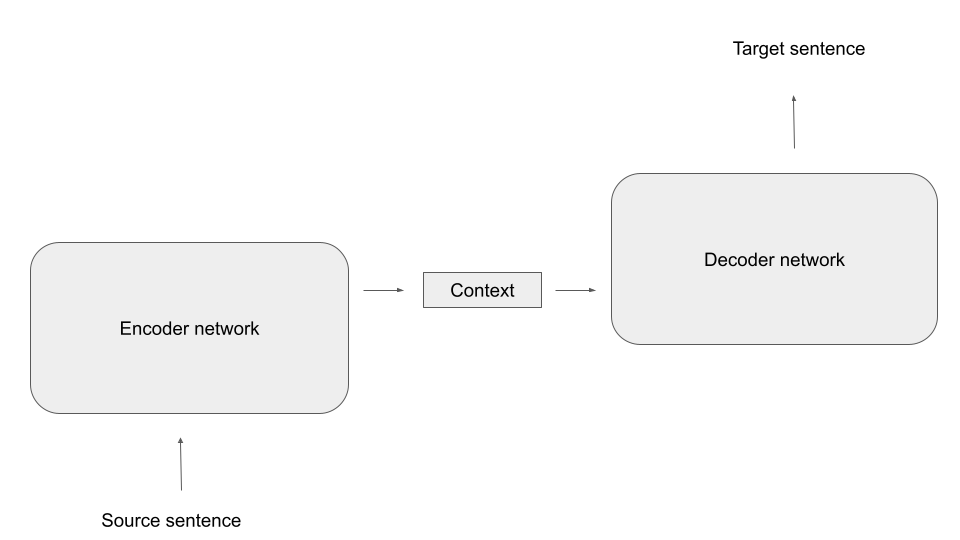
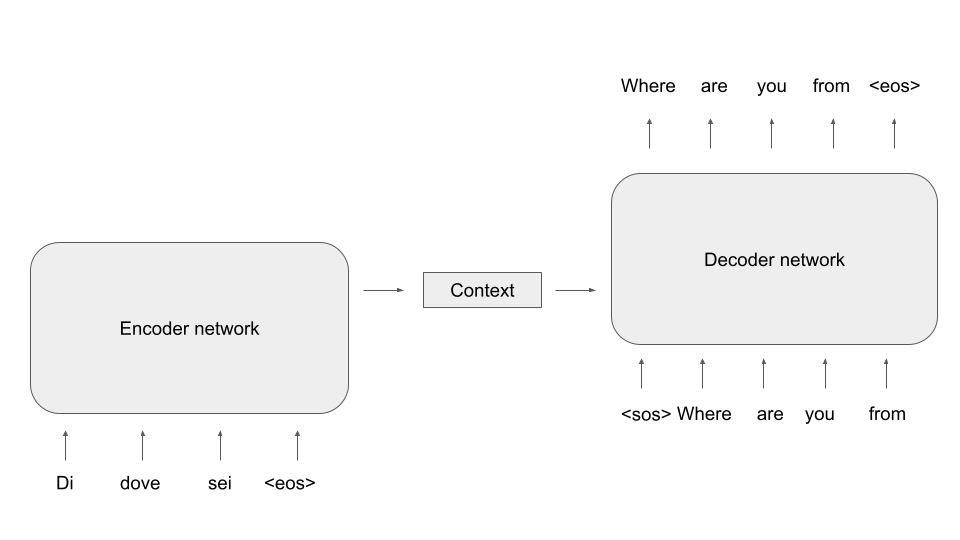

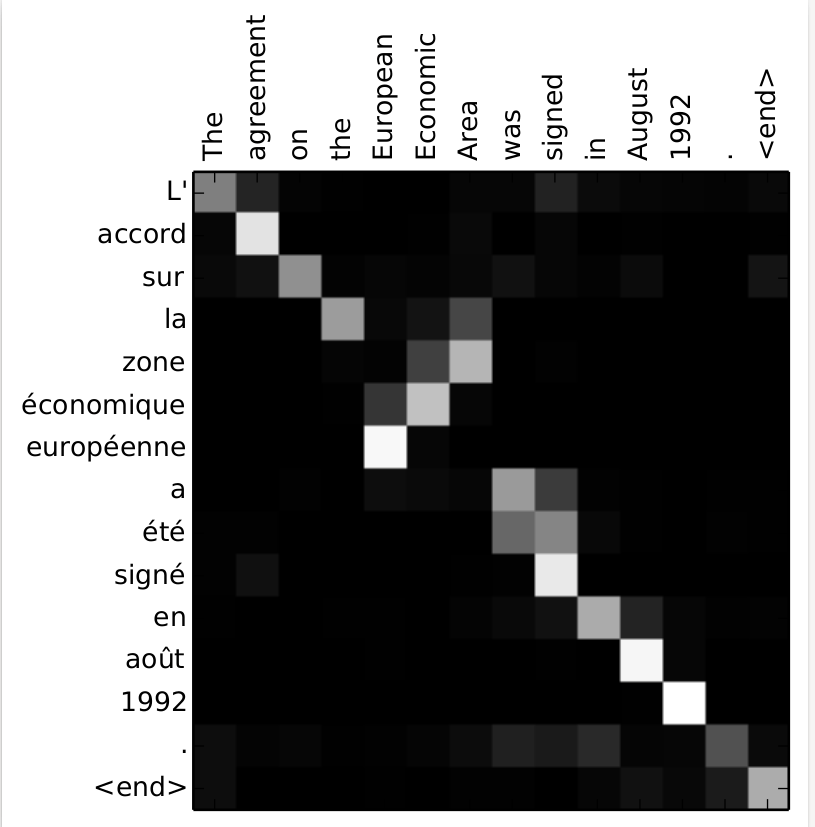

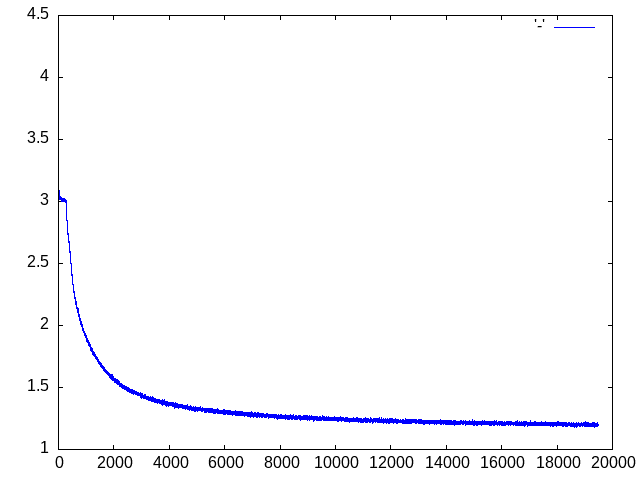



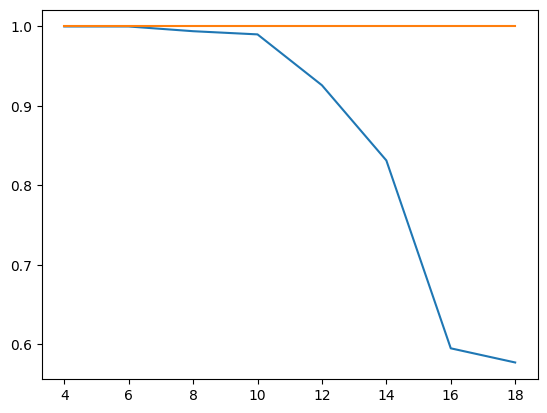

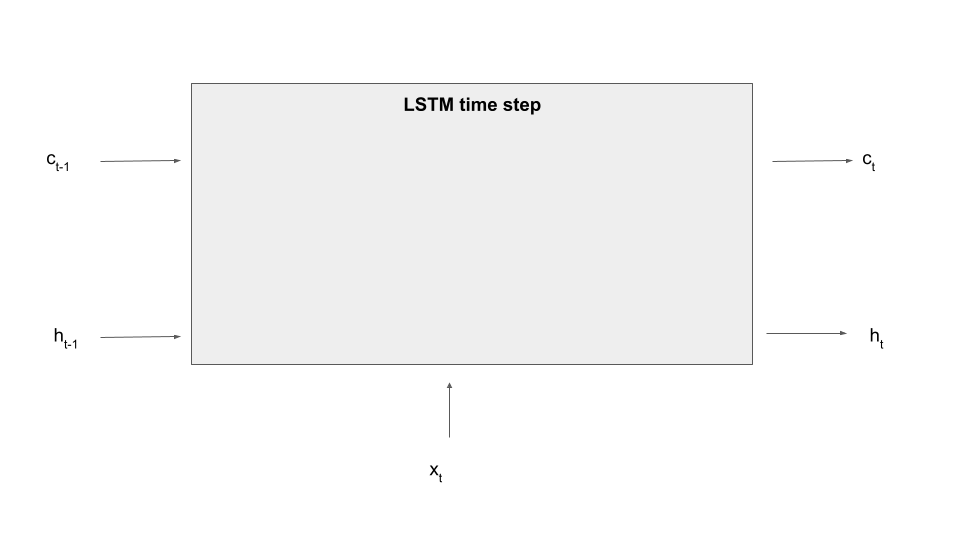


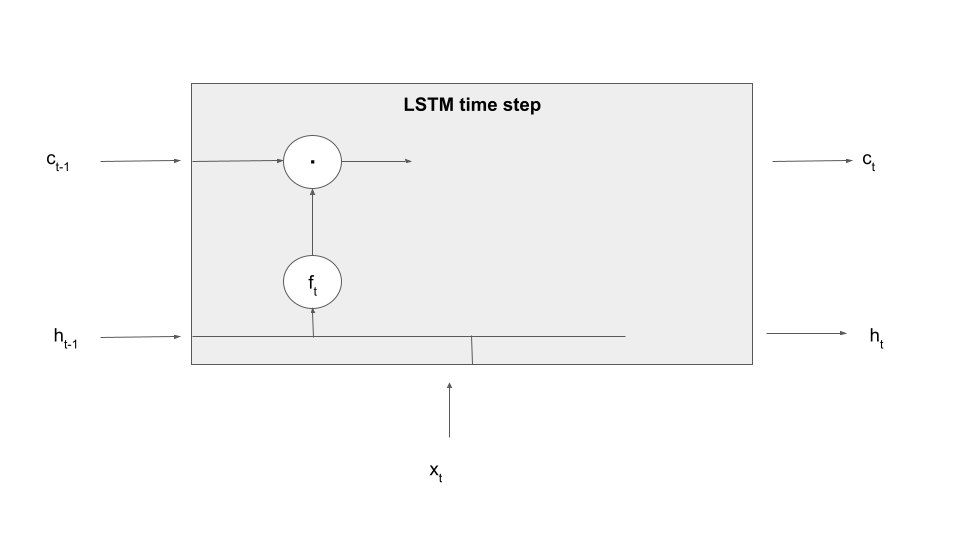



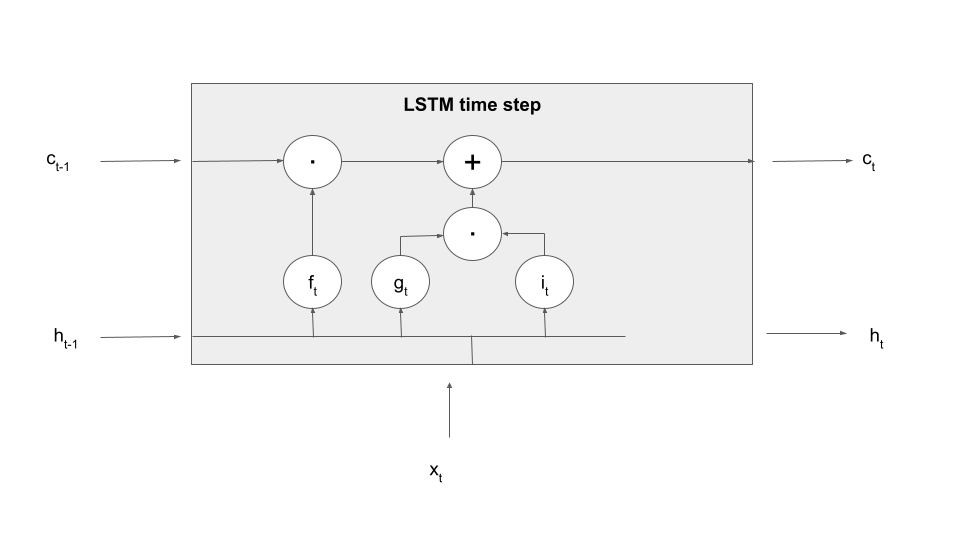


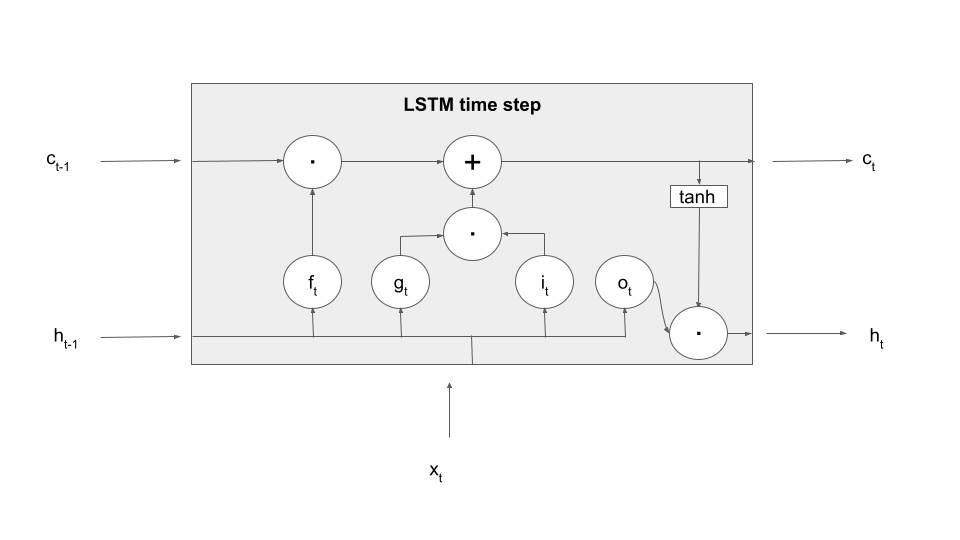

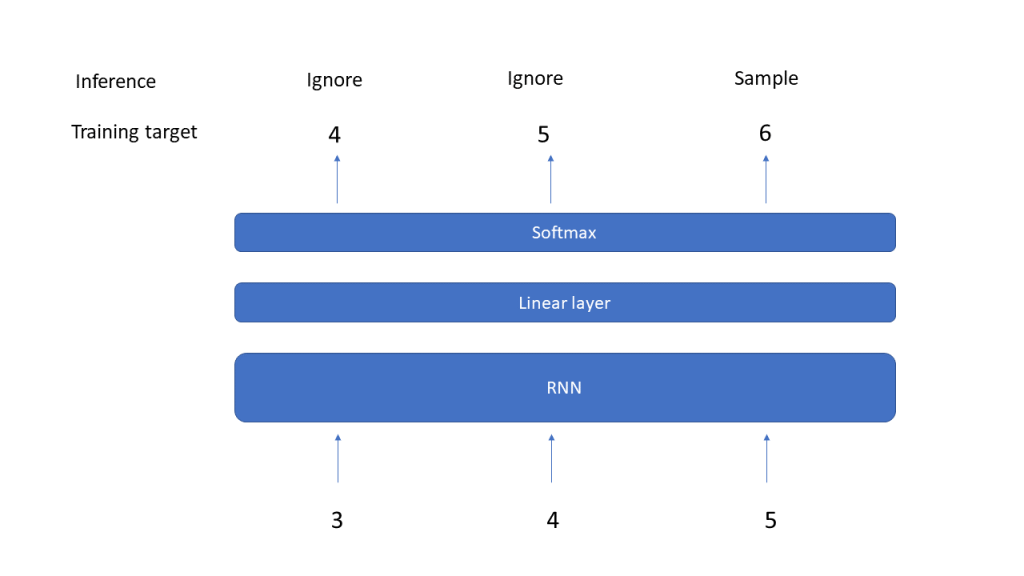




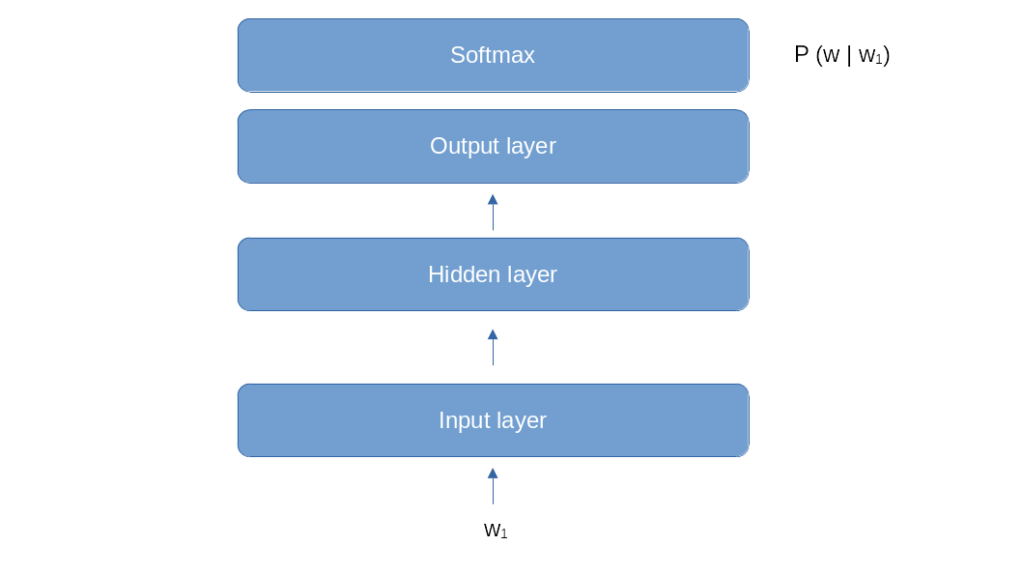





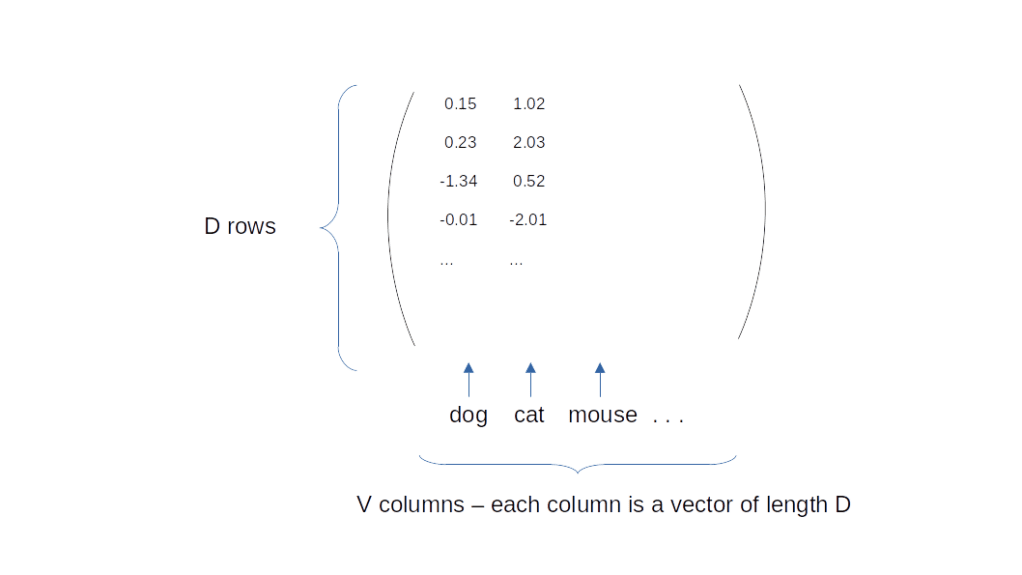

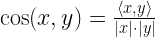

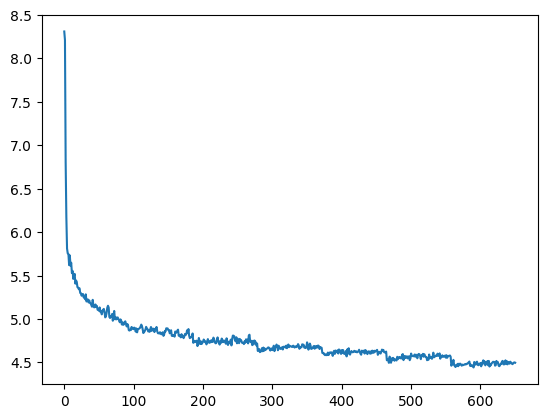

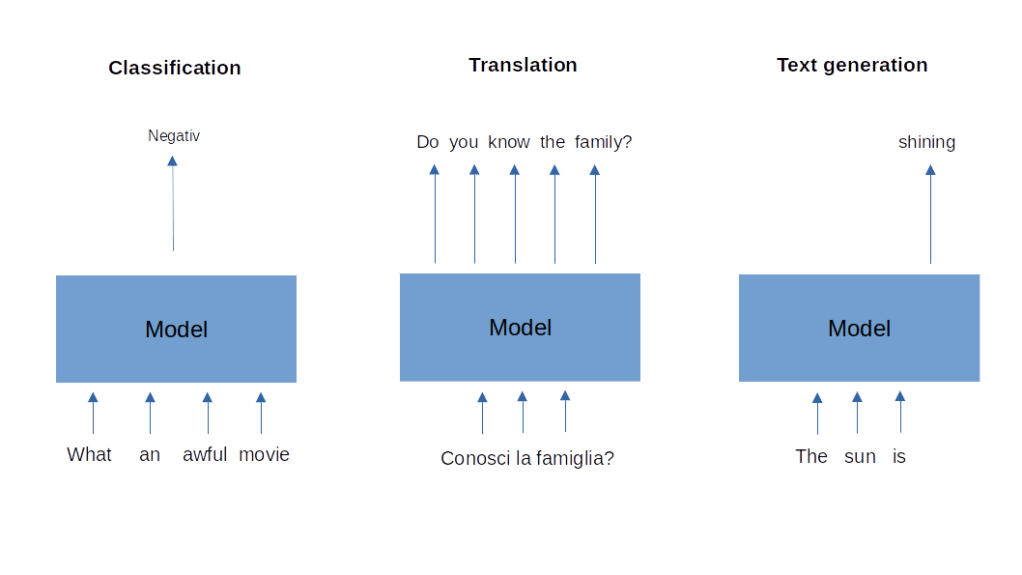

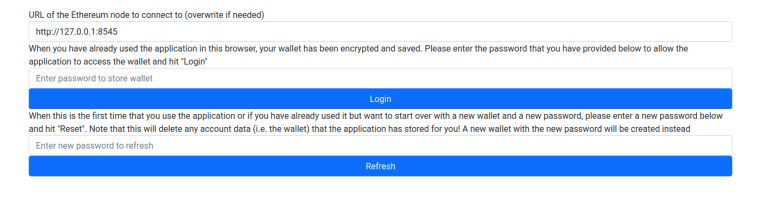


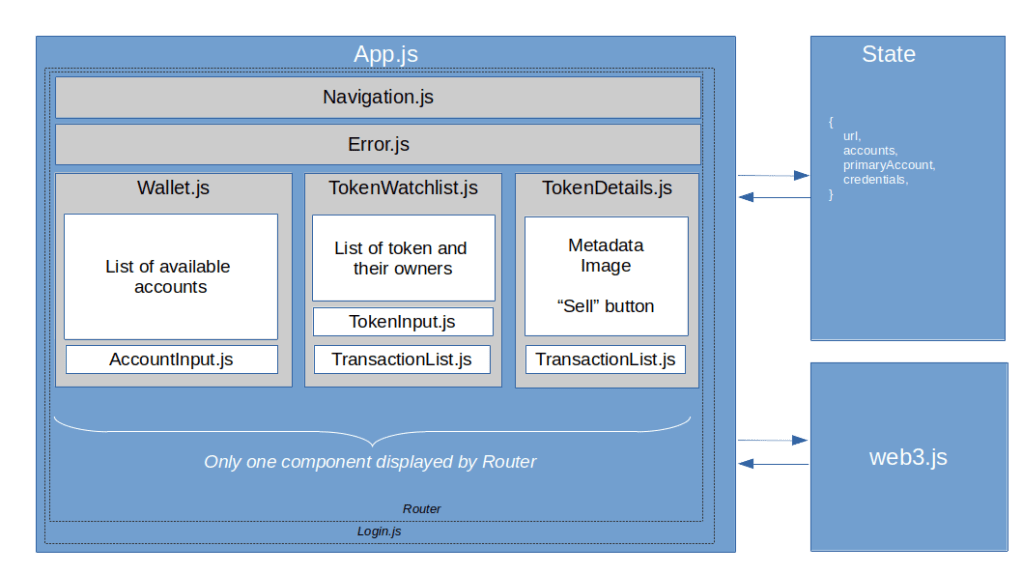
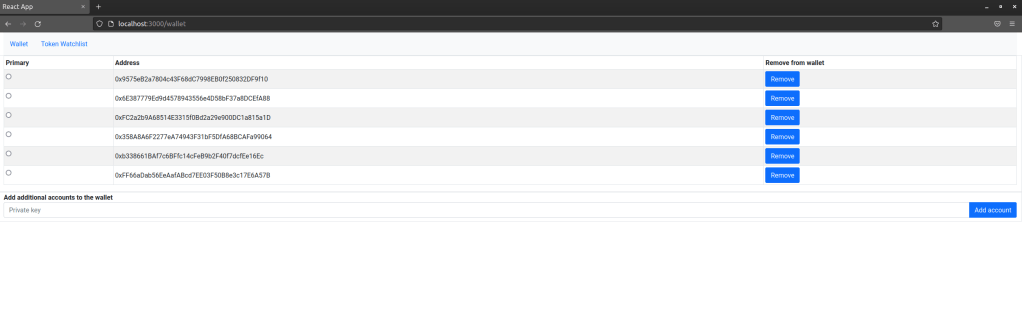
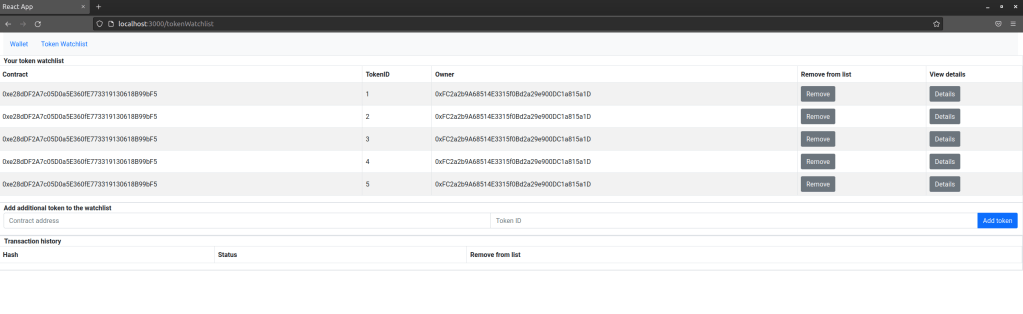
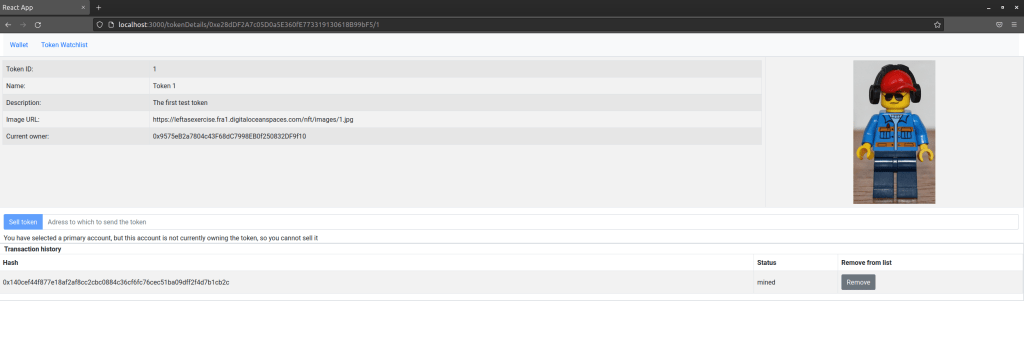
 LeftAsExercise