Scripts in the bitcoin protocol

There is a point that we have touched upon several times but not yet properly explained – the role of scripts in the bitcoin protocol. We have seen that the public key and the signature are stored inside a bitcoin transaction in container data structures that were called scriptPubKey and scriptSig in the source code. But scripts are more than just container for data, they are in fact executable and do not only store keys and signatures but also instruct the bitcoin server what to do with this data in order to validate a signature.

So what is a script?

In fact, a script is a combination of instructions, called opcodes, and data. During execution, the data is placed on a stack. Instructions can remove (“pop”) data from the top of the stack, operate on them and then place a result on the stack (“push”). If you have ever seen Forth, that might sound familiar.

Let me guide you through the relevant source code in the reference implementation to give you an idea what role scripts play in the bitcoin protocol. The key location in the code is the function VerifyScript in script/interpreter.cpp. This function is called when the bitcoin server needs to validate a transaction input, for instance before adding it to a block so that it becomes part of the blockchain or upon receiving it from a peer in the network. In this case, this function will be called, passing it – among other parameters – the signature script that is part of the transaction input, the public key script that is part of the transaction output referenced by that input and – via an instance of the class BaseSignatureChecker – a reference to the transaction of which the transaction input is a part.

The key sequence in this function is the following code snippet.

std::vector stack, stackCopy;
if (!EvalScript(stack, scriptSig, flags, checker, SIGVERSION_BASE, serror))
    // serror is set
    return false;
if (flags & SCRIPT_VERIFY_P2SH)
    stackCopy = stack;
if (!EvalScript(stack, scriptPubKey, flags, checker, SIGVERSION_BASE, serror))
    // serror is set
    return false;
if (stack.empty())
    return set_error(serror, SCRIPT_ERR_EVAL_FALSE);
if (CastToBool(stack.back()) == false)
    return set_error(serror, SCRIPT_ERR_EVAL_FALSE);

So basically the following things happen. First, a clean stack – implemented as a vector – is created. Then, the signature script is evaluated and operates on this stack. Next, the public key script of the spent transaction output is executed, using the same stack. If, after executing both scripts, the stack is either empty or the element at the top is not the boolean value True, the verification has failed.

Now, in most cases, both the signature script and the public key script are not arbitrary, but follow a small number of defined patterns that, when executed, are effectively equivalent to validating the signature of the transaction (these patterns are defined in the function Solver in script/standard.cpp. The most commonly used of these patterns is called Pay to public key hash (P2PKH). In this case, the signature script does in fact not contain any real opcodes, but consists of two pieces of data that are pushed on the stack. Here and in the sequel, we will use capital letters to denote a script instruction and data in brackets to denote data. The first piece of data that is pushed on the stack is the signature of the transaction. The second piece is a hash of the public key that belongs to the private key which was used to make the signature. If, for instance, Alice is building a transaction to transfer bitcoin to Bob, this will be the public key of Alice. Thus a P2PKH signature script looks as follows.

[signature] [public key]

After that script has executed, we will therefore find two items on the stack. At the top of the stack, there will be the public key, and below, at the bottom of the stack, there will be the signature.

[public key]
[signature]

The next script that the engine will evaluate is the public key script. In the case of a standard P2PKH script, this is a bit more complicated and looks as follows.

OP_DUP OP_HASH160 [public key hash] OP_EQUALVERIFY OP_CHECKSIG

Let us go through the instructions one by one. To understand how each of the opcodes is processed, you will have to look at the code in EvalScript in script/interpreter.cpp. The first opcode that is executed is OP_DUP. This command will simply duplicate the item at the top of the stack. As we are still working with the stack left over after executing the signature script, our stack will look as follows after the OP_DUP has been executed.

[public key]
[public key]
[signature]

The next command is OP_HASH160. This instruction will pop one item off the stack, will calculate its 160 bit hash value (SHA2560 followed by RIPEMD160) and push the result back onto the stack. Thus our stack now is

[public key hash]
[public key]
[signature]

The next command is again not really a command, but just pushes the value on the stack. Thus after executing this part of the script, the stack now contains four items.

[public key hash]
[public key hash]
[public key]
[signature]

The next instruction is the instruction OP_EQUALVERIFY. This operation removes the two top items from the stack, compares them and raises an error if the two values are not equal. Now remember where these two items came from. One of them originates from the transaction input – it was the result of taking the hash value of the public key that Alice added to the transaction input along with the signature, i.e. the public key matching her private key. The other one was part of the spent transaction output. Thus this check fails unless – as it should be – the transaction output has been paid to Alice’s public key hash, so that these two items are equal.

If that is the case and we survive this verification step, two of the four stack items will have been gone and our stack is

[public key]
[signature]

Now the last instruction is executed. This instruction – OP_CHECKSIG – removes the two items left (the public key and the signature) from the stack and actually validates the signature, similar to what we have done in my post on elliptic curve cryptography. If the signature could be successfully validated, a boolean “True” is pushed on the stack, and the verification of the script completes successfully, otherwise “False” is pushed and the script verification returns an error.

Thus, effectively, executing this script amounts to comparing the public key in the transaction input with the public key hash in the spent transaction output and verifying the signature contained in the transaction input.

An example

Of course, in a bitcoin transaction, the scripts are not included in a nice, readable way as we have presented them here. Instead, a script is simply a sequence of bytes. Time to take a look at an example in depth. In one of the last posts, we looked at the transaction ed70b8c66a4b064cfe992a097b3406fa81ff09641fe55a709e4266167ef47891. Let us now analyse this transaction in detail. The following ipython session assumes that you have downloaded my btc library.

In [1]: import btc.utils
In [2]: raw = btc.utils.getRawTransaction(txid="ed70b8c66a4b064cfe992a097b3406fa81ff09641fe55a709e4266167ef47891")
In [3]: import btc.txn
In [4]: txn = btc.txn.txn()
In [5]: txn.deserialize(raw)
In [6]: txin = txn.getInputs()[0]
In [7]: script = txin.getScriptSigHex()
In [8]: script
Out[8]: '47304402207f5dfc2f7f7329b7cc731df605c83aa6f48ec2218495324bb4ab43376f313b840220020c769655e4bfcc54e55104f6adc723867d9d819266d27e755e098f646f689d0121038c2d1cbe4d731c69e67d16c52682e01cb70b046ead63e90bf793f52f541dafbd'

To understand how this script is translated into opcodes, we need to look at CScript::GetOpcode() in script/script.h. Here we find that any number x smaller than OP_PUSHDATA1, i.e. 0x4c, is interpreted as an instruction to push the following x bytes onto the stack – this is called an immediate push. If we match this with the general description of a signature script in the P2PKH standard above, we find that the next 0x47 = 71 bytes are the private key.

In [9]: sig = txin.getScriptSigHex()[2:2*71+2]
In [10]: sig
Out[10]: '304402207f5dfc2f7f7329b7cc731df605c83aa6f48ec2218495324bb4ab43376f313b840220020c769655e4bfcc54e55104f6adc723867d9d819266d27e755e098f646f689d01'
In [11]: script = txin.getScriptSigHex()[2*71+2:]
In [12]: script
Out[12]: '21038c2d1cbe4d731c69e67d16c52682e01cb70b046ead63e90bf793f52f541dafbd'

Looking at the remaining part of the script, we see that the next opcode is again an immediate push, pushing the remaining part of the script onto the stack. So we can conclude that this remaining part must be the public key.

In [13]: pub = script[2:]
In [14]: pub
Out[14]: '038c2d1cbe4d731c69e67d16c52682e01cb70b046ead63e90bf793f52f541dafbd'

We see that the public key starts with 0x03, so it is a compressed key, and we could encode it using our findings from my previous post on this.

The signature, however, looks a bit more mysterious, so let us try to understand the content of the variable sig. This is a so called DER encoded signature, with an additional byte appended at the end.

The DER standard is an ASN.1 encoding standard which is part of the X.690 specification. In the source code, the format is described in IsValidSignatureEncoding in script/interpreter.cpp. Essentially a DER encoded signature is mixture of structural information like data types and lengths, and the actual data, i.e. the integers r and s that make up an ECDSA signature. If you need the details, you will find a Python implementation of a decoding routine here.

Let us now take a look at the spent transaction where we find the second part of the script.

In [15]: prev_raw = btc.utils.getRawTransaction(txid=txin.getPrevTxId())
In [16]: prev = btc.txn.txn()
In [17]: prev.deserialize(prev_raw)
In [18]: index = txin.getVout()
In [19]: spentTxo = prev.getOutputs()[index]
In [20]: script = spentTxo.getScriptPubKeyHex()
In [21]: script
Out[21]: '76a914140268d5d1c4e1792db22e4776edf3c168fd59f588ac'

Let us again try to translate this script into transactions and data. In script.h, we find that the first byte is the opcode OP_DUP = 0x76. The second byte is the opcode OP_HASH160 = 0xa9. The third byte is again an immediate push and will push 0x14 = 20 bytes onto the stack, which is the public key hash.

In [22]: script = script[6:]
In [23]: pubKeyHash = script[:40]
In [24]: script = script[40:]
In [25]: script
Out[25]: '88ac'

Thus we are left with the two bytes 0x88 and 0xac. These bytes are again opcodes, namely OP_EQUALVERIFY and OP_CHECKSIG. So we find that our public key script has exactly the form that we expect.

We have now dissected a serialized transaction down to the last byte and have looked at how the process of verifying the signature is decoded as a combination of a signature script and a public key script (which are sometimes called the unlocking and locking script). In one of the next posts, we will look at the process of creating a signature in more detail and we will assemble a full bitcoin transaction which we can push into our local test network.

On the road again – serializing and deserializing bitcoin transactions

In this post, I will show you how a bitcoin transaction presented in the raw format is to be interpreted and how conversely a bitcoin transaction stored in a C++ (and later Python) object can be converted into a hexadecimal representation (a process called serialization). Ultimately, the goal of this and subsequent posts will be to create a bitcoin transaction from scratch in Python, to sign it and to publish it in a bitcoin network, without using any of the available bitcoin libraries.

The subject of serialization and deserialization in the bitcoin protocol is a bit tricky. At the end of the day, the truth is hidden in the reference implementation somewhere (so time to get the code from the GitHub repository if you have not done so yet). I have to admit that when I first started to work with that code, I found it not exactly easy to understand, given that it has been a few years (well, somewhere around 20 years to be precise) since I last worked with templates in C++. Still, the idea of this post is to get to the bottom of it, and so I will walk you through the most relevant pieces of the source code. But be warned – this will not be an easy read and a bit lengthy. Alternatively, you can also skip directly to the end where the result is again summarized and ignore the details.

The first thing that we need is access to a raw (serialized) bitcoin transaction. This can be obtained from blockchain.info using the following code snippet.

import requests

def get_raw_transaction(txid="ed70b8c66a4b064cfe992a097b3406fa81ff09641fe55a709e4266167ef47891"):
    url = 'https://blockchain.info/en/tx/' + txid + '?format=hex'
    r = requests.get(url)
    return r.text

If you print the result, you should get

0200000003620f7bc1087b0111f76978ef747001e3ae0a12f254cbfb858f
028f891c40e5f6010000006a47304402207f5dfc2f7f7329b7cc731df605
c83aa6f48ec2218495324bb4ab43376f313b840220020c769655e4bfcc54
e55104f6adc723867d9d819266d27e755e098f646f689d0121038c2d1cbe
4d731c69e67d16c52682e01cb70b046ead63e90bf793f52f541dafbdfeff
fffff15fe7d9e0815853738ce47deadee69339e027a1dfcfb6fa887cce3a
72626e7b010000006a47304402203202e6c640c063989623fc782ac1c9dc
3c6fcaed996d852ec876749ba63db63b02207ef86e262ad4b4bc9cebfadb
609f52c35b0105e15d58a5ecbecc5e536d3a8cd8012103dc526ca188418a
b128d998bf80942d66f1b3be585d0c89bd61c533bddbdaa729feffffff84
e6431db86833897bab333d844486c183dd01e69862edea442e480c2d8cb5
49010000006a47304402200320bc83f35ceab4a7ef0f8181eedb5f54e3f6
17626826cc49c8c86efc9be0b302203705889d6aed50f716b81b0f3f5769
d72d1b8a6b59d1b0b73bcf94245c283b8001210263591c21ce8ee0d96a61
7108d7c278e2e715ac6d8afd3fcd158bee472c590068feffffff02ca780a
00000000001976a914811fb695e46e2386501bcd70e5c869fe6c0bb33988
ac10f59600000000001976a9140f2408a811f6d24ab1833924d98d884c44
ecee8888ac6fce0700

Having that, we can now start to go through this byte by byte – you might even want to print that string and strike out the bytes as we go. To understand how serialization works in the reference implementation, we will have to study the the header file serialize.h containing boilerplate code to support serialization. In addition, each individual data type contains specific serialization code. It is useful to compare our results with the human readable description of the transaction at blockchain.info.

To understand how the mechanism works, let us start at the function getrawtransaction in rpc/rawtransaction.cpp which is implementing the corresponding RPC call. This function ends up calling TxToUniv in core_write.cpp and finally EncodeHexTx in the same file. Here an instance of the class CDataStream is created which is defined in streams.h. For that class, the operator << is overwritten so that the function Serialize is invoked. Templates for this method are declared in serialize.h and will tell us how the individual data types are serialized in each individual case for the elementary data types and sets, vectors etc.. All composite classes need to implement their own Serialize method to fit into this scheme.

For a transaction, the method CTransaction::Serialize is defined in primitives/transaction.h and delegates the call to the function SerializeTransaction in the same file.

template
inline void SerializeTransaction(const TxType& tx, Stream& s) {
    const bool fAllowWitness = !(s.GetVersion() & SERIALIZE_TRANSACTION_NO_WITNESS);

    s << tx.nVersion;
    unsigned char flags = 0;
    // Consistency check
    if (fAllowWitness) {
        /* Check whether witnesses need to be serialized. */
        if (tx.HasWitness()) {
            flags |= 1;
        }
    }
    if (flags) {
        /* Use extended format in case witnesses are to be serialized. */
        std::vector vinDummy;
        s << vinDummy;
        s << flags;
    }
    s << tx.vin;
    s << tx.vout;
    if (flags & 1) {
        for (size_t i = 0; i < tx.vin.size(); i++) {
            s << tx.vin[i].scriptWitness.stack;
        }
    }
    s << tx.nLockTime;
}

Throughout this post, we will ignore the extended format that relates to the segregated witness feature and restrict ourselves to the standard format, i.e. to the case that the flag fAllowWitness above is false.

We see that the first four bytes are the version number, which is 2 in this case. Note that little endian encoding is used, i.e. the first byte is the least significant byte. So the version number 2 corresponds to the string

02000000

Next, the transaction inputs and transaction outputs are serialized. These are vectors, and the mechanism for serializing vectors becomes apparent in serialize.h.

template
void Serialize_impl(Stream& os, const std::vector& v, const V&)
{
    WriteCompactSize(os, v.size());
    for (typename std::vector::const_iterator vi = v.begin(); vi != v.end(); ++vi)
        ::Serialize(os, (*vi));
}

template
inline void Serialize(Stream& os, const std::vector& v)
{
    Serialize_impl(os, v, T());
}

We see that to serialize a vector, we first serialize the length of the vector, i.e. the number of elements, and then call the serialization method on each of the individual items. The length is serialized in a compact format called a varInt which stores a number in 1 – 9 bytes, depending on its size. In this case, one byte is sufficient – this is the byte 03 after the version number. Thus we can conclude that the transaction has three transaction inputs.

To understand the next bytes, we need to look at the method CTxIn::SerializeOp.

template
inline void SerializationOp(Stream& s, Operation ser_action) {
    READWRITE(prevout);
    READWRITE(scriptSig);
    READWRITE(nSequence);
}

This is not very surprising – we see that the spent transaction output, the signature script and the sequence number are serialized in that order. The spent transaction prevout is an instance of COutPoint which has its own serialization method. First, the transaction ID of the previous transaction is serialized according to the method base_blob::Serialize defined in uint256.h. This will produce the hexadecimal representation in little endian encoding, so that we have to reverse the order bytewise to obtain the transaction ID.

So in our example, the ID of the previous transaction is encoded in the part starting with 620f7b… in the first line and ending (a transaction ID has always 256 bit, i.e. 32 bytes, i.e. 64 characters) with the bytes …1c40e5f6 early in the second line. To get the real transaction ID, we have to revert this byte for byte, i.e. the transaction ID is

f6e5401c898f028f85fbcb54f2120aaee3017074ef7869f711017b08c17b0f62

The next four bytes still belong to the spent transaction and encode the index of the spent output in the list of outputs of the previous transaction. In this case this is 1, again encoded in little endian byte order, i.e. as 01000000. Thus we have now covered and understood the following part of the hex representation.

0200000003620f7bc1087b0111f76978ef747001e3ae0a12f254cbfb858f
028f891c40e5f601000000

Going back to the serialization method of the class CTxIn, we now see that the next few bytes are the signature script. The format of the signature script is complicated and will be covered in a separate post. For today, we simply take this as a hexadecimal string. In our case, this string starts with 6a473044 …. in the second line and ends with … 541dafbd close to the end of line five.

Finally, the last two bytes in line five and the first two bytes in line six are the sequence number in little endian byte order.

We are now done with the first transaction input. There are two more transaction inputs that follow the same pattern, the last one ends again with the sequence number close to the end of line 15.

Now we move on to the transaction outputs. Again, as this is a vector, the first byte (02) is the number of outputs. Each output is then serialized according to the respective method of the class TxOut.

template
inline void SerializationOp(Stream& s, Operation ser_action) {
    READWRITE(nValue);
    READWRITE(scriptPubKey);
}

The first element is the value, which is an instance of the class CAmount. Again, we can look up the serialization method of this class in amount.h and find that this is simply a 64 bit integer, so its serialization method is covered by the templates in serialize.h and results simply in eight bytes in little endian order:

ca780a0000000000

If we reorder and decode this, we obtain 686282 Satoshi, i.e. 0.0686282 bitcoin. The next object that is serialized is the public key script. Again, we leave the details to a later post, but remark that (which is also true for the signature script) the first byte is the length of the remaining part of the script in bytes, so that we can figure out that the script is composed of the 0x19 = 25 bytes

76a914811fb695e46e2386501bcd70e5c869fe6c0bb33988ac

For the second output, the pattern repeats itself. We have the amount and the public key script

76a9140f2408a811f6d24ab1833924d98d884c44ecee8888ac

of the second output.

Finally, there are four bytes left: 6fce0700. Going back to SerializeTransaction, we identify this as the lock time 0x7ce6f ( 511599 in decimal notation).

After going through all these details, it is time to summarize our findings. A bitcoin transaction is encoded as a hexadecimal string as follows.

  • The version number (4 bytes, little endian)
  • The number of transaction inputs
  • For each transaction input:
    • the ID of the previous transaction (reversed)
    • the index of the spent transaction output in the previous transaction (4 bytes, little endian)
    • the length of the signature script
    • the signature script
    • the sequence number (4 bytes, little endian)
  • The number of transaction outputs
  • For each transaction output:
    • the amount (eight bytes, little endian encoding) in Satoshi
    • the length of the public key script
    • the public key script
  • the locktime (four bytes, little endian)

In my GitHub account, you will find a Python script Transaction.py that retrieves our sample transaction from the blockchain.info site and prints out all the information line by line. To run it, clone the repository using

$ git clone https://github.com/christianb93/bitcoin.git ; cd bitcoin

and then run the script

$ python Transaction.py

The script uses a few modules in the package btc, namely txn.py and serialize.py that essentially implement the serialization and deserialization routines discussed in this post.

That is it for today. In the next posts, I will start to look at a topic that we have more or less consequently ignored or oversimplified so far: scripts in the bitcoin world.

Transactions in the bitcoin network

In my previous posts on the bitcoin protocol, I have described those objects that constitute participants – private and public keys and bitcoin addresses. Now we will look at those objects that represent actual transfers of bitcoins between these participants, namely at transactions.

Essentially, a bitcoin transaction consists of two parts. First, a transaction contains a list of one or more transaction outputs. A transaction output describes the target of the bitcoin transfer and basically consists of a recipient, usually identified by the bitcoin address, and an amount that this recipient is supposed to receive. A transaction can have one or more outputs and thus pay bitcoins to different recipients as part of one transaction (in fact, this is typically the case due to the need for change as we will see later).

There are different types of transaction outputs. The most common one is called a Pay to Public Key Hash (P2PKH) transaction output and refers to a recipient by a hash of the public key of that recipient, which is essentially the same as the bitcoin address. Only the owner of that public key, i.e. technically speaking whoever has access to the private key, can spend these transaction outputs – we will see later how the signing process in the blockchain takes care of this.

Similar to outputs, that determine the target of the payment, there are transaction inputs, that determine the source of the payment. Each transaction input refers to an earlier transaction output. Transaction outputs that are also consumed by some transaction input are called spent, outputs that are not yet referenced by any transaction input are called unspent transaction outputs, abbreviated UTXO.

TransactionChain.

Let us look at an example to illustrate this. Suppose Alice wants to transfer 1.0 BTC to Bob. She (respectively her wallet software) will first scan all the unspent transaction outputs available to Alice, i.e. all transaction outputs that refer to public keys for which Alice has the private key. In the example displayed above, her wallet might locate two transactions (the transactions on the left of the picture) that together contain three transaction outputs with amounts 0.3, 0.5 and 0.4 (the outputs not circled in red).

These outputs sum up to 1.2 BTC and are therefore sufficient to fund the payment to Bob. Alice will therefore construct a transaction – displayed in the middle of the picture above – that has three inputs, each of them referring to the selected transaction outputs. She could now try to add only one output to the transaction and put Bobs public key hash into this output, but this would mean that she transfers 1.2 BTC to Bob, not only 1.0 BTC. Therefore Alice will add a second transaction output to her transaction, that transfers a certain amount called the change back to herself. Many wallets use dedicated addresses for this that are called change addresses.

In the example above, the change – represented by the second transaction output – is 0.1 BTC. Thus the total inputs of the transaction sum up to 1.2 BTC, the total outputs sum up to 1.1 BTC. The difference is called the fee and will be credited to the miner who creates the block in which the transaction will be included – we will look at the process in mining in a separate post.

We now see that there is no such thing as a “bitcoin balance” stored somewhere in the blockchain. There are only transactions, and ownerhip of bitcoin is equivalent to owning the private key that matches unspent transaction outputs. Transactions form a chain, where each transaction is linked to previous transactions via the transaction inputs, and this chain represents the flow of bitcoin ownership.

You might ask yourself whether this is not a “chicken and egg” problem. If each transaction can only spend bitcoins that are present in previously unspent transaction outputs, where do all the bitcoins initially come from? The answer is again provided by the process of mining, where special bitcoin transactions called coinbase transactions are generated that only have an output (and a dummy input) so that bitcoin supply is created.

With this preparation, let us now take a look at the source code of the reference implementation. The transaction data structure is defined in primitives/transaction.h. After removing some comments and constants, the relevant part of the code is

class CTransaction
{
public:
    const int32_t nVersion;
    const std::vector vin;
    const std::vector vout;
    const uint32_t nLockTime;

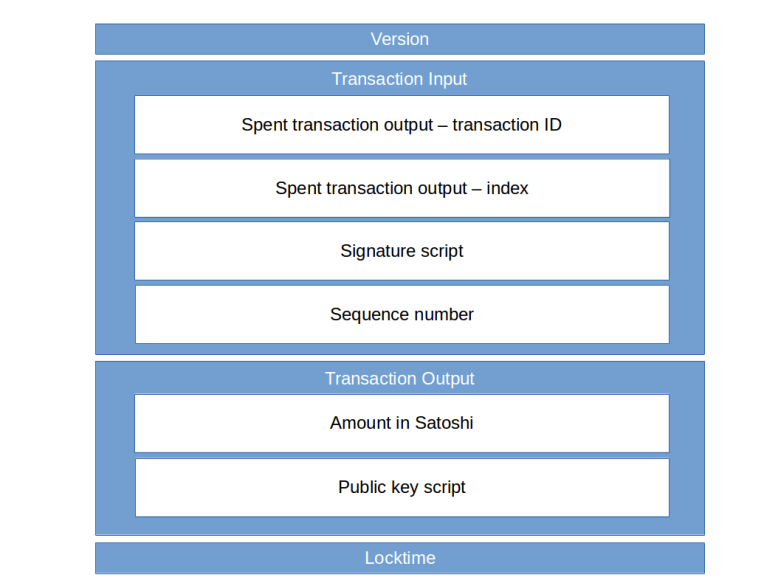
We see that in addition to the attributes that we expect – a vector of transaction inputs and a vector of transaction outputs – a transaction has two additional attributes. The first attribute is the version number. The current version number is 2 (CURRENT_VERSION in the header file), but you will also find older transactions with version number one. The second additional field is the locktime, which can be used to define an earliest time (or block) at which the transaction can be added to the chain.

In the same header file, the transaction input and the transaction output structure are defined. We start with the transaction output.

class CTxOut
{
public:
CAmount nValue;
CScript scriptPubKey;

We see that a transaction output consists of a value that represents the amount that the transaction transfers, and a field called scriptPubKey which contains essentially the hash of the public key of the recipient – we will look at scripts in the bitcoin protocol in more detail in a later post. The definition of CAmount is located in amount.h:

/** Amount in satoshis (Can be negative) */
typedef int64_t CAmount;

static const CAmount COIN = 100000000;
static const CAmount CENT = 1000000;

The amount is thus specified in a unit called Satoshi which is therefore the smallest unit of bitcoin that can be transferred. The constant COIN is the number of Satoshi that comprises one bitcoin and is 10^8.

The definition of the transaction input is similar. Ignoring a feature called segregated witness, the relevant part is

class CTxIn
{
public:
COutPoint prevout;
CScript scriptSig;
uint32_t nSequence;

Here COutPoint is a class that refers to a previous transaction output – the spent transaction output – as expected from the picture above, and which consists of the ID (i.e. hash value) of the transaction that contains the previous output as well as the index of the output in the vector of all transaction outputs of this transaction. The attribute scriptSig contains roughly speaking a signature of the entire transaction that has been produced with the private key that belongs to the public key referenced in the spent transaction output. Finally, the field nSequence is called the sequence number and can be used in combination with the locktime – again we will not get into details on this in this post yet.

Transaction

The image above summarizes what we have learned so far about the structure of a bitcoin transaction. Time to take a look at a real transaction. The page blockchain.info offers an API to retrieve transactions from the bitcoin blockchain. So let us open a terminal and enter

$ curl https://blockchain.info/en/tx/ed70b8c66a4b064cfe992a097b3406fa81ff09641fe55a709e4266167ef47891?format=hex
0200000003620f7bc1087b0111f76978ef747001e3ae0a12f254cbfb858f028f891c40e5f6010000006a47304402207f5dfc2f7f7329b7cc731df605c83aa6f48ec2218495324bb4ab43376f313b840220020c769655e4bfcc54e55104f6adc723867d9d819266d27e755e098f646f689d0121038c2d1cbe4d731c69e67d16c52682e01cb70b046ead63e90bf793f52f541dafbdfefffffff15fe7d9e0815853738ce47deadee69339e027a1dfcfb6fa887cce3a72626e7b010000006a47304402203202e6c640c063989623fc782ac1c9dc3c6fcaed996d852ec876749ba63db63b02207ef86e262ad4b4bc9cebfadb609f52c35b0105e15d58a5ecbecc5e536d3a8cd8012103dc526ca188418ab128d998bf80942d66f1b3be585d0c89bd61c533bddbdaa729feffffff84e6431db86833897bab333d844486c183dd01e69862edea442e480c2d8cb549010000006a47304402200320bc83f35ceab4a7ef0f8181eedb5f54e3f617626826cc49c8c86efc9be0b302203705889d6aed50f716b81b0f3f5769d72d1b8a6b59d1b0b73bcf94245c283b8001210263591c21ce8ee0d96a617108d7c278e2e715ac6d8afd3fcd158bee472c590068feffffff02ca780a00000000001976a914811fb695e46e2386501bcd70e5c869fe6c0bb33988ac10f59600000000001976a9140f2408a811f6d24ab1833924d98d884c44ecee8888ac6fce0700

The curl command (you could also open the URL in a browser) retrieves a transaction in raw hexadecimal format, specifying the transaction ID as an input (the transaction ID is essentially a hash of the transaction, more on this later). The output is a hexadecimal string containing the requested transaction. This is called a serialized version of the transaction and is important for a number of reasons. First, this is the format that goes over the wire if two nodes in the bitcoin network exchange the transaction. Second, when a transaction is signed, included in a block or when its transaction ID is formed, this serialized representation is the basis. In the next post in this series, we will learn how to encode this representation to match it with the structure described above.

Until then, you might want to play around with the transaction browser at bitcoin.info – just remove the ?format=hex from the URL above and you will get a human readable version of the transaction which will allow you to locate some of the elements (inputs, outputs and amounts) discussed in this post.